
Entrepreneurs, ready to transform your approach to marketing funnels and lead response? Lead Connector With GFunnel is the bridge between instant follow-up and meaningful growth. Marketing funnels succeed when speed, personalization, and automation work together. Lead Connector With GFunnel helps you capture leads, trigger automated workflows, and deliver personalized messages the second a prospect fills out a form. This approach keeps you first in the inbox, dramatically increasing reply and booking rates and converting interest into action.
Marketing funnels require a system that moves faster than the competition. Speed to lead matters more than anything. Lead Connector With GFunnel helps you close that gap by automating form capture, email sending, lead routing, and logging — all inside one business platform. If you want to build marketing funnels that actually convert and scale, this guide walks through the strategy, technical setup, real-world use cases, and why GFunnel’s all-in-one ecosystem makes a difference.
Outline
- Introduction: Why speed and personalization matter in marketing funnels
- Video Insights: Key themes drawn from expert guidance
- GFunnel’s Ecosystem Solutions: How GFunnel maps to each theme
- Real-World Applications: Two case studies with hypothetical outcomes
- Why GFunnel Leads: Comparison and competitive advantages
- Conclusion and CTA
- FAQs
Introduction: Why Speed, Personalization, and Automation Win
Marketing funnels are not just a sequence of pages or emails. They are a business nervous system that must detect a lead and respond in a way that nudges them toward the next step. Lead Connector With GFunnel focuses on the critical first moments after a prospect submits a form. Whoever emails first usually wins. That classic sales maxim remains true because prospects are still hot and attention is fleeting. Ben captured this idea when he said:
[Ben]: Whoever emails first usually wins.
That one sentence captures the competitive edge: speed. In a landscape crowded with noise and delayed responses, the organization that is instantly relevant is more likely to get replies and bookings. Speed alone is not enough. Personalization and a clear next step — booking, downloading, or replying — increase conversion rates. Speed plus the right message equals opportunity.
Lead Connector With GFunnel is designed to fuel marketing funnels that respond instantly, personalize at scale, and guide prospects to the next action. Whether you are a small business owner, an e-commerce entrepreneur, or a marketer managing multiple clients, this system reduces manual follow-up, increases conversions, and provides the analytics needed to continuously optimize your funnel performance.
Video Insights: Strategies for Business Success
Marketers, boost your conversions with these strategies inspired by practical automation workflows. From the transcript-inspired demo, we can extract clear themes that align with modern funnel best practices. The most powerful concepts are automation, personalization, analytics, networking, and speed. Below, I expand each theme into actionable strategies you can apply to your business marketing funnels using Lead Connector With GFunnel.
Harnessing Automation for Immediate Follow-Up
Automation is the backbone of effective marketing funnels. When a prospect fills out a form, that action should trigger a chain of events: an email goes out, the lead is assigned, activity is logged, and the team is notified. Automations remove manual steps while ensuring every lead is treated consistently. As the demo showed, you can set a trigger the moment a form is submitted to send a personalized email. Ben framed the urgency succinctly:
[Ben]: Speed to lead matters more than anything.
That quote reinforces a simple truth: automate the first touch. A timely, automated response increases the likelihood of engagement dramatically. Consider these practical automation elements to include in your marketing funnels:
- Form submission triggers immediate welcome email
- Personalized custom values to insert prospect data (name, offer source)
- Lead assignment to a salesperson or agent for fast follow-up
- Internal logging and notifications so team members stay in the loop
Stat: Businesses that respond within an hour are 7 times more likely to have meaningful conversations with decision makers. Automations make that response window realistic and scalable.
Personalization: Make Every Message Feel Human
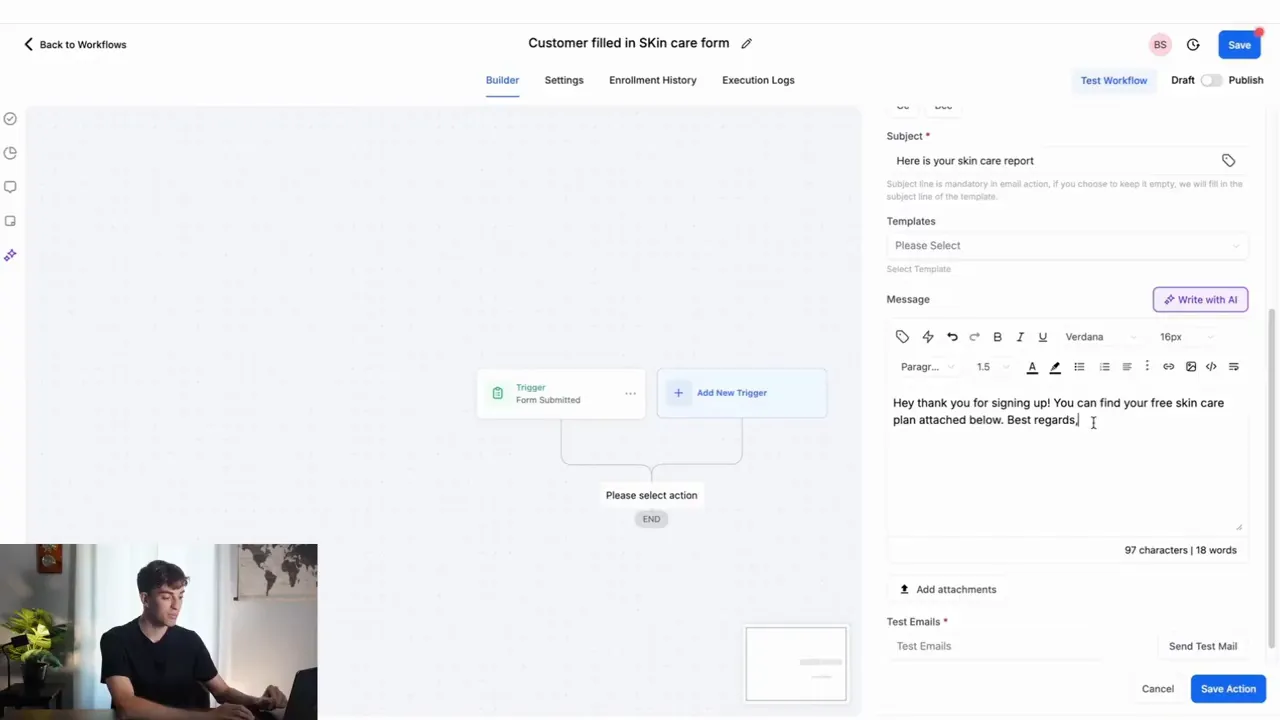
Personalization is not just about addressing someone by name. It is about using the context the lead provided to make the message relevant and to give a clear next step. In the demo the email pulled the contact's first name and referenced the specific plan being delivered. That simple personalization increases open and reply rates.
Use custom values and dynamic fields in your emails and messages inside Lead Connector With GFunnel. Personalization elements to use in marketing funnels include:
- Contact first and last name
- Offer or page source (where the lead converted)
- Specific product interests or needs captured on the form
- Suggested next steps like booking links or downloadable resources
Stat: Personalized emails generate 6x higher transaction rates than non-personalized messages. Add a personalized booking link and you turn an automated message into a conversion opportunity.
Analytics and Logging: Close the Loop
Automation without analytics is blind. When your marketing funnels capture leads and send the first email, you must track what happens next: does the lead open, reply, or book? Lead Connector With GFunnel logs lead activity, assigns records, and surfaces it to your team, enabling rapid optimization.
Key analytics insights to track within your marketing funnels:
- Form submission rate by page or campaign
- Email open and reply rates for automated follow-ups
- Booking or download conversion rates tied to automation
- Time-to-first-response and follow-up effectiveness
Stat: Real-time dashboards uncover bottlenecks. Teams using real-time analytics see faster iteration and improved conversion rates over teams relying on delayed reporting.
Networking and Community: Amplify Reach and Support
Marketing funnels benefit from community-driven growth. Whether you are a solo founder or an agency managing multiple clients, access to niche communities provides education, leads, and collaboration. GFunnel promotes networking and peer support to accelerate results. Communities focused on e-commerce, SaaS founders, or restaurant operators enable sharing best practices for marketing funnels, lead follow-up, and automation.
Practical ways to leverage community in your funnels:
- Share funnel templates and workflows with peers
- Participate in A/B testing experiments within groups
- Find mentors for campaign optimization
Community-driven improvements translate into better conversion rates and faster learning.
Speed and Performance: The Hidden Conversion Drivers
Speed applies not only to lead responses but also to the tools you use. The faster your builder autosaves and the quicker your system logs activity, the less friction your team experiences. GFunnel emphasizes performance with a web worker-based autosave down to 103ms, 28 times faster than slower alternatives. Faster tools mean fewer lost changes, quicker setup, and better uptime for urgent campaigns.
Stat: Faster autosave and UX reduce setup time by up to 40 percent, helping teams deploy marketing funnels and automations faster.
Quote Summary
[Ben]: The moment someone fills out a form, your system can instantly fire off a personalized email so you're the first one in their inbox.
Use this as a guiding principle: capture, respond, and route instantly. In the next section I map each theme to specific GFunnel features and provide tactical advice for setup and optimization.
GFunnel’s Ecosystem Solutions
Small business owners, scale smarter with GFunnel. Here I map the five themes above to concrete GFunnel features. Each subsection describes how GFunnel supports that theme, a practical setup tip, and a stat that summarizes potential impact. Where applicable, I reference GFunnel’s product descriptions and performance advantages, including the 103ms autosave and the integrated networking ecosystem.
GFunnel’s Automation for Immediate Follow-Up
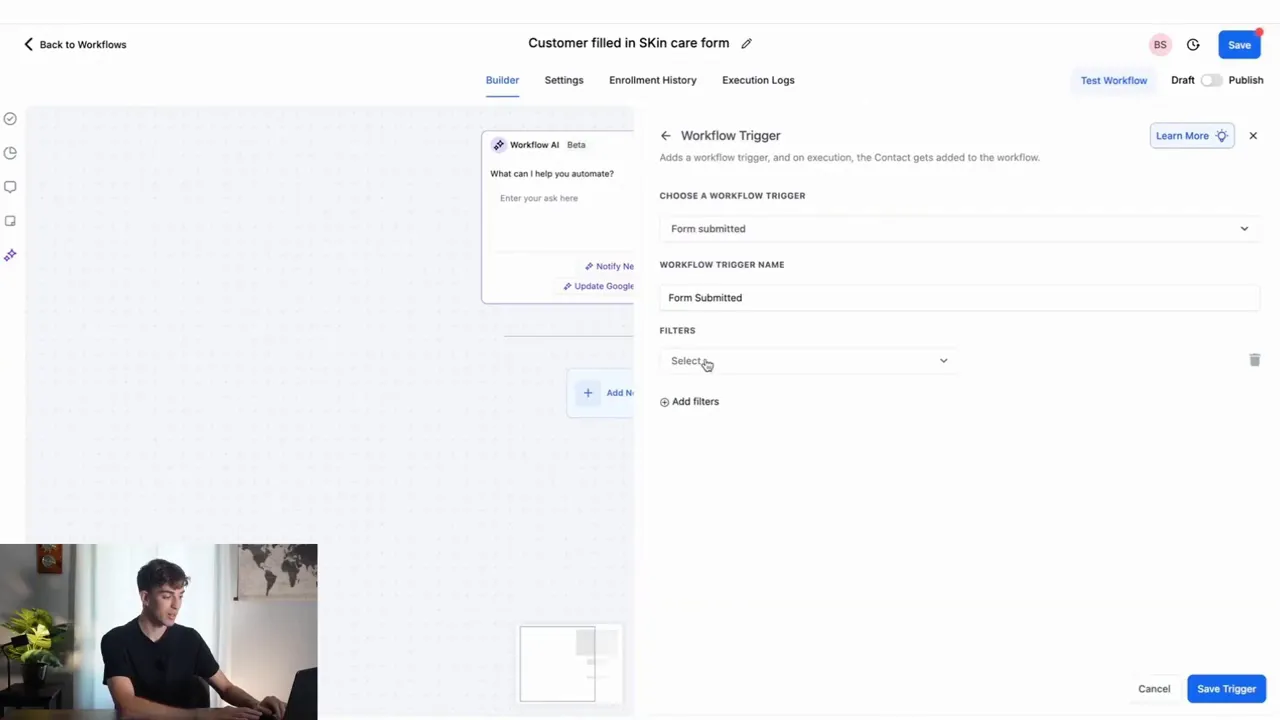
GFunnel’s automation features let you design workflows that trigger when a form is submitted. Think of Lead Connector With GFunnel as a CRM integrated with the funnel builder and workflow engine. The built-in automation reduces manual labor and ensures no lead slips through.
- Feature: Workflow builder with form triggers and email actions.
- Setup tip: Create a workflow named clearly, for example "Customer filled in skincare form", then set a trigger for the specific form and add a send-email action.
- Impact stat: Automation can reduce manual work by up to 50 percent for follow-up tasks.
Lead Connector With GFunnel ensures the email arrives the second the prospect hits submit. This is critical for marketers building high-conversion marketing funnels. Once you build a workflow, clone it across clients or campaigns to scale quickly.
Join GFunnel’s automation community to share workflow templates: https://www.gfunnel.com/automation-home
GFunnel’s Personalization Tools
Personalization is a first-class capability in GFunnel. Use custom values and dynamic fields in your emails to pull first name, offer source, or any custom form field. This enables marketing funnels that feel human even when they are automated.
- Feature: Dynamic custom value insertion across email templates.
- Setup tip: Create email templates with placeholders for contact first name and offer source, then attach resources like a free plan or booking link.
- Impact stat: Personalized messages can lift engagement by up to 20 percent and improve conversions.
You can centralize templates and reuse them across your marketing funnels. For agencies, create a template library to roll out personalized automations to clients in minutes.
Explore GFunnel’s CRM tools and templates: https://www.gfunnel.com/crm
GFunnel’s Real-Time Analytics and Logging
Insightful funnels depend on visibility. GFunnel offers real-time dashboards that track form submissions, email opens, replies, and conversions — all tied to the underlying CRM record. This gives you a complete view of funnel performance at a glance.
- Feature: Real-time analytics dashboards and lead activity logging.
- Setup tip: Build views that filter by campaign or offer source to compare performance across marketing funnels.
- Impact stat: Teams using real-time dashboards iterate faster and typically see a 15 to 25 percent improvement in funnel conversions over teams relying on delayed analytics.
Consolidated analytics remove the need to stitch multiple tools together and let you test and iterate faster. If you prefer richer datasets, GFunnel exposes API endpoints for integrations with external analytics systems too.
Check GFunnel’s analytics and reporting features: https://www.gfunnel.com
GFunnel’s Community and Networking for Growth
GFunnel is more than software. It is a business platform that connects entrepreneurs with peers, mentors, and niche communities. For marketers, this means quick access to templates, case studies, and tactical advice from people who run similar marketing funnels.
- Feature: Niche communities, events, and discussions for e-commerce pros, SaaS founders, and local businesses.
- Setup tip: Join relevant communities like e-commerce pros to ask for feedback on funnel copy and UX early in development.
- Impact stat: Businesses that actively participate in niche communities accelerate learning and often reduce time-to-profit by 30 percent.
Community-driven learning helps you implement automation, personalization, and analytics faster. Connect with peers and share marketing funnels that perform well.
Find and join communities: https://www.gfunnel.com/communities
GFunnel’s Performance: Fast Autosave and Reliable UX
Tool performance is a practical conversion driver. GFunnel’s drag-and-drop funnel builder and form editor include a web worker-based autosave that completes in 103ms, making it 28x faster than typical autosave delays. That means fewer lost edits, rapid iteration, and less frustration during setup.
- Feature: Web worker autosave (103ms) and responsive builder interface.
- Setup tip: Work in the builder without fear of losing changes. Use branching workflows to test variations quickly.
- Impact stat: Faster UX reduces setup time and increases deployment frequency, improving test velocity for marketing funnels.
For agencies and high-volume marketers, this speed advantage compounds: faster creation, quicker testing, and rapid rollouts across multiple clients.
Learn about funnel building and fast autosave: https://www.gfunnel.com/funnel-home
Real-World Applications: Two Case Studies
Small business owners, apply these models to your business. Below I outline two detailed case studies: an e-commerce store and a local restaurant. Each demonstrates how Lead Connector With GFunnel powers marketing funnels from capture to conversion.
Case Study 1: E-commerce Store — Beauty & Skincare Brand
Scenario: A direct-to-consumer skincare brand wants to capture potential customers from social ads, deliver a personalized skincare plan, and convert leads into purchases or consultations.
Goal: Increase replies and bookings for personalized skincare consultations while capturing first-party data for future retargeting.
Implementation with Lead Connector With GFunnel:
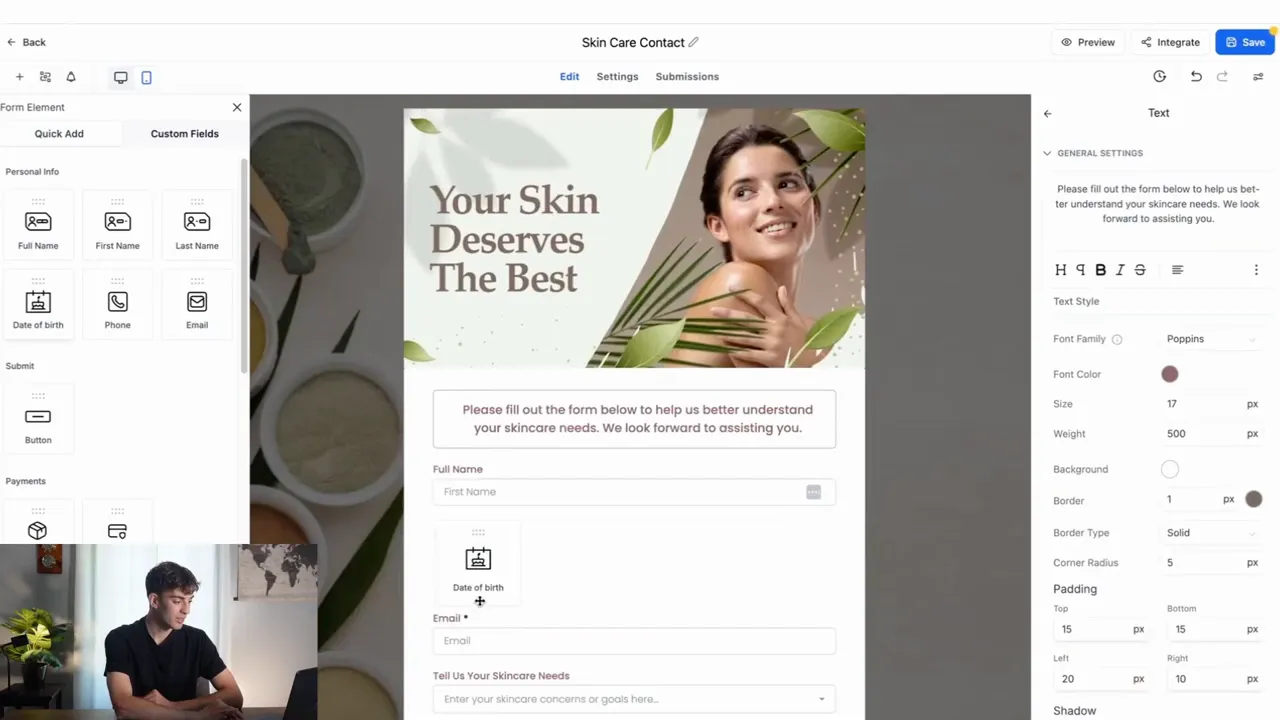
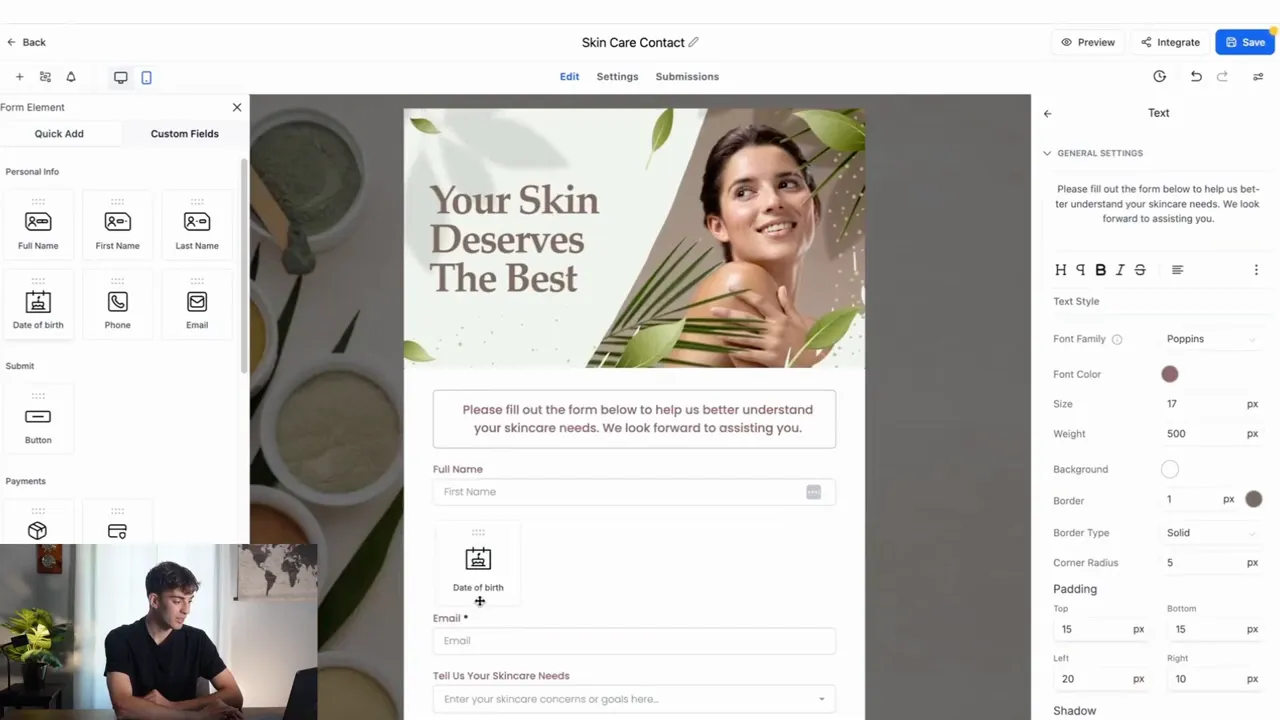
- Create a conversion landing page with an embedded form asking for name, email, date of birth, skin type, and goals.
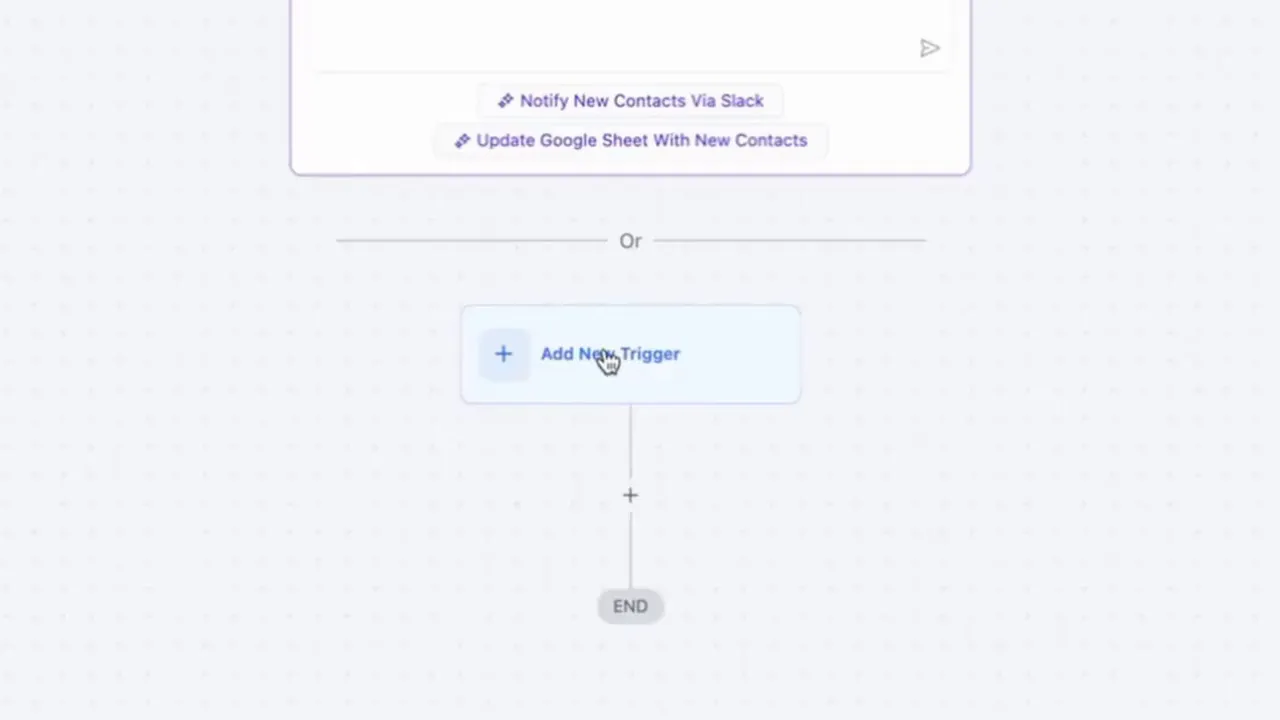
- Set a workflow trigger: form submitted for the skincare contact form.
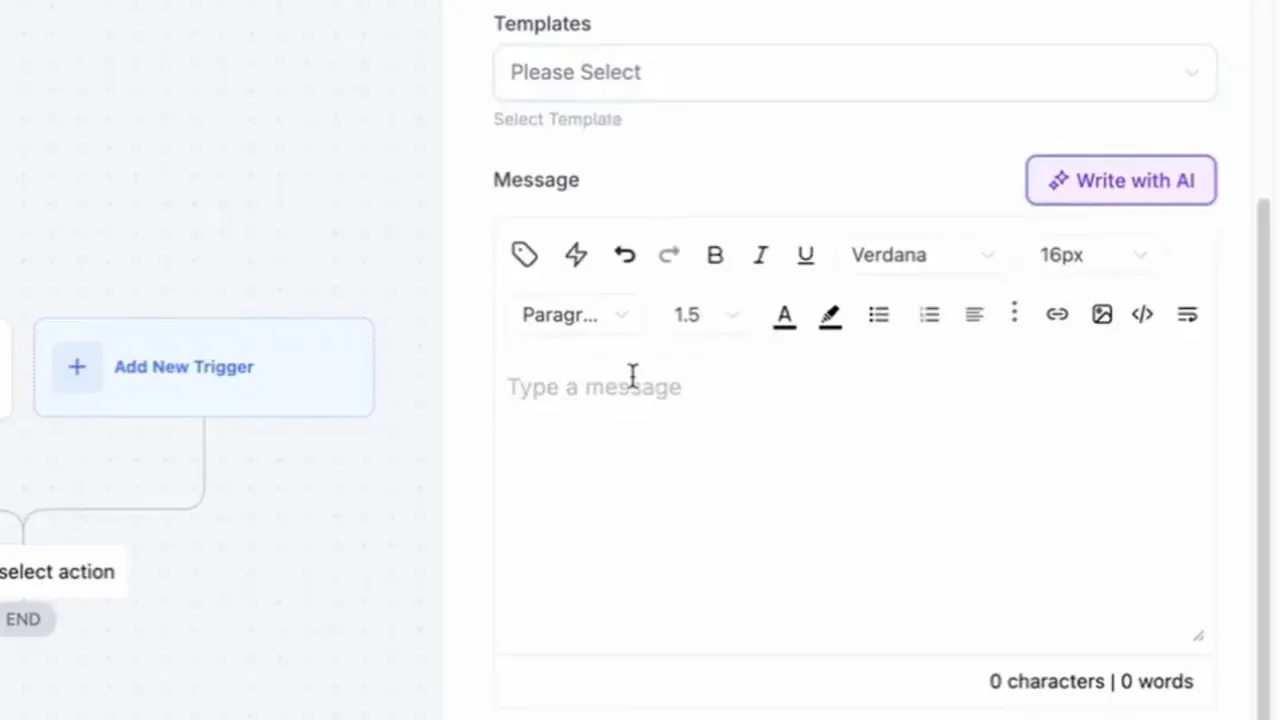
- Use an automated email action to send a personalized free skincare plan PDF and a booking link for a free consultation. Insert the contact first name and reference the ad source dynamically.
- Log activity on the customer record and assign the lead to a skincare specialist for follow-up.
- Track analytics in real time to compare submission rates by ad creative and landing page variation.
Results (hypothetical but realistic):
- Immediate email delivery improved reply rates by 35 percent compared with delayed manual responses.
- Personalized plans with booking links converted 8 percent of leads into paid consultations in the first month.
- Automations reduced manual follow-up work by 50 percent across the team.
“GFunnel’s automation saved us hours weekly and doubled our consultation bookings in one month.”
Actionable takeaways for e-commerce marketers:
- Always include a clear next step in the automated email (book, reply, or download).
- Use custom fields to tailor the content and increase perceived value.
- Analyze form submission rates by campaign and iterate landing page UX to improve conversion.
Related GFunnel resources: Automation tools - https://www.gfunnel.com/automation-home and CRM - https://www.gfunnel.com/crm
Case Study 2: Local Restaurant — Online Ordering and Reservations
Scenario: A neighborhood restaurant wants to capture reservations and online orders, deliver instant confirmations, and route VIP leads to the manager for special handling.
Goal: Improve reservation conversion and reduce no-shows by providing immediate confirmations and follow-up messages.
Implementation with Lead Connector With GFunnel:
- Build a reservation and online order form using GFunnel’s native site builder or embed on the existing site.
- Create a workflow triggered by form submission to send an instant confirmation email with order details or reservation time.
- Attach a calendar or booking link for modifications and a reminder automation 24 hours before the reservation.
- Use lead tags to identify VIP customers and route them to the manager for personalized follow-up or special offers.
- Log customer preferences for future marketing and loyalty offers.
Results (hypothetical but realistic):
- Confirmation and reminder automations reduced no-shows by 20 percent.
- Personalized VIP handling increased average order size by 18 percent.
- Real-time analytics revealed peak booking times, enabling smarter staffing decisions.
“GFunnel’s communities doubled our local outreach and helped us optimize reservations in weeks.”
Actionable takeaways for restaurants:
- Use instant confirmations to reduce uncertainty and set expectations for guests.
- Leverage tagging and segmentation for repeat customers and loyalty rewards.
- Track order and reservation patterns in real time to align staffing and menu strategy.
Related GFunnel resources: Restaurant ecosystem and ordering tools - https://www.gfunnel.com
Why GFunnel Leads
Small business owners, scale smarter with GFunnel. Here is why GFunnel stands out compared with traditional tool stacks. Instead of stitching multiple vendors together for forms, email, CRM, analytics, and community, GFunnel consolidates everything into an integrated ecosystem. That reduces friction, improves data integrity, and speeds up execution.
Key Differentiators
- All-in-one platform: Funnels, CRM, automation, analytics, and communities in one place. No need for multiple subscriptions or complex integrations.
- Performance: Fast autosave (103ms) and responsive builders that speed up rollout and reduce errors.
- Scalability: Clone workflows and templates to roll out successful marketing funnels across clients quickly.
- Community: Niche communities for learning and growth, providing actionable templates and peer support.
- Affordability: Tiered plans, free trial options, and value-focused pricing that supports small businesses.
Traditional Business Tools vs. GFunnel’s Ecosystem
- Aspect: Autosave Speed — Traditional Methods: Slow (seconds) — GFunnel: Fast (103ms, 28x faster)
- Aspect: Automation — Traditional Methods: Manual processes or piecemeal automations — GFunnel: 50% less manual work via built-in workflows
- Aspect: Networking — Traditional Methods: Limited connections and dispersed forums — GFunnel: Niche communities and events for active collaboration
- Aspect: Analytics — Traditional Methods: Third-party dashboards and delayed reporting — GFunnel: Real-time dashboards and unified data
- Aspect: Flexibility — Traditional Methods: Generic tools, patchwork integrations — GFunnel: Tailored solutions with APIs and CRM integrations
GFunnel reduces the need to jump between platforms. For agencies, that means faster client onboarding and the ability to deploy "Lead Connector With GFunnel" processes across accounts, maintaining consistency and performance.
For pricing and plan options check GFunnel’s pricing overview: https://www.gfunnel.com/create-account
Implementation Checklist: Launch a Lead Connector With GFunnel Workflow
Follow this practical checklist to implement a Lead Connector With GFunnel automation for your marketing funnels:
- Design or select a form template capturing essential fields: name, email, interest source, and any qualifying details.
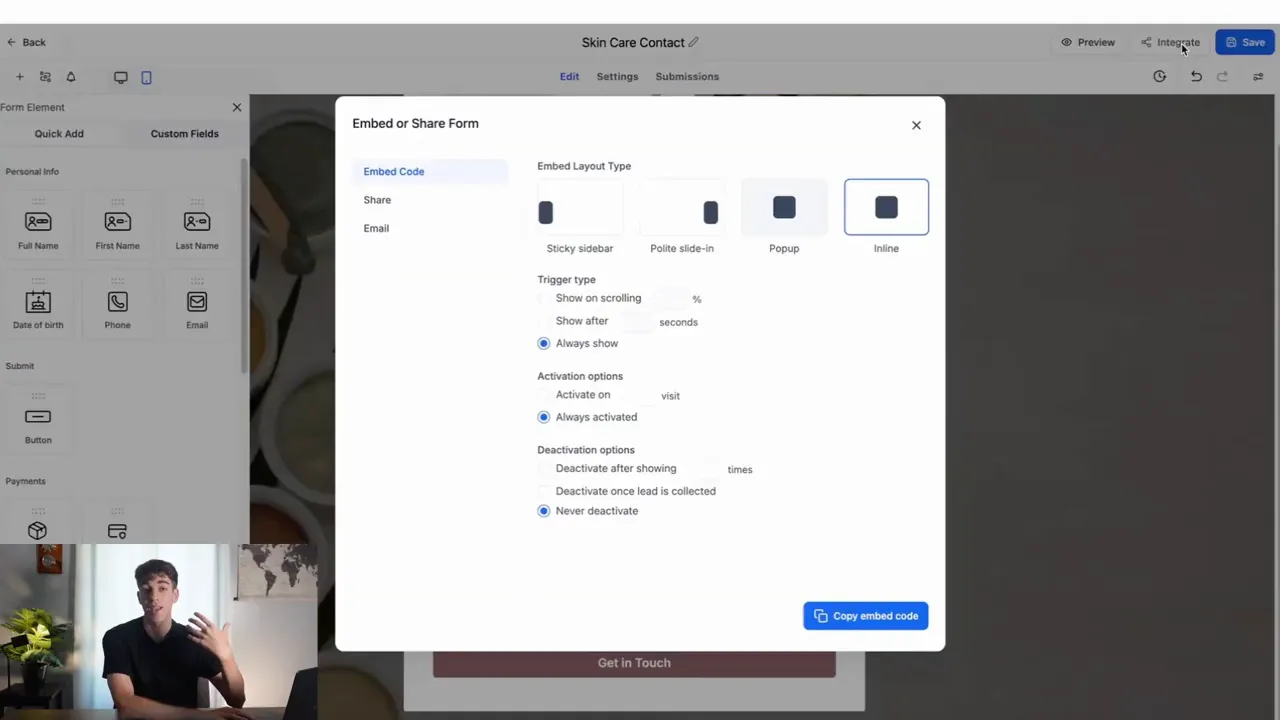
- Embed the form on your site or add it to GFunnel’s native site builder.
- Create a workflow with a trigger: form submitted for that specific form.
- Add an email action with dynamic values for personalization and attach any resources or booking links.
- Assign the lead to a team member or tag it for follow-up and logging.
- Publish and test the workflow end-to-end with a sample submission to verify personalization and delivery timing.
- Monitor analytics and iterate: test subject lines, message content, and call-to-action clarity.
CTA: Ready to implement? Explore GFunnel’s automation tools at https://www.gfunnel.com/automation-home and get started.
Conclusion and Call to Action
Marketing funnels win when you are first, relevant, and actionable. Lead Connector With GFunnel puts those advantages in your hands with integrated forms, workflows, personalization, analytics, and communities. The moment a lead hits submit, your system can automatically respond, personalize the content, log activity, and route the lead to the right person — all without manual effort. Speed to lead matters, and GFunnel makes speed practical and scalable.
If you want to transform your marketing funnels into high-performing, growth-driving systems, start by implementing an instant follow-up workflow. Use dynamic personalization, attach clear next steps, and measure performance in real time. For agencies, clone templates across clients and scale your impact in minutes.
Small business owners, take the next step: explore GFunnel’s business platform and sign up for a trial. See for yourself how Lead Connector With GFunnel can change how you capture and convert leads. Visit GFunnel’s homepage for details and join relevant communities to accelerate learning: https://www.gfunnel.com
FAQs
How does Lead Connector With GFunnel ensure the fastest follow-up in marketing funnels?
Lead Connector With GFunnel automates the moment a form is submitted through workflow triggers. The system sends personalized emails instantly, assigns leads to team members, and logs activity so response time is minimized and follow-up is consistent.
Can I personalize automated emails with information from the form?
Yes. Use custom values and dynamic fields to pull contact first name, offer source, or any custom field you capture on the form. Personalization increases open and reply rates and enhances the perceived value of your automated messages.
What analytics are available to optimize my marketing funnels?
GFunnel provides real-time dashboards that track form submissions, email opens, replies, booking conversions, and other funnel metrics. These insights help identify bottlenecks and improve funnel performance iteratively.
How does GFunnel compare to using separate tools for forms, email, and CRM?
GFunnel consolidates forms, automation, CRM, analytics, and community in one platform, reducing integration complexity, improving data integrity, and speeding up execution. This integrated approach typically lowers costs and simplifies scaling compared with multiple disconnected tools.
Is GFunnel suitable for both small businesses and agencies?
Yes. GFunnel supports single-owner businesses with easy-to-use automation and funnels, and agencies with cloning, templating, and scalable workflows. Agencies particularly benefit from the ability to roll out Lead Connector With GFunnel processes across multiple clients quickly.
Related Topics and Next Steps
- Scale Restaurants with GFunnel: restaurant ecosystem and online ordering — https://www.gfunnel.com
- Build marketing funnels with GFunnel: funnel builder and fast autosave — https://www.gfunnel.com/funnel-home
- Automate business operations with GFunnel: automation features — https://www.gfunnel.com/automation-home
Final Notes and Engagement
Entrepreneurs, marketers, and e-commerce owners: take action now. Implement an instant follow-up workflow and test its impact on your marketing funnels. Join GFunnel’s niche communities to find templates, share wins, and receive feedback. For a quick diagnosis of opportunities, consider taking GFunnel’s 'Test Your Business Growth Potential' quiz available on the platform and follow up with the resources on GFunnel’s site to start building your Lead Connector With GFunnel today.
Explore GFunnel’s features and get started: https://www.gfunnel.com
Need Help Implementing This? |
|
Schedule A Discovery Call With One Of Our Professionals |
| Access Now |


