Entrepreneurs, ready to transform your business with smarter systems? In this guide I’ll walk you through how to turn lead capture into action — automatically assigning projects to teammates in Slack using workflow automations — and show how those same principles map perfectly onto GFunnel’s all-in-one ecosystem. Whether you run a 2-person shop or a 30-person digital marketing agency, marketing funnels and business automation are the engines that turn prospects into paying customers and tasks into delivered projects.
Outline
- Introduction: Why automated project assignments matter for marketing funnels and Lead Connector With GFunnel
- Quick walkthrough: Connect Slack, build a basic workflow, and notify teammates
- Advanced workflows: Dynamic assignments, conditional branches, and scaled operations
- Translating these workflows to GFunnel: Automation, networking, analytics, and more
- Case studies: Real-world GFunnel implementations for an e-commerce store and a restaurant
- Why GFunnel leads: comparison, features, and speed (fast autosave)
- Conclusion and CTAs
- FAQ
Introduction — Marketing funnels, Slack assignments, and Lead Connector With GFunnel
Small business owners, e-commerce entrepreneurs, and marketers: if you want to scale, you need reliable systems that connect lead capture to internal execution. Marketing funnels are not just landing pages and email sequences — they must flow into your operations so that a new lead triggers a project, assigns the right person, and begins the work without you lifting a finger. That's where Lead Connector With GFunnel-style integrations come in: they turn leads into tasks, tasks into deliverables, and deliverables into satisfied customers.
In this article I’ll distill practical workflow strategies that I use to automatically collect client requirements from a form and deliver those projects straight to the right team member in Slack. Then we’ll expand those ideas, mapping them to GFunnel’s broader platform so you can use GFunnel as the hub for everything from marketing funnels to real-time analytics and community networking.
Why this matters: the hidden cost of manual assignments
When you have even a single employee, managing incoming requests becomes a bottleneck. Manual assignments eat time, introduce mistakes, and slow down delivery times — all of which degrade the customer experience and reduce lifetime value. By automating the handoff from lead capture to teammate task assignment, you:
- Reduce admin overhead and save hours per week
- Eliminate assignment errors and delays
- Keep clients informed and projects moving
- Enable predictable workflows that scale
That’s precisely why integrating Slack (or any messaging/notification channel) into your marketing funnels pays dividends — it makes your funnel operational. The lead comes in, the requirements are gathered, a workflow chooses the right teammate, and Slack notifies them immediately. No manual triage. No lost information.
Quick walkthrough: Connect Slack, build a basic workflow, notify a teammate
Here’s a straightforward process you can replicate immediately. I’ll describe this in three steps: connect Slack, build the notification action, and wire the trigger (form submission).
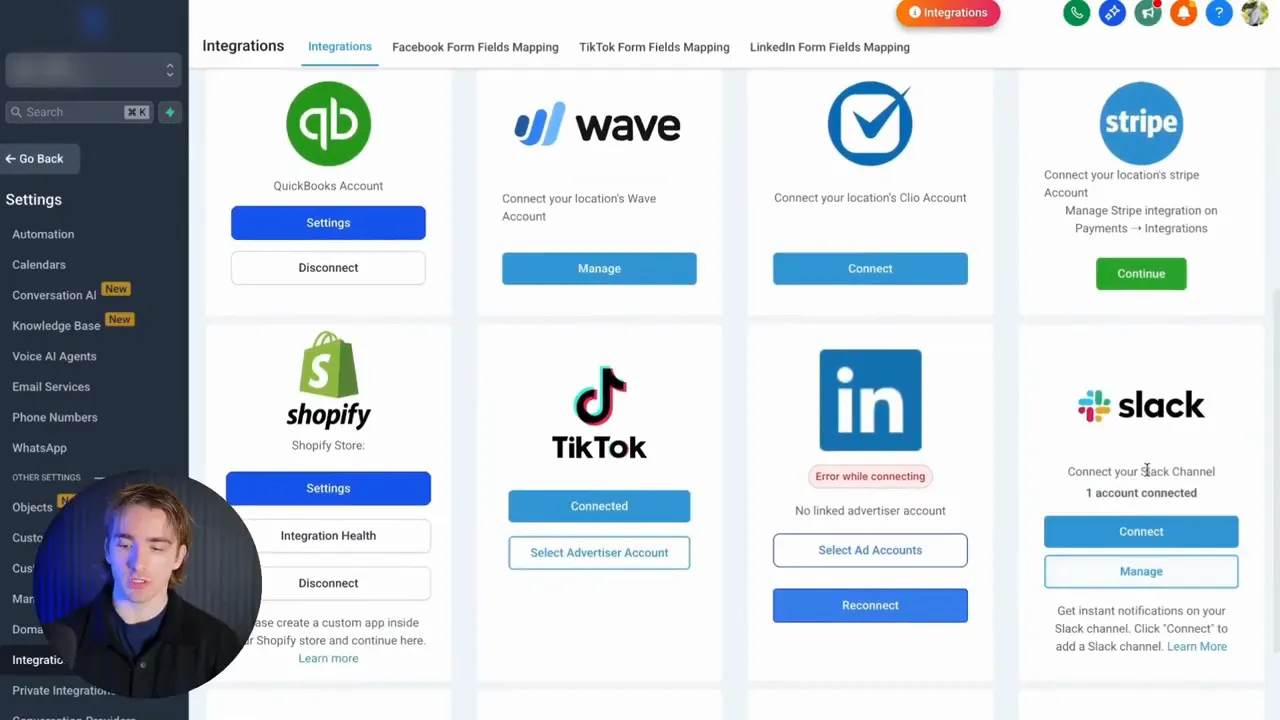
Step 1 — Connect Slack to your system
Before you build anything, you have to connect Slack in the integrations or settings area of your platform (HighLevel-style or GFunnel-type CRM). You can often connect multiple Slack channels or even workspaces so messages can be routed where your team actually works. Doing this first lets your workflow send messages via the platform’s connector (Lead Connector With GFunnel or equivalent).
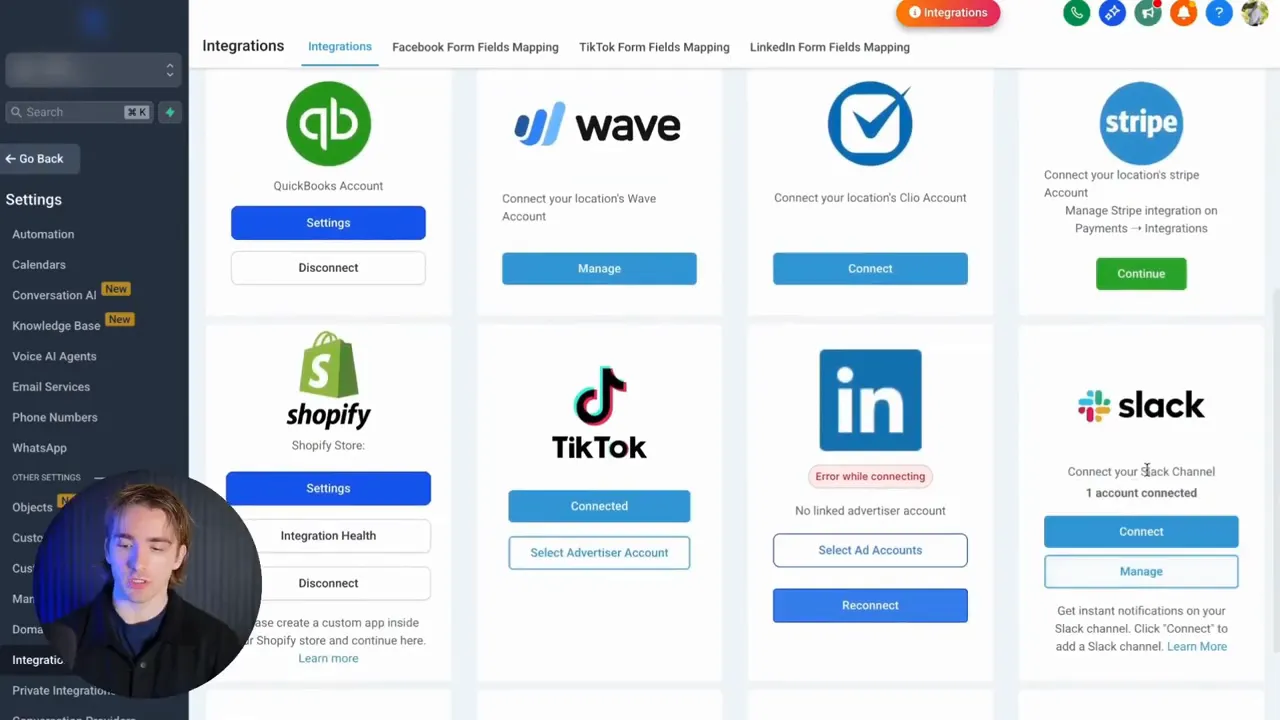
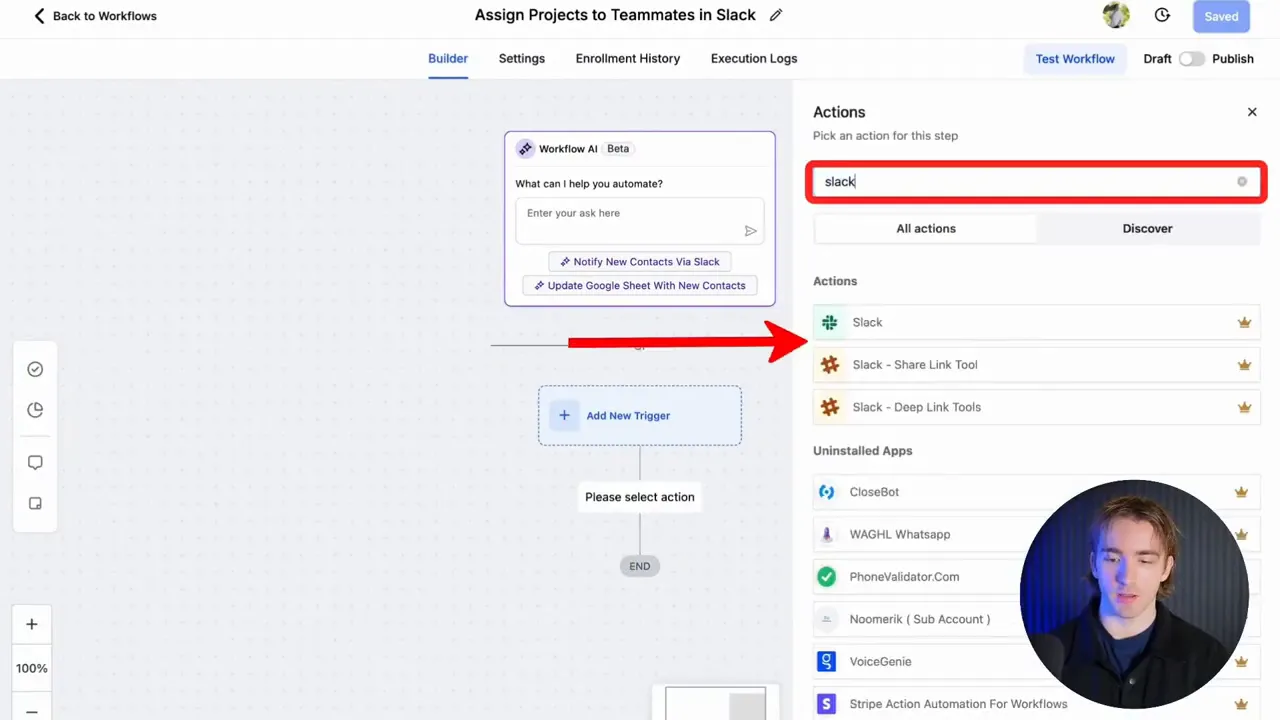
Step 2 — Create a Slack action inside an automation workflow
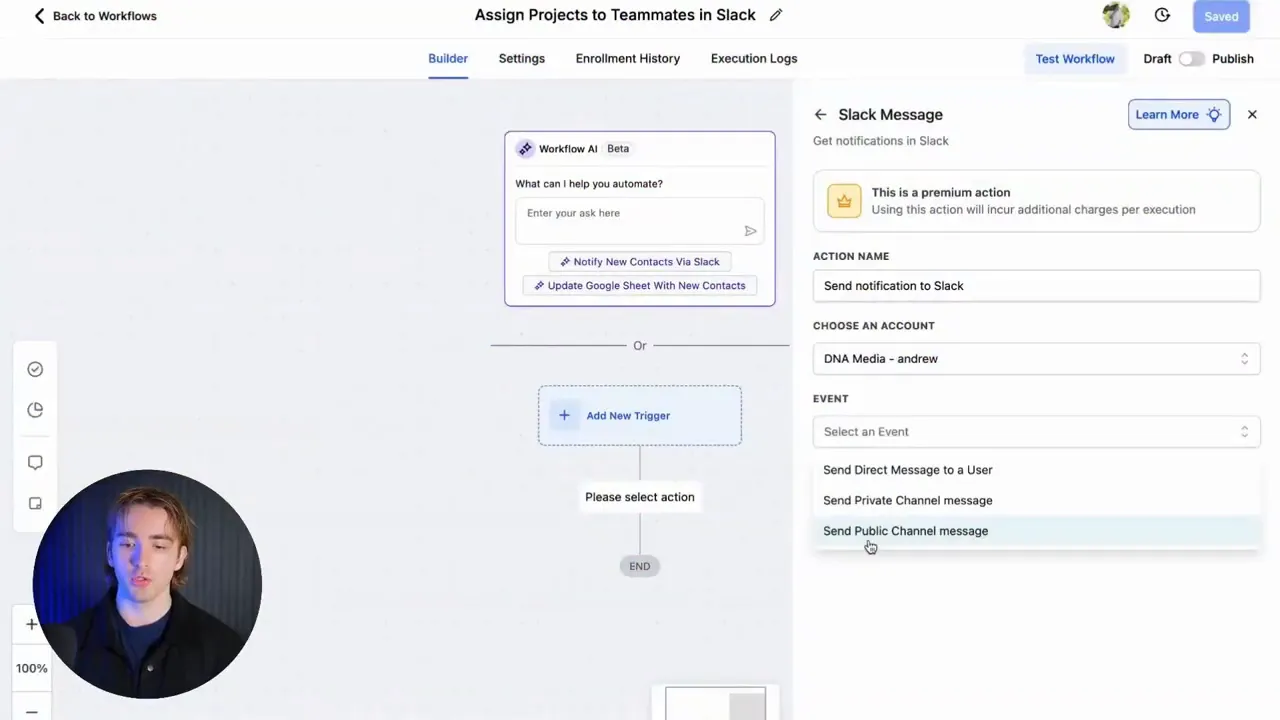
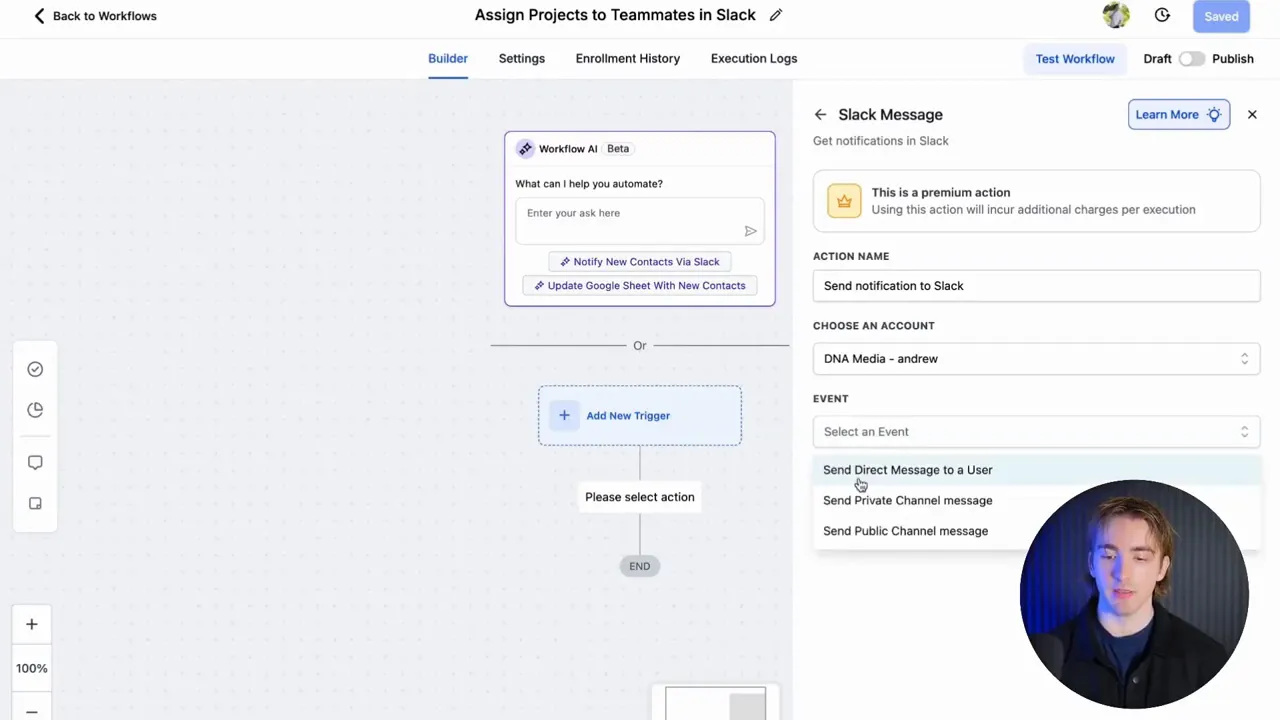
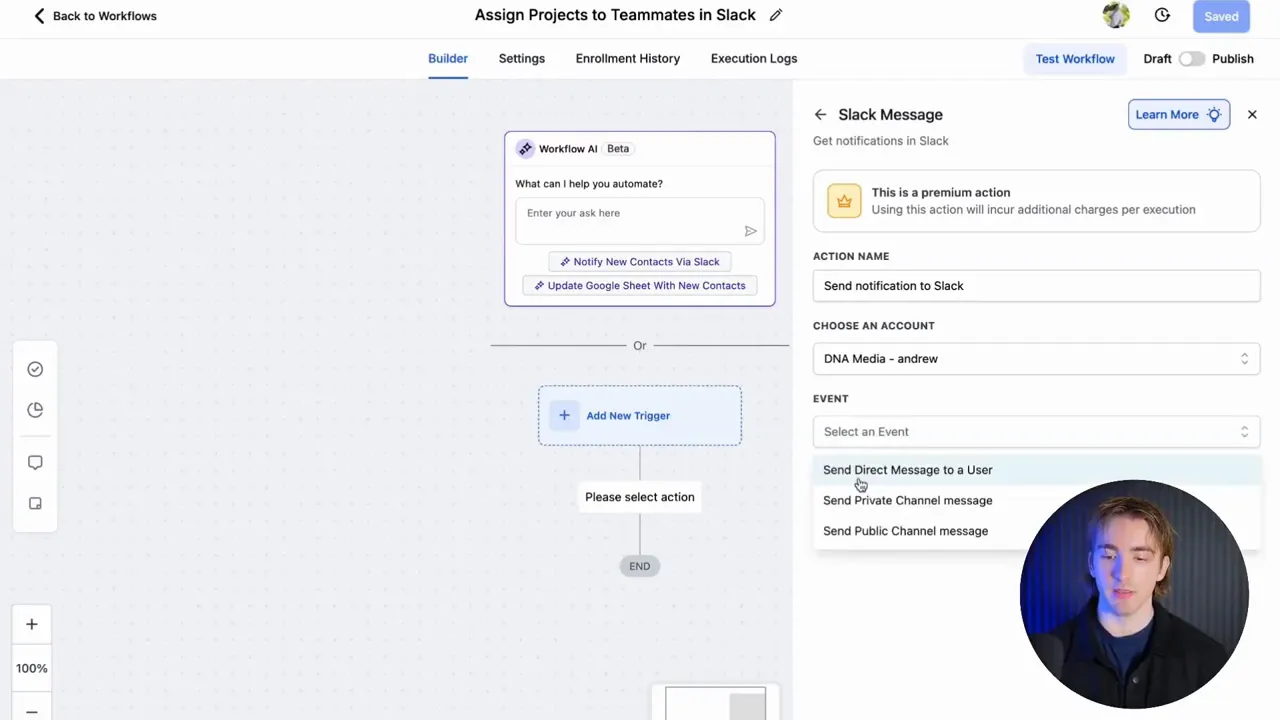
Next, head to automations > workflows and add a Slack action. In most builders you’ll choose an account, then an event type. Typical event options are:
- Send direct message to user
- Send message to a private channel
- Send message to a public channel
For a simple website design agency use-case, select “send direct message to user.” Then pick the user (or choose a dynamic user source; more on that soon). Compose the message and insert custom values from the form, such as contact name, current website, and the detailed explanation of what the client needs. This means your web designer sees everything they need from the lead in one Slack message — no copy-paste, no hunting through records.
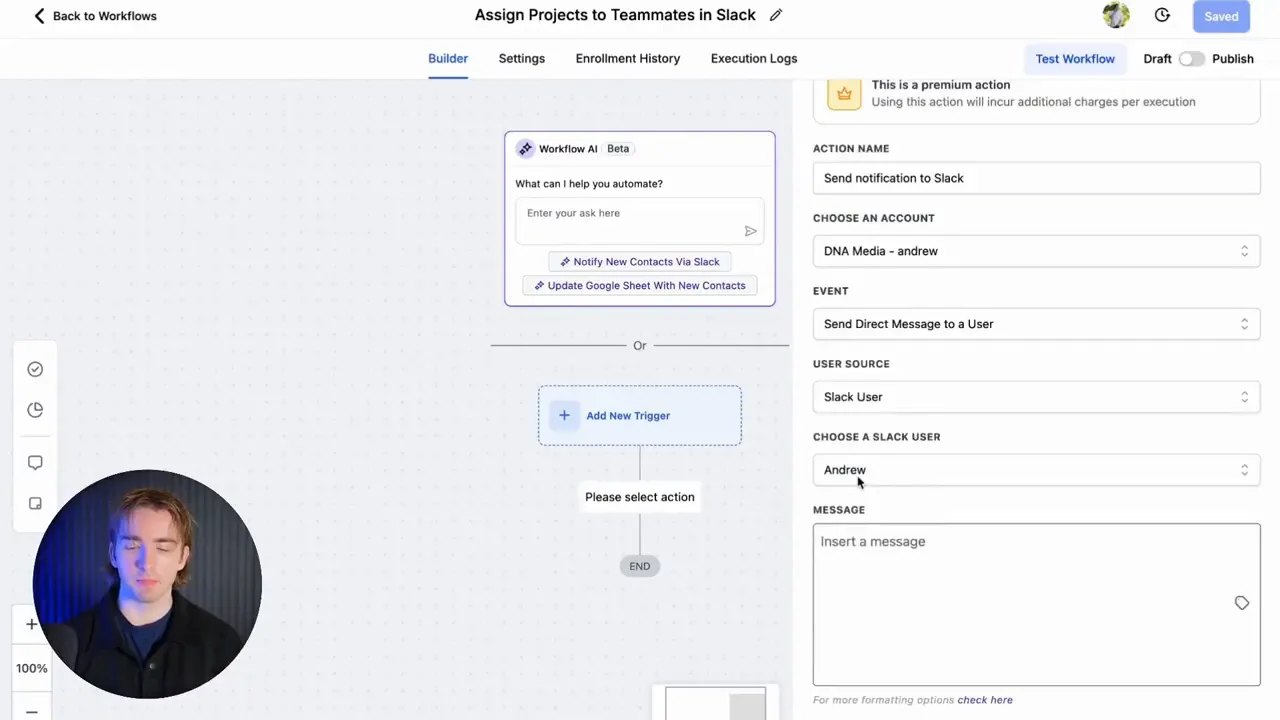
Step 3 — Add the trigger: form submitted
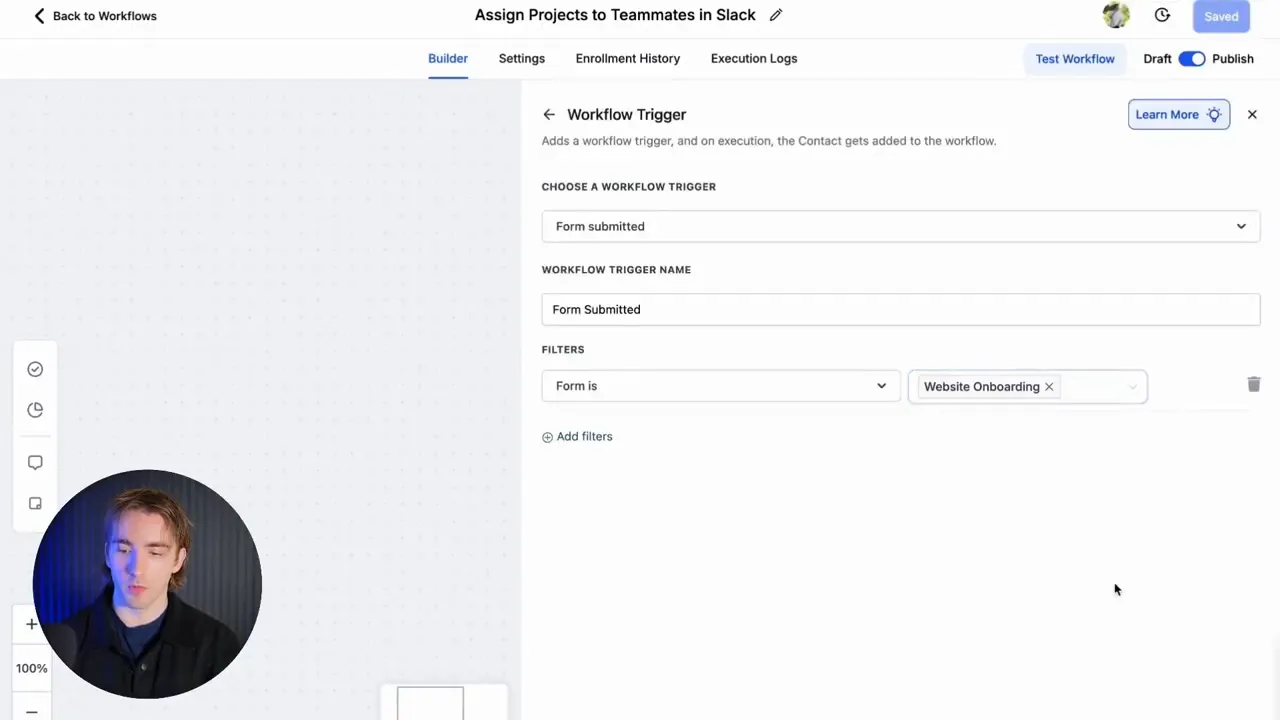
Finish the workflow by attaching a trigger. Most commonly this will be “form submitted” tied to a website onboarding form. Once someone fills it out, the workflow fires, and the assigned team member receives a Slack notification with the lead’s details. Simple, reliable, fast.
Andrew: "If you're in a business and you have even just one employee, you know managing them can be difficult. So having something like this set up for you can make your life infinitely easier."
Small tweaks you can add immediately:
- Include the lead source or campaign UTM so the assignee can prioritize
- Add the contact's phone and email to the Slack message for quick follow-up
- Send the message to a public channel if you want the whole team to be aware
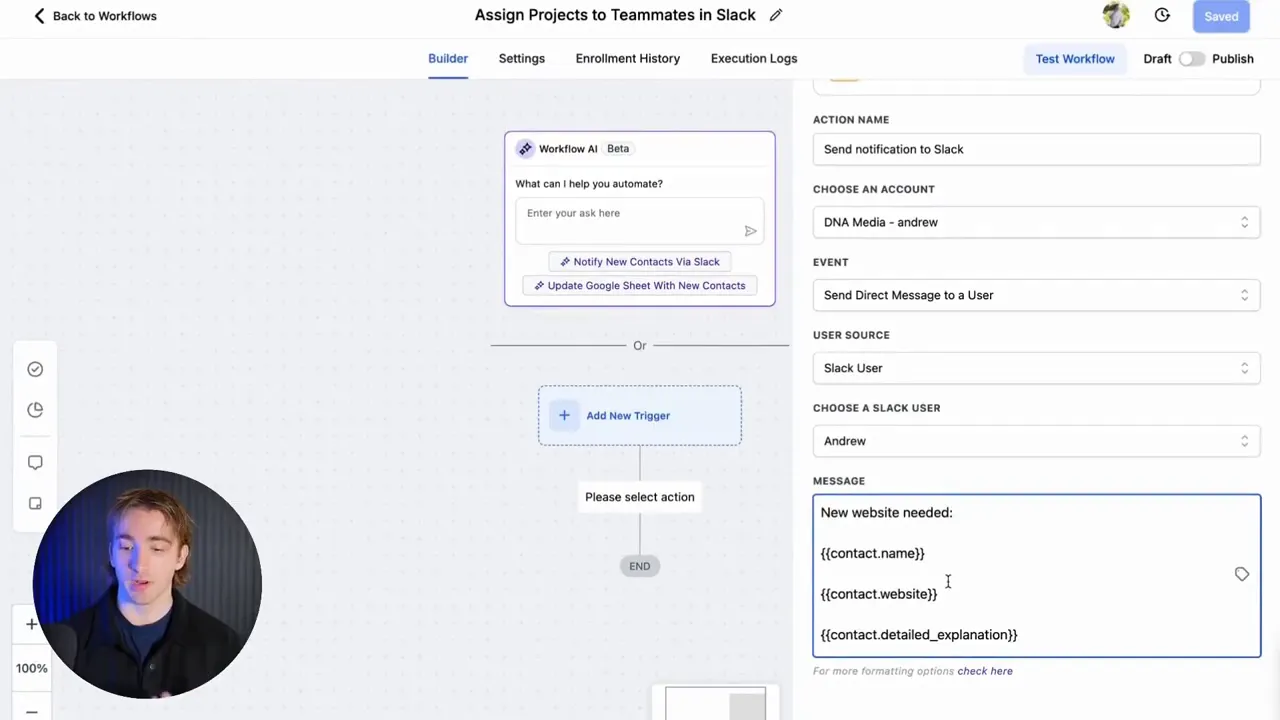
Advanced workflows — dynamic user assignment, conditional branching, and scale
Basic workflows work for single-service businesses, but agencies and growing companies need dynamic routing. What if your incoming requests vary — websites, automations, email campaigns — and you have different specialists for each? That’s where conditional branching and dynamic assignment are critical.
Dynamic user sources: stop selecting users manually
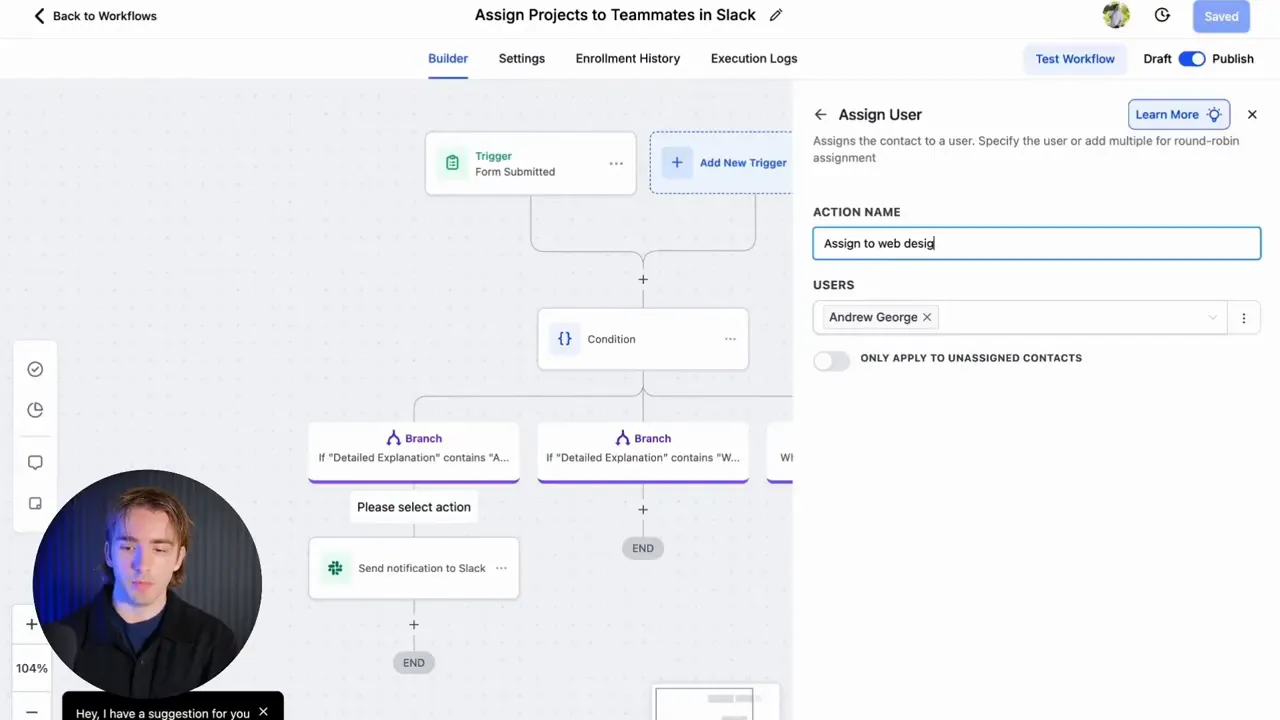
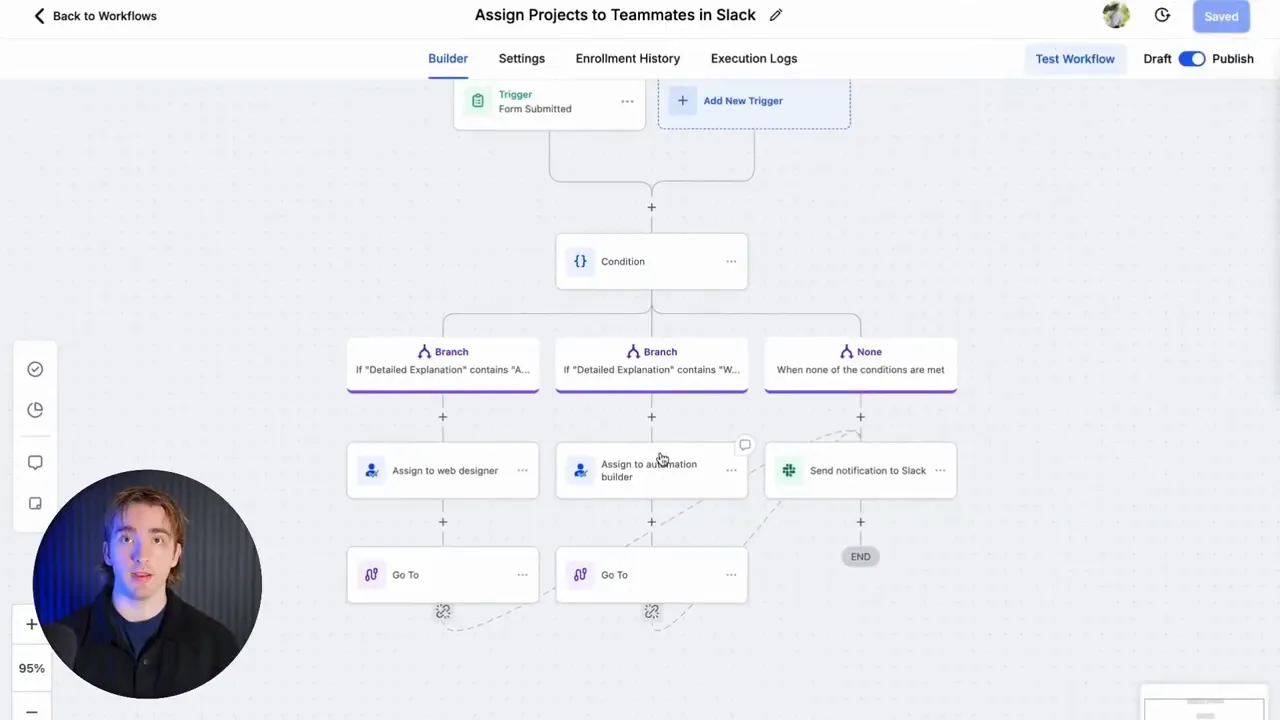
Instead of choosing a Slack user explicitly in the Slack action, choose a user source that can be populated earlier in the workflow. The pattern looks like this:
- Trigger: form submitted
- Analyze the form response (text matching) with an If/Else branch
- Assign to the correct internal user (assign to user action)
- Send Slack notification to the assigned user
This approach lets the workflow decide who should get the project based on keywords or form fields. For example, if the lead’s "detailed explanation" contains "automation," route to your automation specialist; if it contains "website" or "design," route to your web designer. You can scale this pattern to dozens of assignees and dozens of services.
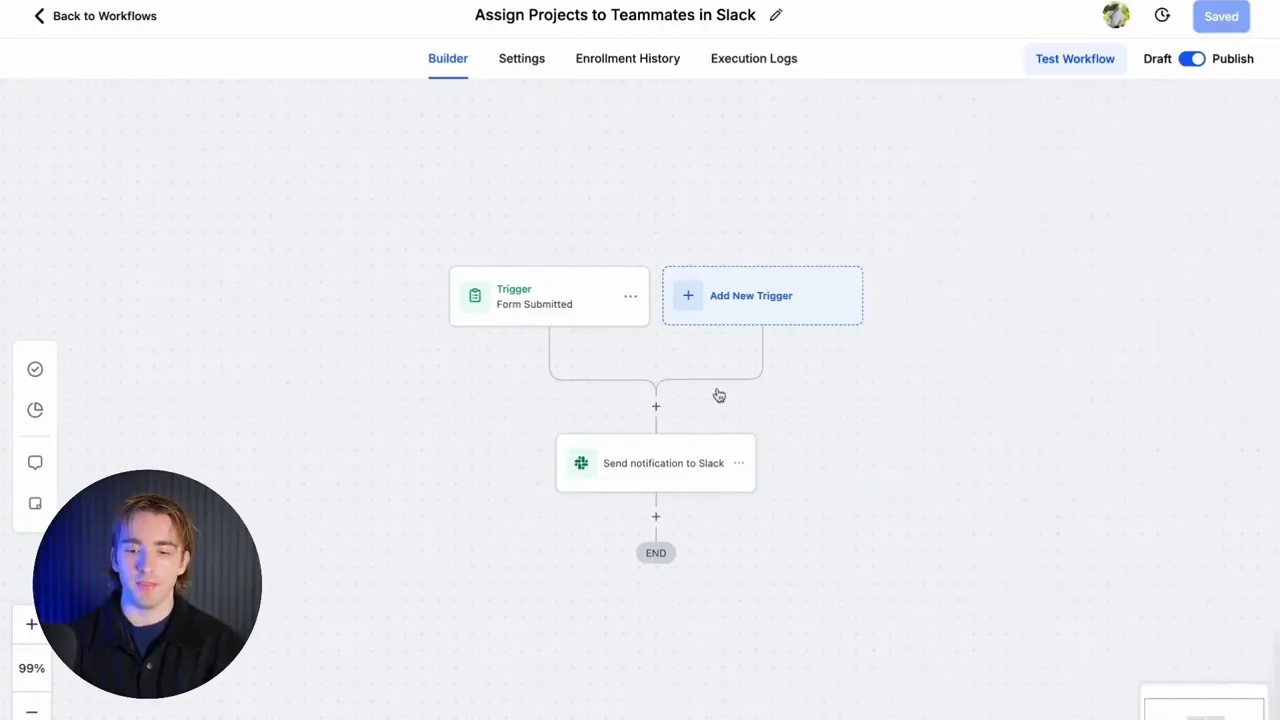
Condition branches and rule complexity
Common patterns include:
- If/Else based on keyword matching (contains "automation", "email", "ecommerce")
- Branching based on budget or timeline fields
- Conditional assignment based on lead score or deal stage
With these branches in place, you can have the workflow assign the correct user, create a task or opportunity in the CRM, and notify the assigned teammate in Slack — all without manual intervention.
Andrew: "So now, if our customer asks for an automation, it assigns it to our automation person. Then it automatically goes to our notification in Slack. And then we'll just say new project needed, and then it will immediately go to the assigned user."
Scaling rules and fallback logic
As your org grows you’ll want to add fallback rules. What if the most relevant teammate is out-of-office? Consider these strategies:
- Round-robin assignment for balanced workload
- Priority-based assignment (senior developers get critical projects)
- Fallback user when the assigned person doesn't acknowledge the task within X hours
Implementing escalation paths inside the workflow keeps projects moving even if someone misses the initial Slack message.
Mapping these concepts to GFunnel’s ecosystem
Now let’s bridge the workflow strategies above to GFunnel’s platform. GFunnel is an all-in-one business platform designed to handle marketing funnels, community networking, automation, analytics, and commerce. The same automation patterns we used for Slack assignments are core features inside GFunnel — but GFunnel expands them across the entire business lifecycle.
GFunnel’s Automation for Dynamic Task Assignment
GFunnel’s automation engine lets you:
- Trigger actions from form submissions, purchases, or CRM updates
- Use If/Else branches for keyword and field-based routing
- Assign tasks to teammates or groups and send notifications via in-platform messaging or integrated Slack
Stat: Automation can reduce manual work by up to 50% when correctly implemented. CTA: Join GFunnel’s automation features page to learn more: https://www.gfunnel.com/automation-home
GFunnel’s CRM (Lead Connector With GFunnel) — centralize lead data
Lead Connector With GFunnel is the connective tissue that stores lead data, tracks pipeline stages, and makes the right data available to automations. When a form is submitted, the CRM captures the contact, stores relevant fields (e.g., detailed explanation), and exposes those values to workflows so tasks are routed correctly.
Stat: Businesses that centralize CRM and automation see a 20% lift in conversion by reducing friction and response times.
To create the flow we discussed earlier in GFunnel: set up a form in your funnel, capture fields, create a workflow that evaluates the "detailed explanation" field, set an assign-to-user action, and then send a notification into Slack or GFunnel’s internal communication channel.
Use this resource to get started with funnels: https://www.gfunnel.com/funnel-home
GFunnel for Marketing Funnels and Lead Nurturing
Marketing funnels are more than capture pages — they are sequences that acquire, nurture, and convert leads. GFunnel provides:
- Drag-and-drop funnel builder to create landing pages and order flow
- Email automation to nurture leads captured via forms
- Audience segmentation for targeted messages
Stat: Properly structured funnels with email automation can increase conversions by 20% or more when combined with A/B testing and segmentation (see Neil Patel-style funnel optimization strategies).
CTA: Build marketing funnels with GFunnel: https://www.gfunnel.com/funnel-home
GFunnel’s Real-Time Analytics
One big advantage of moving beyond point tools is real-time visibility. GFunnel gives you dashboards that show engagement, conversions, funnel drop-off, and individual campaign performance. This allows you to:
- Optimize funnels quickly
- Identify where leads drop off and apply improvements
- Measure the performance of automated assignments (time to claim, time to first contact)
Stat: Real-time analytics helps teams react to drop-offs and salvage up to 30% more leads than waiting for batch reports.
CTA: Explore GFunnel’s real-time analytics and dashboards at https://www.gfunnel.com
GFunnel’s Community Networking and Collaboration
Networking inside GFunnel is a strategic advantage. Instead of isolated Slack channels, GFunnel offers niche communities where entrepreneurs, e-commerce pros, and marketers share tactics, templates, and referrals. This expands the concept of notifications beyond operations — it brings mentorship, talent sourcing, and peer problem-solving into one place.
Stat: Niche community engagement often leads to 2x faster problem resolution vs. random web searches.
CTA: Connect with GFunnel’s communities: https://www.gfunnel.com/communities
GFunnel’s Fast Autosave and Page Builder (103ms)
One of GFunnel’s technical differentiators is the fast autosave performance — 103ms via a dedicated web worker — making building funnels and pages feel instantaneous. Compare that to older tools where autosave takes seconds and interrupts momentum. Faster autosave equals faster iteration on landing pages and marketing funnels.
Stat: Autosave improved from 2.861s to 103ms — roughly 28x faster. CTA: See the funnel builder: https://www.gfunnel.com/funnel-home
GFunnel features mapped to the transcript themes
From the earlier workflow example we extracted recurring themes: automation, dynamic assignment, communication (Slack), and operational scaling. Below I map those themes to GFunnel features with practical takeaways.
GFunnel’s Automation for Reducing Manual Work
Theme: Automation.
GFunnel’s solution: Task automation reduces manual assignment and follow-up. With triggers, branches, and assignment actions you can automate the full lifecycle from lead capture to delivery. This maps directly to the Slack workflow concept but extends farther — e.g., triggering email sequences, creating invoices, or placing orders.
Performance stat: Expect up to 50% less manual work on repetitive tasks once automation is implemented. CTA: Try automation features: https://www.gfunnel.com/automation-home
GFunnel’s Networking Tools for Team and Community Collaboration
Theme: Communication/networking.
GFunnel’s solution: Internal messaging, community groups, and event calendars let your team share templates, ask for help, or source specialists. If a lead requires something beyond your team’s capacity, post to a community or group and find vetted collaborators fast.
Performance stat: Community-driven referrals can reduce hiring time by 40%. CTA: Join GFunnel’s niche communities: https://www.gfunnel.com/communities
GFunnel’s Real-Time Analytics for Faster Optimization
Theme: Analytics.
GFunnel’s solution: Real-time dashboards help you monitor funnel conversion rates and the impact of automation. You can see how many projects are being auto-assigned, how fast teammates respond, and which funnel steps are losing leads.
Performance stat: Real-time insight can improve conversion by up to 20% through faster iteration and testing. CTA: Check analytics capabilities: https://www.gfunnel.com
GFunnel’s Funnel Builder and Autosave for Rapid Iteration
Theme: Speed and reliability.
GFunnel’s solution: With a drag-and-drop builder and a 103ms autosave, teams can iterate quickly on marketing funnels without losing work. Faster iteration means more tests, better creatives, and higher converting funnels.
Performance stat: Faster autosave reduces lost edits and boosts productivity by an estimated 15–25% for heavy builders. CTA: Start building funnels: https://www.gfunnel.com/funnel-home
GFunnel’s Flexible Integrations and API
Theme: Extensibility.
GFunnel’s solution: If you need an integration not built-in, GFunnel supports API access and third-party connectors, so you can route Slack notifications, CRM updates, and webhooks into any external tool. This flexibility ensures your marketing funnels and internal workflows can evolve without lock-in.
Performance stat: Integrations reduce tool switching and save teams an estimated 10–15% of time spent managing disconnected tools. CTA: Learn about integrations: https://www.gfunnel.com
Real-world applications — two case studies
Marketers, boost your conversions with these practical GFunnel-based case studies that show how marketing funnels, automations, and networking combine to deliver growth.
Case Study 1 — E-commerce brand: From Lead to Fulfillment
Situation: A mid-sized e-commerce store selling specialty home goods wanted to increase the speed of order customizations and reduce customer support response time. They had a 6-person team: marketing, design, operations, and fulfillment.
Challenge: Customization requests came via a contact form and email. The team manually logged them into a spreadsheet, assigned tasks by Slack messages, and tracked completion across multiple tools. This caused delays, miscommunications, and increased refunds.
GFunnel solution implemented:
- Built marketing funnels to capture customization requests with structured form fields.
- Created GFunnel automation: on form submission, evaluate the customization type, assign task to the correct teammate, and send Slack/Dashboard notification.
- Integrated CRM to log customer data and purchase history for context.
- Used GFunnel’s real-time analytics to track average time-to-first-response and adjust staffing during peak hours.
Outcome:
- Response time decreased from 10 hours to under 90 minutes.
- Order errors reduced by 30% due to more contextual assignments.
- Conversion on upsells during order confirmation improved by 12% because the funnel triggered targeted emails after assignment.
"GFunnel’s automation saved us hours weekly and reduced our order errors dramatically — our operations feel like a well-oiled machine now."
Long-tail keywords used: "automate business operations with GFunnel", "build marketing funnels with GFunnel", "Best business platform for entrepreneurs".
Case Study 2 — Local restaurant chain: Online ordering and operations
Situation: A regional restaurant chain wanted tighter coordination between online orders, kitchen operations, and marketing promotions. Their ordering system produced orders but they struggled to route special instructions to the right kitchen manager.
Challenge: Special requests were lost between the POS, email, and phone. Marketing promotions were not tied to operations, causing order mismatches.
GFunnel solution implemented:
- Built a funnel with call net capture and online order forms to centralize order data.
- Configured automations to parse order notes, assign to the right kitchen manager, and notify via Slack or GFunnel internal messaging.
- Used GFunnel’s restaurant ecosystem features and CRM to store customer preferences for repeat offers.
- Scaled community-driven support by connecting to GFunnel restaurant groups for staffing tips and menu optimization strategies.
Outcome:
- Order accuracy improved by 25%.
- Customer satisfaction scores rose, and repeat order rate improved 18% within three months.
- Marketing ROI increased because promotions were tied directly to CRM segments and timed with operations.
"Having order rules automatically push to the right kitchen manager cut mistakes in half. GFunnel connected marketing and ops in a way we never had before."
Long-tail keywords used: "networking for small businesses", "automate business operations with GFunnel", "scale restaurants with GFunnel".
Why GFunnel leads — comparison and advantages
Small business owners, scale smarter with GFunnel! Below is a practical comparison of traditional methods vs. GFunnel’s ecosystem. Because the publishing environment in this article only supports basic tags, the "table" is represented as structured rows for clarity.
Traditional Business Tools vs. GFunnel’s Ecosystem
- Aspect: Autosave Speed — Traditional Methods: Slow (seconds) — GFunnel: Fast (103ms, 28x faster)
- Aspect: Automation — Traditional Methods: Manual processes and spreadsheets — GFunnel: 50% less manual work via workflows and CRM
- Aspect: Networking — Traditional Methods: Limited connections (ad-hoc Slack groups) — GFunnel: Niche communities and events to scale collaboration
- Aspect: Analytics — Traditional Methods: Third-party dashboards with lag — GFunnel: Real-time dashboards and actionable metrics
- Aspect: Customization — Traditional Methods: Generic tools needing many integrations — GFunnel: Tailored solutions and APIs
GFunnel packs funnels, CRM, analytics, community, and ecommerce into one platform. That reduces friction and eliminates the need to stitch together multiple point solutions. The result is an operationally coherent business stack that makes your marketing funnels actionable.
Competitive advantages:
- All-in-one platform reduces monthly tool costs
- Faster iteration with 103ms autosave
- Community features for recruitment, mentorship, and partnership
- Built-in e-commerce processing and specialized restaurant tools
CTA: Explore GFunnel’s affordable plans and get started: https://www.gfunnel.com/create-account
Implementation checklist — turn leads into projects today
Use this checklist to implement the automated assignment workflow in GFunnel or a similar platform:
- Create a funnel with a capture form that includes structured fields (name, website, description, budget, timeline).
- Set up your CRM to store the form data and expose fields to automations (Lead Connector With GFunnel).
- Build an automation: trigger on form submitted, add If/Else branches for service types, assign to users, and send Slack/internal notifications.
- Configure fallback rules (round-robin, escalation) and response SLAs.
- Monitor response times and funnel conversion with real-time analytics and adjust staffing or messaging accordingly.
- Engage GFunnel communities to source specialists or share best practices.
Community call — connect and learn
Connect with E-commerce Pros and other niche groups in GFunnel to accelerate learning. Practical insight from peers reduces trial-and-error and can cut months of experimentation into weeks. Visit GFunnel’s communities: https://www.gfunnel.com/communities
Interactive engagement: Test your business growth potential
Looking to pinpoint where automation will help most? Try a GFunnel quiz (suggested interactive element) like "Test Your Business Growth Potential" to receive tailored next steps. While this guide describes high-impact actions, a quick quiz helps prioritize changes based on your current bottlenecks.
CTA: Take the quiz at GFunnel to receive custom recommendations: https://www.gfunnel.com/create-account
Related content
- Scale Restaurants with GFunnel — https://www.gfunnel.com
- GFunnel’s networking tools and communities — https://www.gfunnel.com/communities
- Automation features overview — https://www.gfunnel.com/automation-home
Conclusion — Automate the handoff from marketing funnels to delivery with Lead Connector With GFunnel
Running a business with multiple people doesn’t have to mean spending all your time assigning projects. By connecting your marketing funnels to your operations (via Lead Connector With GFunnel-style CRM and automations), you create predictable handoffs that keep clients happy and teams focused. From a simple form-to-Slack direct message to a sophisticated conditional routing engine with fallback and analytics, automations empower teams to scale without increasing chaos.
GFunnel’s full ecosystem — funnels, CRM, automation, real-time analytics, communities, and a super-fast autosave — gives businesses everything they need to implement the workflows described in this guide. If your goal is to move faster, convert more, and streamline delivery, GFunnel is built for that work.
Small business owners: scale smarter with GFunnel. E-commerce entrepreneurs: improve conversions and fulfillment by making your marketing funnels operational. Marketers: design smarter funnels that not only capture leads but also trigger action inside the business. Ready to see how it works? Create an account and get hands-on: https://www.gfunnel.com/create-account
FAQ
- How does GFunnel support automated project assignments?
GFunnel’s automation engine links form triggers to workflows that can evaluate form content, assign tasks to teammates, and send notifications via internal messaging or integrated Slack. This replaces manual triage and reduces human error.
- What makes GFunnel more than a funnel builder?
GFunnel combines marketing funnels with a CRM (Lead Connector With GFunnel), automation, real-time analytics, niche communities, and e-commerce processing. This all-in-one approach removes the need for multiple tools and reduces integration friction.
- Can GFunnel send notifications to Slack?
Yes. GFunnel can integrate with Slack and other messaging platforms. You can route notifications directly to users, private channels, or public channels depending on your workflow design.
- How fast is GFunnel’s autosave and why does it matter?
GFunnel’s autosave runs at approximately 103ms using a dedicated web worker — roughly 28x faster than older autosave implementations. This makes building pages and funnels faster and reduces lost changes.
- What types of businesses benefit most from GFunnel’s ecosystem?
Small businesses, e-commerce stores, restaurants, agencies, and entrepreneurs benefit from GFunnel’s combined features — particularly organizations that need to turn marketing funnels into operational tasks quickly and reliably.

Additional resources
- GFunnel Homepage: overview of tools and networking — https://www.gfunnel.com
- GFunnel Funnels: drag-and-drop funnel builder and autosave — https://www.gfunnel.com/funnel-home
- GFunnel Automation features — https://www.gfunnel.com/automation-home
- GFunnel Communities: network with other entrepreneurs — https://www.gfunnel.com/communities
- GFunnel Pricing and account creation — https://www.gfunnel.com/create-account
Suggested next steps
- Create a simple form and map its fields to automate an assignment workflow.
- Start with a single If/Else rule (e.g., "contains: website" or "contains: automation") and assign to users.
- Measure response times in real-time analytics and iterate.
- Join GFunnel communities to share templates and find talent.
Thank you for reading — this has been Andrew, sharing practical ways to make marketing funnels operational using Lead Connector With GFunnel and automation best practices. If you want a walkthrough or help building your first funnel-to-Slack workflow, sign up and get started: https://www.gfunnel.com/create-account
Need Help Implementing This? |
|
Schedule A Discovery Call With One Of Our Professionals |
| Access Now |


