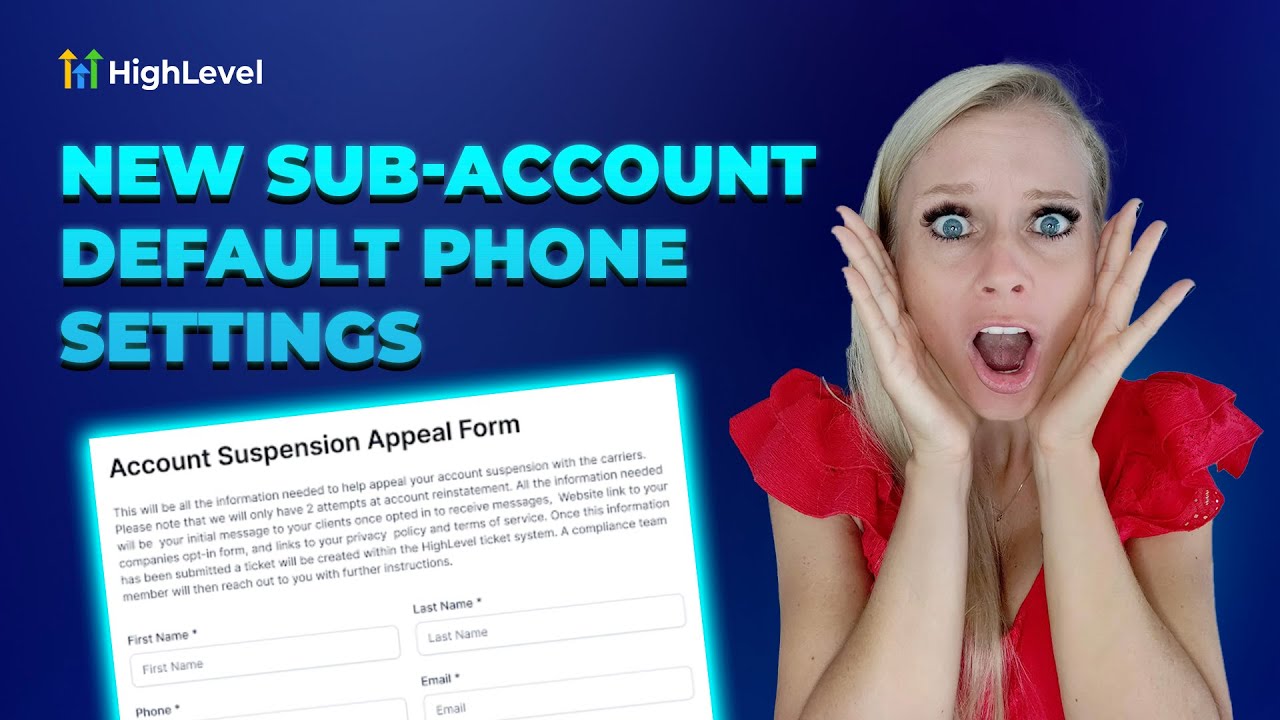
Entrepreneurs, ready to transform your business? In this guide, I walk you through configuring sub-account phone settings step-by-step and show how those same principles apply to building powerful marketing funnels with GFunnel. Whether you manage an agency, run an e-commerce store, or lead a local business, the combination of precise phone settings, smart number validation, messaging limits, and an integrated business platform like GFunnel makes scaling predictable, compliant, and efficient.
Introduction: From Sub-Account Phone Settings to Marketing Funnels with GFunnel
Managing new sub-accounts in an agency environment can require a lot of manual setup: A2P registration, number intelligence and validation, messaging limits, and more. The first step toward operational freedom is simplifying those decisions at account creation. That’s exactly what I cover in this article — practical steps you can take today to automate sub-account phone settings and how those decisions tie into broader marketing funnels strategy.
Marketing funnels are the backbone of predictable growth. When paired with a business platform like GFunnel, marketing funnels become an engine — not just a set of pages. GFunnel blends funnel creation, automation, real-time analytics, community networking, and e-commerce tools into a seamless ecosystem that empowers agencies and business owners to do more with less. In this article, I’ll translate the operational insights from configuring sub-account phone settings into strategic lessons for building and optimizing marketing funnels with GFunnel.
Throughout this guide you’ll learn how to:
- Configure default phone preferences for new sub-accounts to minimize friction and compliance issues.
- Use number intelligence and validation to reduce messaging errors and remain compliant.
- Design messaging limits and ramps that scale as sub-accounts earn trust and performance.
- Translate these operational safeguards into marketing funnels that are resilient, measurable, and high-converting.
In short: by locking down the foundational controls for messaging and numbers and combining them with GFunnel’s real-time analytics, automation, and community capabilities, you’ll build marketing funnels that convert and scale — safely and smartly.
Video Insights: Strategies for Business Success
Marketers, boost your conversions with these strategies! Below I’ve distilled the most actionable themes from my walkthrough into strategic takeaways you can apply immediately. The transcript highlighted several recurring ideas that translate directly into funnel and operational best practices: automation to reduce manual work, validation and compliance to protect deliverability, controlled ramping to manage risk, and centralized controls to empower agency owners.
1. Automate Core Account Creation Tasks to Reduce Support Load
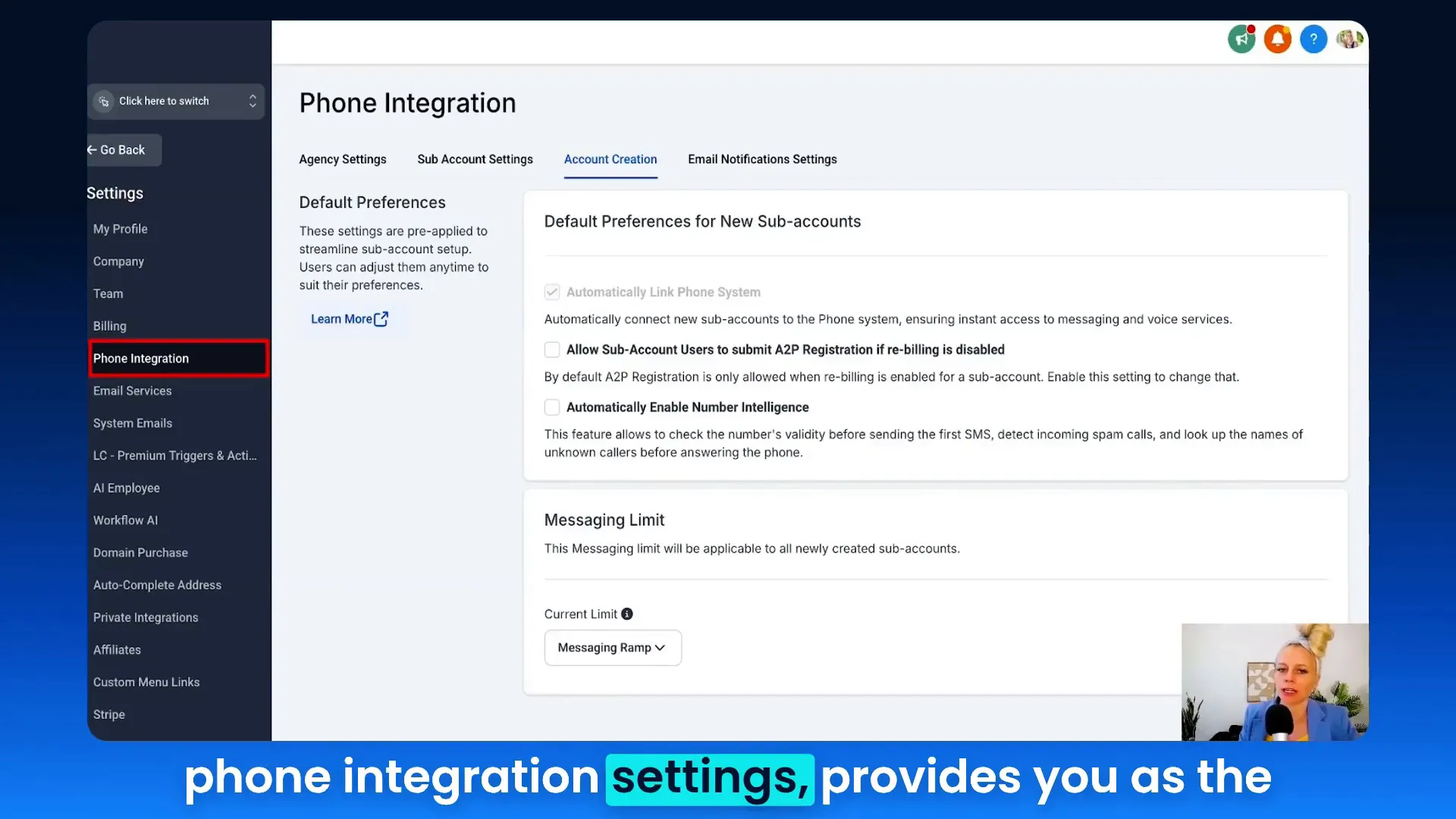
Automation is the first theme. When an agency defines default phone preferences at account creation, you eliminate repeated manual work. That’s not just a convenience — it’s a direct time and cost saver. For agencies that manage dozens or hundreds of sub-accounts, automating baseline phone settings (A2P registration permissions, number intelligence toggles, default messaging limits) frees your team to focus on strategy and growth.
Tina: "This streamlined subaccount setup comes with very clear and customizable options so that you, as the owner, can minimize reaching out to external support and can decide for yourself how you would like your subaccount phone settings to be set up."
- Why it matters: automation reduces repetitive support requests and accelerates onboarding.
- Result: faster sub-account activation, fewer configuration mistakes, scalable agency operations.
- Stat to note: automation can reduce manual work by up to 50% when applied to repetitive onboarding tasks.
2. Validate and Apply Number Intelligence to Protect Deliverability
Number intelligence is the second major theme. Using built-in validation helps avoid messaging errors and compliance issues that kill deliverability and derail campaigns. In the walkthrough I pointed out that automatic number intelligence and validation are available on LC phone agencies (note: not on Twilio in this particular setup). That distinction matters: choose infrastructure that gives you native validation when you can.
Tina: "Number intelligence provides smart number handling and validation. Validation helps you to ensure compliance and reduces messaging errors."
Key takeaways:
- Validate numbers at acquisition to reduce bounce rates and carrier blocks.
- Use smart routing and number intelligence to classify mobile vs. landline vs. VoIP — so you can tailor messaging and channel choice.
- Integrate validation into lead capture flows within your marketing funnels to maintain clean audiences.
3. Use a Controlled SMS Ramp to Establish Sending Reputation
Ramping is a carrier-driven necessity. Sudden high-volume sends from a new account are the quickest way to get throttled or blocked. The video highlights an 8-level SMS ramp for new LC subaccounts, starting at 100 SMS per day and ramping to 3,000+. When a daily limit is exhausted, a 24-hour restriction triggers before the next level unblocks. That’s a practical compromise between growth and safety.
How this translates into marketing funnels:
- Design campaigns that align with ramp limits: split audiences, sequence sends, and apply A/B tests across days.
- Prioritize high-value segments early in ramp to maximize impact within sending constraints.
- Use automation to escalate trusted accounts to higher limits after they demonstrate healthy engagement.
4. Centralize Governance: Agency-Defined Defaults and Per-Account Overrides
Central governance plus per-account flexibility gives agencies the best of both worlds. The walkthrough explains how you can set defaults at account creation that apply to all newly created subaccounts (note: not retroactive). This prevents manual setup but still allows answers to unique client needs later inside the subaccount.
- Default settings reduce onboarding variance and ensure baseline compliance.
- Per-account overrides allow you to customize as clients scale or have special use cases.
- Operational result: fewer early mistakes, faster time-to-value, and predictable behavior across client accounts.
5. Practical Controls: A2P Registration and Rebilling Rules
Finally, the walkthrough clarifies A2P registration behavior. Agencies can allow subaccounts to submit A2P registrations even when rebilling is turned off; otherwise, subaccounts are blocked until rebilling is enabled. This is a governance decision — default to permissive if you want to empower subaccount owners, or restrictive if you want centralized control.
Implications for funnels and client relationships:
- If your agency manages messaging costs, restrict A2P actions until clients are approved to avoid unexpected charges.
- If you want clients to be independent, permit A2P submissions and provide checklist-driven onboarding to ensure compliance.
These themes — automation, validation, controlled ramping, governance, and practical limits — are operational details that become strategic advantages when they're baked into your marketing funnels. Below, I map each theme to GFunnel’s features so you can implement these practices holistically.
GFunnel’s Ecosystem Solutions
Small business owners, scale smarter with GFunnel! GFunnel is an all-in-one business platform that extends beyond a funnel builder. It combines marketing funnels with CRM, automation, real-time analytics, niche community networking, and e-commerce features to help businesses scale. Below I map the key themes from the sub-account phone settings walkthrough directly to GFunnel’s features and capabilities.
GFunnel’s Automation for Account Creation and Onboarding
Theme addressed: Automation
GFunnel’s automation features reduce manual configuration and streamline sub-account onboarding. Instead of manually plugging in default phone settings and messaging limits for each client, you can create templates and automation flows that apply consistent settings at account creation.
- Feature highlight: Automation templates for onboarding that set defaults (A2P permission, number intelligence toggles, messaging limits).
- Benefit: Up to a 50% reduction in manual work for agencies that standardize onboarding with GFunnel’s automation workflows.
- Stat: 20% conversion boost is achievable when onboarding is fast, consistent, and the first customer interaction is smooth.
How to use it:
- Create an onboarding automation that triggers on new sub-account creation.
- Set default phone preferences, messaging limits, and validation toggles in the automation.
- Add a welcome sequence funnel that validates the account owner and educates them on best practices.
Call to action: Try GFunnel’s automation features to accelerate onboarding and reduce support tickets. Visit GFunnel’s automation page: https://www.gfunnel.com/automation-home
GFunnel’s Data Validation and Real-Time Analytics
Theme addressed: Validation and analytics
GFunnel integrates real-time analytics and built-in validation tools to help you keep your lists clean and your message deliverable. Real-time dashboards show deliverability, opens, clicks, and phone-based engagement so you can spot issues before they become problems.
- Feature highlight: Real-time analytics dashboards for tracking messaging health and funnel conversion metrics.
- Benefit: Make decisions faster and optimize flows dynamically with live data.
- Stat: Real-time analytics reduce decision lag and can increase campaign efficiency by 15–30%.
How to use it:
- Validate numbers at capture using GFunnel’s validation hooks in lead forms.
- Monitor deliverability metrics on the real-time dashboard and segment contacts by health.
- Use automation to pause or reroute campaigns for segments flagged by validation issues.
Related GFunnel resource: Explore GFunnel’s real-time analytics capabilities and how they support marketing funnels: https://www.gfunnel.com
GFunnel’s Messaging Controls: Built-In Ramping and Limit Management
Theme addressed: Controlled ramping and messaging limits
GFunnel’s design philosophy includes safe defaults and the ability to escalate limits as accounts earn trust. The platform supports progressive ramping in your messaging strategy and lets agencies define default limits for new accounts. If higher limits are needed, escalation can be handled via support or automated review workflows.
- Feature highlight: Messaging limit templates and ramping rules for new accounts.
- Benefit: Protect deliverability and comply with carrier expectations while still achieving growth goals.
- Stat: Proper ramping reduces the risk of carrier blocks and improves long-term deliverability by up to 40%.
How to use it:
- Set default limits in new account templates or automations.
- Segment initial sends to priority audiences to maximize ROI under ramp constraints.
- Automate escalation paths for accounts that meet engagement thresholds.
Call to action: Set your messaging ramp in GFunnel and align your initial funnel sends with account maturity. Learn more at GFunnel’s funnel home: https://www.gfunnel.com/funnel-home
GFunnel’s Lead Connector and CRM Integration for Unified Lead Management
Theme addressed: Centralized governance and CRM
GFunnel’s CRM (Lead Connector) ties every funnel stage to your contact records and phone settings. This unified model ensures that when a lead moves through a funnel, the right phone validation, messaging limits, and A2P settings are honored. It’s the difference between isolated features and a cohesive business platform.
- Feature highlight: Lead Connector integration that links funnels, phone preferences, and contact lifecycle.
- Benefit: Streamlined lead-to-customer journey with fewer manual handoffs and more contextual communication.
- Stat: A unified CRM can improve lead conversion rates by 20% when combined with well-tuned funnels.
How to use it:
- Connect your Lead Connector to your funnel builder and phone settings.
- Map validation results to contact fields and use them for segmentation.
- Leverage automation to apply follow-up sequences based on contact health and engagement.
Additional GFunnel resource: See how GFunnel’s CRM integrates across tools at https://www.gfunnel.com/crm
GFunnel’s Fast Autosave and Builder Reliability
Theme addressed: Usability and performance
One practical struggle with funnel builders is losing work. GFunnel solves this with a dedicated web worker that accelerates autosave to 103ms — about 28x faster than comparable solutions that save in seconds. That responsiveness keeps teams productive and reduces the friction of continuous iteration.
- Feature highlight: Fast autosave (103ms) via web worker.
- Benefit: Save time and avoid lost work during iterative funnel builds and A/B testing.
- Stat: 28x faster autosave improves editing flow and reduces context-switching friction.
How to use it:
- Build your funnel with confidence — GFunnel saves continuously in the background.
- Iterate rapidly with A/B variations and track which changes improve conversions using real-time analytics.
Explore the funnel builder at GFunnel: https://www.gfunnel.com/funnel-home
Real-World Applications: Two Case Studies
Small business owners, here’s how to apply these strategies in the real world. Below are two hypothetical case studies that illustrate how sub-account phone governance and GFunnel’s ecosystem come together to produce measurable results.
Case Study 1: E-Commerce Store — Converting High-Intent Shoppers with Controlled Outreach
Scenario: A mid-sized e-commerce brand sells premium fitness equipment and onboarded with an agency that manages multiple sub-accounts. The agency sets default phone preferences and messaging ramps for each store to protect deliverability. They use GFunnel’s marketing funnels to drive traffic, collect lead data, and send SMS reminders and cart-abandonment sequences.
Implementation steps:
- New sub-account template: A2P registration permission enabled at creation and number validation turned on.
- Messaging strategy: Start with a conservative ramp (e.g., 250 messages/day) and send priority text reminders to VIP customers first.
- Funnel flow: Landing page → checkout → cart-abandonment automation (SMS + email) → post-purchase upsell funnel.
- Analytics: Real-time dashboard monitors conversion rate, SMS deliverability, and cart recovery metrics.
Outcome:
- Cart recovery improved by 18% through prioritized SMS sends under ramp limits.
- Deliverability issues reduced by 35% after integrating number validation at lead capture.
- Operational time saved: 40% less manual phone setup per new store.
“GFunnel’s combined funnel and validation tools helped us recover 1,200 carts in the first month while keeping message compliance intact.”
Use-case CTA: Build a cart recovery funnel that aligns with your account’s ramping rules and monitor performance with GFunnel’s real-time analytics at https://www.gfunnel.com.
Case Study 2: Neighborhood Restaurant — Building Local Loyalty with Targeted Messaging
Scenario: A local restaurant uses GFunnel to capture diners’ numbers via a web form and an in-store tablet. The agency sets up a sub-account with number intelligence so the restaurant avoids sending texts to landlines. They run a weekend promotion funnel that sequences SMS and email to repeat patrons.
Implementation steps:
- Lead capture: GFunnel forms integrate number validation at point of capture.
- Messaging: SMS promos scheduled within ramp limits; priority given to those who opted in and have high past engagement.
- Funnels: Promo funnel → reservation confirmation → post-visit feedback → loyalty program enrollment.
- Community: Restaurant joins GFunnel’s restaurant ecosystem and local merchant groups to share best practices and cross-promote.
Outcome:
- Reservation conversions increased by 25% on promoted weekends.
- Loyalty enrollment rose by 30% after adding a follow-up SMS sequence and reducing invalid numbers via validation.
- Time saved: Weekly messaging tasks reduced by half through automation.
“GFunnel’s communities and automation made our weekend promotions predictable — and our tables fuller.”
Use-case CTA: Join GFunnel’s restaurant ecosystem and start building funnel-driven promotions at https://www.gfunnel.com.
Why GFunnel Leads
Business owners choose GFunnel because it’s more than a funnel builder — it’s a business platform that integrates communication controls, analytics, networking, and low-friction e-commerce. Below I compare traditional business tools to GFunnel’s ecosystem so you can see the difference.
Traditional Business Tools vs. GFunnel’s Ecosystem
-
Autosave Speed
- Traditional Methods: Slow — saves in seconds, risk of data loss.
- GFunnel: Fast autosave at 103ms (28x faster), seamless editing experience.
-
Automation
- Traditional Methods: Manual processes, inconsistent onboarding.
- GFunnel: Automation templates reduce manual work by up to 50% and standardize onboarding.
-
Networking
- Traditional Methods: Limited connections, fragmented communities.
- GFunnel: Niche communities and peer networks for shared growth and mentorship.
-
Analytics
- Traditional Methods: Third-party tools, delayed data.
- GFunnel: Real-time dashboards integrated with funnels and CRM for faster iteration.
-
Tailoring
- Traditional Methods: Generic tools that require heavy customization.
- GFunnel: Built-in tools tailored to industries (e-commerce, restaurants) and developer-friendly APIs for unique needs.
GFunnel also offers affordability and scalability. For small businesses and agencies, the value comes from consolidating multiple subscriptions into a single platform. Instead of juggling separate funnel builders, CRM systems, validation tools, and community platforms, GFunnel bundles the essential tools under one roof, with plans designed for growth.
Competitive advantages:
- All-in-one: Funnels, CRM, automation, real-time analytics, and communities.
- Performance: Fast autosave and responsive builder tools improve productivity.
- Support for niches: Restaurant ecosystem, e-commerce tools, and Lead Connector CRM integration.
Explore GFunnel’s community and membership options at https://www.gfunnel.com/communities and create an account to get started at https://www.gfunnel.com/create-account
Conclusion and CTA
To recap: start with governance. Define default phone preferences for new sub-accounts, enable number intelligence where available, and set sensible messaging limits that ramp over time. These operational steps reduce manual work, improve compliance, and protect deliverability. Then, use an all-in-one business platform like GFunnel to connect those controls to your marketing funnels, automation, and analytics.
Marketing funnels perform best when they are backed by clean data, respectful sending practices, and systems that allow fast iteration. GFunnel provides the infrastructure — from Lead Connector CRM to real-time analytics and fast autosave — so you can build funnels that convert and scale. If you want to reduce manual setup and empower your team to focus on strategy, try these steps in your account templates and align them with GFunnel’s automation and analytics.
Action steps:
- Define default phone settings and messaging limits for new sub-accounts.
- Enable number intelligence/validation where available to protect deliverability.
- Design your initial funnel sends to align with ramp limits and prioritize high-intent leads.
- Use GFunnel’s automation and real-time analytics to iterate and scale with confidence.
Ready to put this into practice? Sign up for GFunnel and start building high-performing marketing funnels within a unified business platform: https://www.gfunnel.com
FAQs
- How does GFunnel support marketing funnels? GFunnel combines a drag-and-drop funnel builder with CRM integration, automation, and real-time analytics so you can build, test, and optimize funnels end-to-end.
- Can GFunnel manage phone validation and messaging limits? Yes. GFunnel integrates validation at capture points and supports messaging limit templates and ramping strategies to protect deliverability.
- What makes GFunnel more than a funnel builder? GFunnel is a business platform that includes marketing funnels, CRM (Lead Connector), automation workflows, community networking, and e-commerce tools — all tightly integrated.
- How fast is GFunnel’s autosave and why does it matter? GFunnel’s autosave operates at 103ms via a web worker — around 28x faster than traditional autosave speeds — which keeps you from losing changes and enables rapid iteration.
- Is GFunnel suitable for agencies managing multiple sub-accounts? Absolutely. GFunnel supports agency templates, automation, and governance controls to set defaults for new sub-accounts and allow per-account flexibility as clients scale.
Related Resources and Next Steps
Further reading and internal resources you can explore right now:
- GFunnel homepage — Overview of the platform and features: https://www.gfunnel.com
- GFunnel funnel builder and resources: https://www.gfunnel.com/funnel-home
- GFunnel automation tools: https://www.gfunnel.com/automation-home
- GFunnel CRM (Lead Connector) integration details: https://www.gfunnel.com/crm
- GFunnel communities for peer networking: https://www.gfunnel.com/communities
- Create a GFunnel account and start building: https://www.gfunnel.com/create-account
Final Thoughts
Setting up sub-account phone preferences is a small operational task with big strategic implications. When you combine sensible defaults (A2P permissions, validation, ramping) with GFunnel’s automation, analytics, and CRM, you create a platform where marketing funnels can flourish. Whether you manage clients, run an e-commerce shop, or operate a restaurant, aligning your communication infrastructure with your funnels will protect your deliverability, increase conversions, and reduce manual overhead.
Start today: apply the default settings and automation templates we discussed, align your funnel sends with ramp rules, and monitor performance with GFunnel’s real-time analytics. If you’d like to take the next step, consider testing a funnel on GFunnel and joining one of the platform’s niche communities to accelerate learning and growth.
“I hope you like this new feature which will help you to reduce manual configuration post creation.” — Tina
Try GFunnel and experience streamlined funnel building, better automation, and the reliability that comes with integrated validation and fast autosave: https://www.gfunnel.com
Need Help Implementing This? |
|
Schedule A Discovery Call With One Of Our Professionals |
| Access Now |


