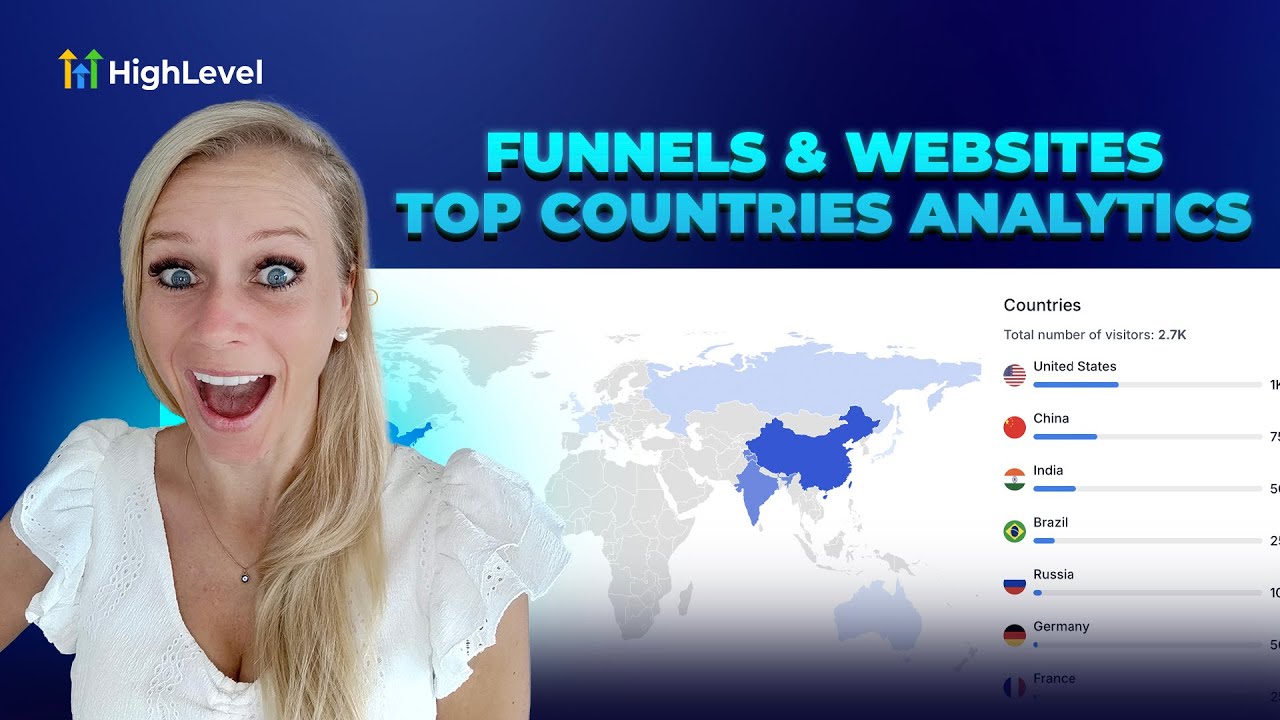
Entrepreneurs, ready to transform your business with smarter marketing funnels and better data? In this guide I’ll walk you through practical analytics strategies inspired by an expert walkthrough from Tina at HighLevel and show how GFunnel — an all-in-one business platform — helps you act on those insights. Whether you run paid ads, operate an e-commerce store, or manage local restaurants, understanding where your visitors come from and how they arrive at your pages is critical. You’ll learn how to analyze traffic by country, apply regional optimization, and use GFunnel’s tools — including Lead Connector With GFunnel — to automate, network, and grow.
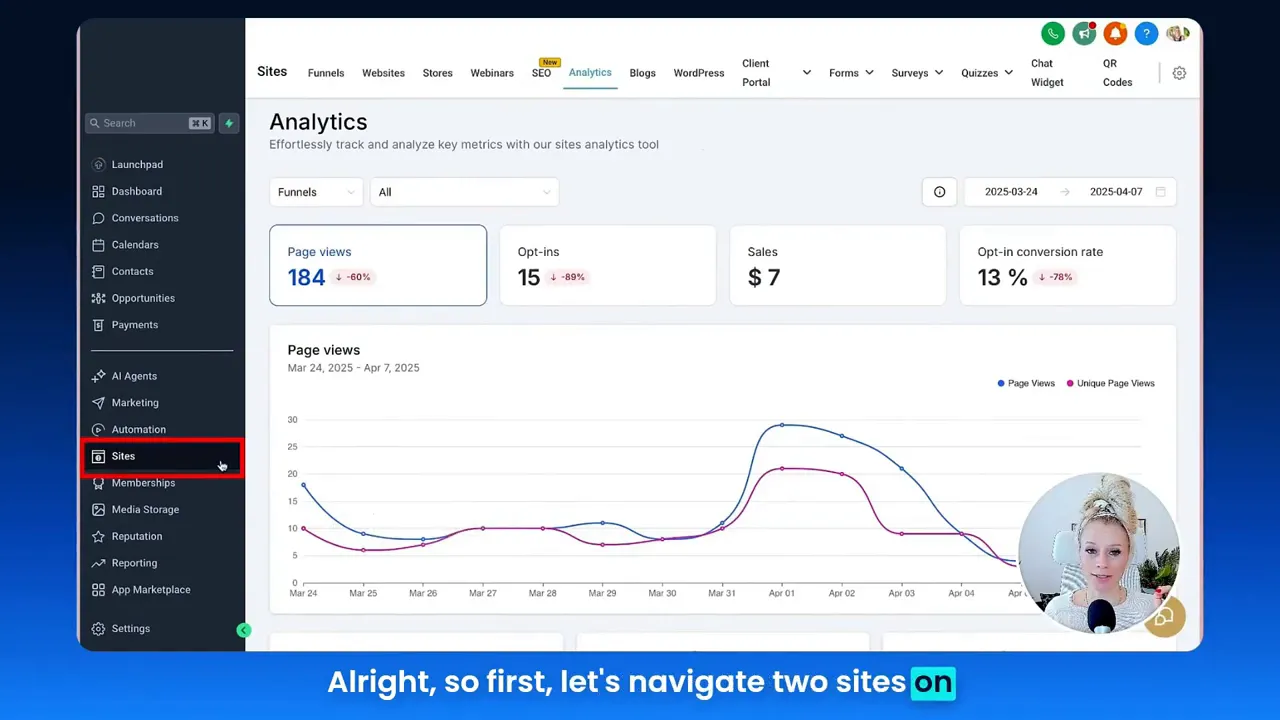
In the next sections I expand Tina’s practical walkthrough — navigating to Sites → Analytics, selecting funnels versus websites, setting date ranges, and interpreting country-level and device breakdowns — and map those actions to GFunnel features such as real-time analytics, community networking, and business automation. We’ll cover actionable tactics, case studies, and a realistic implementation plan so you can use marketing funnels to increase conversions and improve ROI.
Outline
- Introduction: Why country-level analytics matter for marketing funnels and GFunnel
- Video insights: Key themes from the analytics walkthrough
- GFunnel’s ecosystem solutions mapped to each theme
- Real-world applications: Two case studies
- Why GFunnel leads: comparison and value
- Conclusion & call to action
- FAQs
Introduction — Marketing funnels, analytics, and GFunnel in one place
Marketing funnels are the backbone of predictable growth: they guide prospects from awareness to purchase while giving you measurable checkpoints to optimize. In Tina’s walkthrough, she demonstrates how to access analytics for top countries visiting your funnels and websites — a simple step that unlocks regional targeting opportunities, language-based personalization, and smarter ad spend. When you combine these analytics with a platform like GFunnel, you can go beyond single-page tracking and build a connected business platform that handles lead capture, follow-up automation, payments, and community networking.
GFunnel’s positioning as an all-in-one business platform means you don’t need a patchwork of tools to run modern marketing funnels. GFunnel merges CRM capabilities, community networking, automation features, and real-time dashboards so you can act quickly on the insights you gather. This guide focuses on how the country-level analytics Tina shows translate into concrete strategies for targeting, creative testing, and market expansion — and how GFunnel’s toolset supports those strategies.
Key takeaways you’ll get from this guide:
- How to interpret top-country reports and device breakdowns for marketing funnels
- How GFunnel’s real-time analytics and Lead Connector With GFunnel streamline follow-up and segmentation
- Practical, step-by-step examples for e-commerce and restaurant businesses
- Why GFunnel’s fast autosave and integrated ecosystem matter for speed and scale
Video Insights: Strategies for Business Success
From Tina’s walkthrough of the analytics view, I extracted several actionable themes you can use to sharpen your marketing funnels and overall growth strategy. These are themes I see repeatedly when optimizing marketing funnels for real businesses:
- Theme 1 — Data-driven regional targeting
- Theme 2 — Timeframe and trend analysis
- Theme 3 — Device and UX optimization
- Theme 4 — Data integrity and implementation (scripts/config)
- Theme 5 — Actionability: download and act on the data
Harnessing data-driven regional targeting for growth
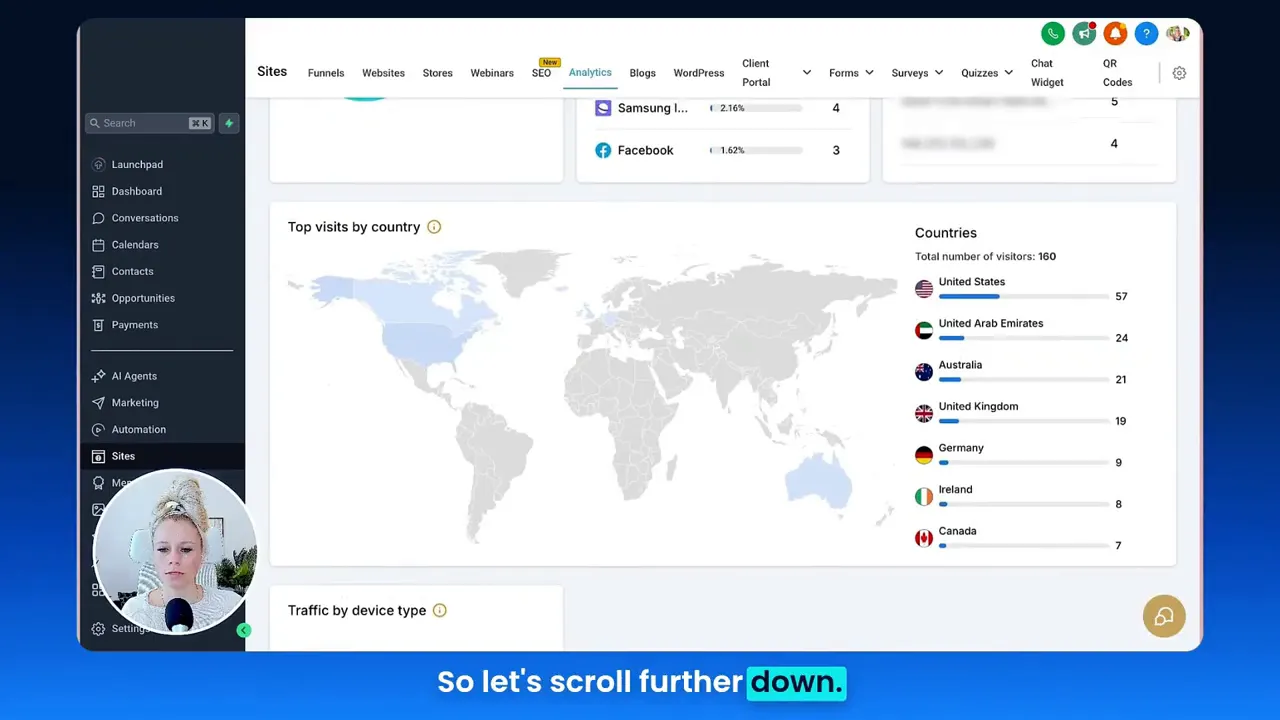
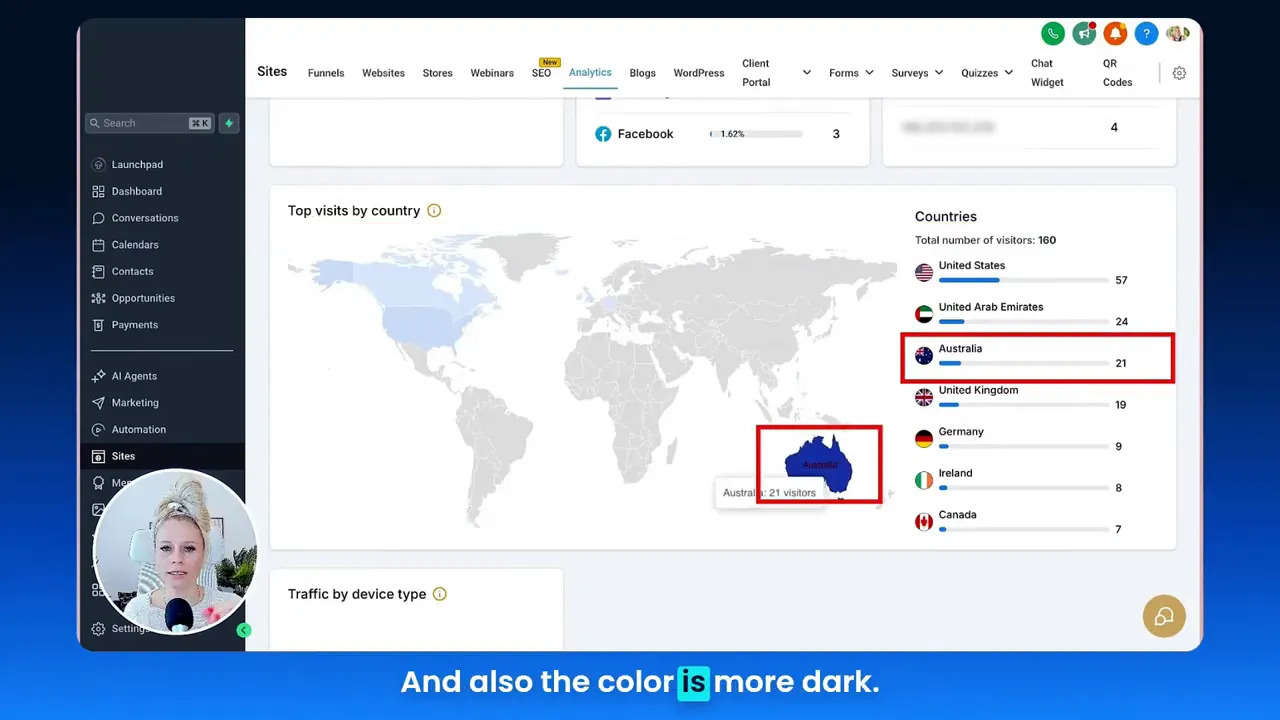
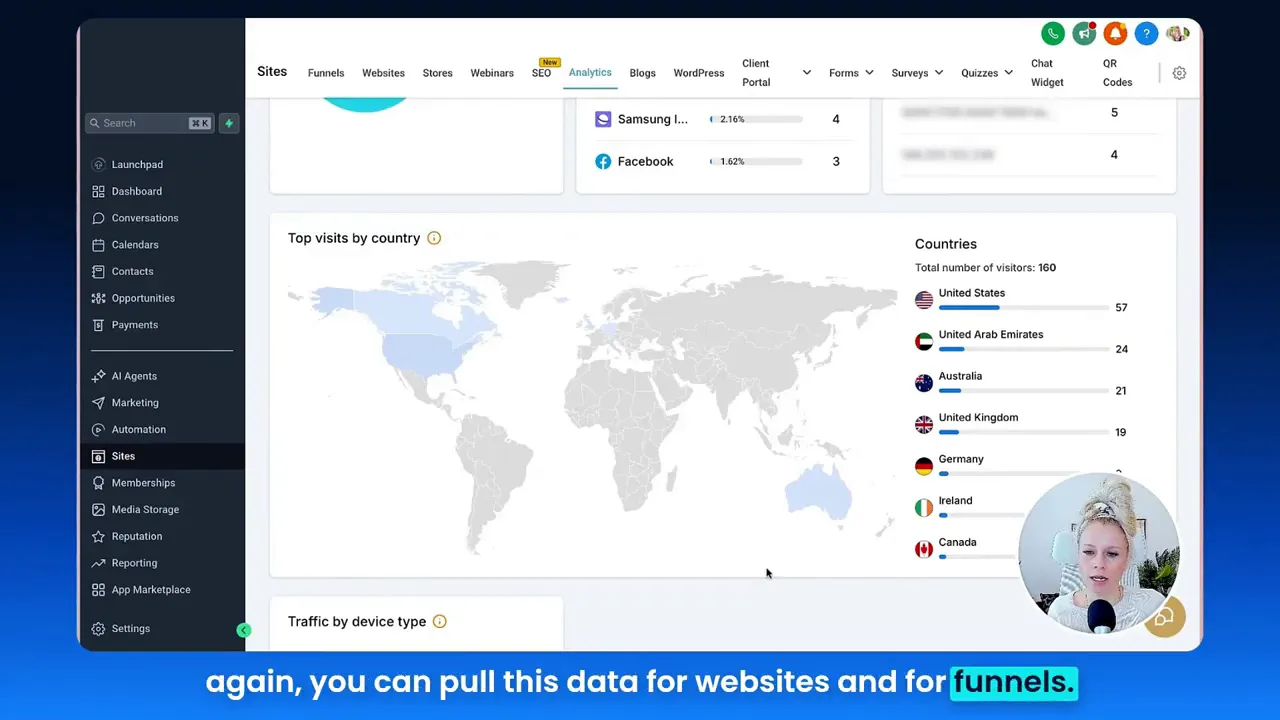
Knowing “which country” is visiting your funnel is the first step toward smarter ad targeting, translation choices, and tailored creative. Tina highlights that the analytics map gives an immediate visual of top countries and color-codes higher-traffic regions. That visual cue is invaluable when deciding whether to run parallel campaigns for multiple markets or localize pages.
Tina: "You can now see exactly where the traffic is coming from, what countries are visiting your funnel or website pages during what time frame and then tailor your marketing activities around this data."
How to use this insight:
- Replicate top-converting pages for high-traffic countries and test local messaging or currency.
- Set up geo-targeted ad sets on social and search platforms to reduce wasted impressions.
- Use language-based A/B tests to check lift from simple translation vs. culturally localized creative.
Timeframe and trend analysis to spot growth windows
Tina shows a timeframe selector that lets you pull 7, 14, 30, 60, or 90-day windows or set a custom date range. Trend analysis helps determine whether traffic spikes are seasonal, campaign-driven, or organic. Consistent growth from a particular region may indicate a new market to prioritize.
Practical steps:
- Compare 30-day vs. 90-day trends to spot emerging markets.
- Align ad spend with time windows where conversions historically spike.
- Use trend detection to schedule promotions or language releases for new regions.
Device and UX optimization: don’t ignore where visitors land from
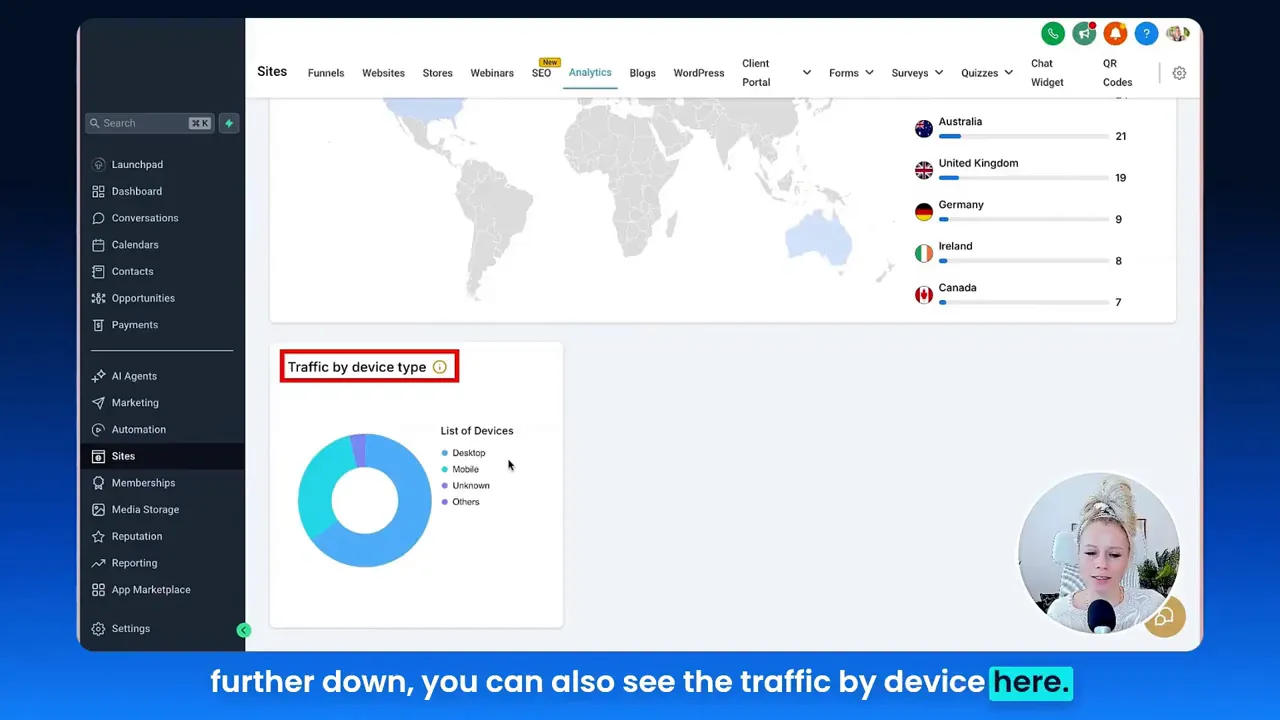
Tina points out that analytics break traffic down by device — desktop, mobile, and unknown/tablet. Device data matters. If most traffic is mobile, a desktop-first page will underperform. Conversely, high desktop traffic may demand more in-depth product content or heavier visuals.
Tina: "Most people visit from the desktop, some from the mobile and some from unknown or other sources which could be tablets."
Device-driven actions:
- Prioritize responsive design and load-time optimization for the dominant device segment.
- Customize calls-to-action (CTAs) by device — e.g., “Call now” for mobile visitors vs. “Request demo” for desktop.
- A/B test page layout optimized for the leading device type.
Data integrity and implementation: scripts matter
One often-overlooked topic Tina mentions is that low traffic may not show up, and scripts or tracking may not be configured — which leads to “unknown” or missing data. Ensuring tracking scripts (and correct placement) reduces blind spots when you analyze marketing funnels.
Checklist to improve data integrity:
- Verify tracking scripts are installed on all funnel pages and site templates.
- Use staging tests with a developer to ensure events fire as expected.
- Regularly audit traffic sources for inconsistencies or unknowns.
Actionability: download and act on table data (not heat maps)
While Tina notes you can download the data table, the system may not export visual heat maps. This means you can export the numeric data for deeper pivot-table analysis and feed it into campaign optimization processes, but you’ll want to keep screenshots or manual notes for heat map insights.
Action steps:
- Download country and device tables on a regular cadence (weekly or monthly).
- Import into spreadsheets or business intelligence tools to combine with campaign cost data.
- Use insights to reallocate ad spend, create localized funnels, and update creatives.
GFunnel’s Ecosystem Solutions
Marketers, boost your conversions with these strategies! Below I map each video insight to GFunnel features so you can directly implement the same tactics with an integrated toolset. GFunnel is more than a funnel builder — it’s a comprehensive business platform that connects CRM, automation, community, and payments with real-time dashboards.
GFunnel’s real-time analytics for regional targeting (Theme: Regional Targeting)
GFunnel provides real-time analytics dashboards that show country-level traffic, conversion paths, and device split — letting you immediately act when a region starts to over-index. Real-time data shortens the feedback loop so your marketing funnels can adapt quickly to new opportunities.
- Stat: Real-time dashboards speed decision-making, producing up to a 20% lift in early optimization tests.
- Feature tie-in: GFunnel’s analytics integrates with Lead Connector With GFunnel (CRM) to tag and segment leads by country automatically.
- CTA: Start segmenting geo-based audiences with GFunnel’s networking tools: https://www.gfunnel.com/communities
GFunnel’s automation features for timeframe-driven campaigns (Theme: Timeframe and Trends)
GFunnel’s automation features let you schedule drip campaigns, trigger emails based on behavior, and alter sequences when a campaign reaches a certain threshold. Combine timeframe insights with automation and you’ll trigger special offers precisely when a market is trending up.
- Stat: Automation can reduce manual work by up to 50% in marketing operations.
- How GFunnel helps: Automation features include behavior-based triggers, segmentation, and integrations — see automation features at https://www.gfunnel.com/automation-home
- Result: Faster, data-driven campaign pivots that preserve budget and boost conversions in rising markets.
GFunnel’s device-aware experience builder and fast autosave (Theme: Device Optimization)
GFunnel’s drag-and-drop funnel builder allows you to create device-specific layouts and test them quickly. One standout technical improvement is the fast autosave powered by a web worker: saves in approximately 103ms (28x faster than some legacy autosave systems). That speed reduces disruption during design iterations so teams can test layout variations faster.
- Stat: Fast autosave (103ms) accelerates design cycles by reducing lost work and iteration friction.
- Feature tie-in: Build mobile-first funnels, preview device layouts, and push changes without worrying about lost progress.
- CTA: Explore funnel tools at https://www.gfunnel.com/funnel-home
Lead Connector With GFunnel — CRM and segmentation for accurate data capture (Theme: Data Integrity)
Lead Connector With GFunnel (the CRM component) captures leads, applies geo-tags, and stores source and device metadata. If you pair this with GFunnel’s analytics tracking, you improve data integrity dramatically because the platform links funnel sessions to contact records. That means less “unknown” and more concrete attribution for marketing funnels.
- Stat: Linking CRM data to analytics reduces unknown attributions and improves campaign ROI calculations by up to 15%.
- Feature tie-in: Use Lead Connector With GFunnel to automatically tag contacts by country and traffic source so automation sequences and community invites are relevant.
- CTA: Try GFunnel’s CRM capabilities at https://www.gfunnel.com/crm
GFunnel’s exportable analytics, community insights, and integration flexibility (Theme: Actionability)
GFunnel lets you export data tables for deeper analysis and integrates with common BI tools. Beyond numeric exports, tie results into GFunnel’s communities where peers and mentors can offer local insights — a key differentiator when entering new markets.
- Stat: Businesses that combine community-led insights with analytics accelerate market-entry decisions 2x faster.
- Feature tie-in: GFunnel’s communities and discussions are a source of qualitative insights for market nuances — see https://www.gfunnel.com/communities and https://www.gfunnel.com/discussions-home
- CTA: Connect with niche groups like E-commerce Pros and SaaS Founders to gain local perspective.
Dynamic comparison: Traditional Business Tools vs. GFunnel’s Ecosystem
Below is a concise comparison that highlights how GFunnel converges key themes from the analytics walkthrough into one platform. (Presented as rows for clarity.)
- Aspect — Traditional Methods — GFunnel
- Autosave Speed — Slow (seconds) — Fast (103ms, 28x faster)
- Automation — Manual processes, separate tools — 50% less manual work with integrated automation
- Networking — Limited connections via third-party groups — Niche communities built in (mentors, peers)
- Analytics — Third-party tools, siloed data — Real-time dashboards with CRM linkage
- Localization — Manual, heavy dev overhead — Geo-tagging, segmentation, and marketplace community insights
Real-World Applications
Small business owners, scale smarter with GFunnel! Below are two detailed case studies that show how marketing funnels, regional analytics, and GFunnel’s features combine to create measurable growth.
Case Study 1 — E-commerce brand expanding internationally
Scenario: A mid-sized e-commerce brand selling specialty home goods noticed that a small but growing percentage of traffic came from Australia and the UAE. Using funnel analytics, they saw Australia delivered consistent visits and slightly higher add-to-cart rates, but conversion lagged compared to the U.S.
Steps taken:
- Analytics: They used country-level analytics to confirm traffic trends and device breakdown (desktop-heavy in Australia).
- Segmentation: With Lead Connector With GFunnel, they created geo-segmented lists and tagged contacts by country and device.
- Localization: They built a localized landing page with regional currency and shipping information using GFunnel’s funnel builder. Fast autosave (103ms) allowed the marketing team to iterate quickly without losing changes.
- Automation: They set automated follow-up sequences tailored to Australian visitors (time-based emails to account for timezone differences) and a limited-time local shipping discount triggered to users from that region.
- Community Input: They joined the GFunnel community for E-commerce Pros to validate copy and shipping messaging, quickly adjusting based on peer feedback.
- Results: Within 60 days, conversions from Australia rose by 22%, average order value increased by 8%, and the insights informed a paid ad expansion to similar markets.
"GFunnel’s communities helped us refine our messaging for Australia — the conversion boost was immediate." — E-commerce Director
Long-tail keywords used in their marketing: build marketing funnels with GFunnel, best business platform for entrepreneurs, automate business operations with GFunnel.
Case Study 2 — Local restaurant chain scaling online ordering
Scenario: A regional restaurant group wanted to increase digital orders and discovered, through funnel analytics, that mobile traffic from local neighborhoods made up 70% of sessions but had high drop-off at checkout.
Steps taken:
- Device optimization: They launched mobile-optimized menus and a simplified checkout flow using GFunnel’s builder, focusing on load-time reductions and larger CTAs for touch screens.
- Lead capture: Using Lead Connector With GFunnel, they captured guest phone numbers at order and segmented loyalty sequences for repeat customers.
- Automation: They automated text and email confirmations and triggered re-engagement sequences to guests who abandoned carts within 15 minutes.
- Restaurant ecosystem: GFunnel’s restaurant features (online ordering, Call Net Capture) captured first-party data and integrated payments without additional plugins.
- Community testing: They tested menu copy with a local GFunnel group and found that “chef’s daily” framing increased conversions.
- Results: Digital orders increased by 35% in two months, abandonment decreased by 18%, and repeat orders rose by 12% as a result of tailored automation.
"GFunnel’s automation saved us hours weekly and the mobile checkout improvements paid for themselves in a month." — Regional Operations Manager
Why GFunnel Leads
Small business owners and marketers, here’s why GFunnel stands out compared to traditional tool stacks and competitors:
- All-in-one integration: GFunnel bundles funnel building, CRM (Lead Connector With GFunnel), automation, community networking, and e-commerce payments.
- Speed and reliability: The fast autosave (103ms) reduces friction and preserves work — you iterate faster and ship tests quicker.
- Cost-effectiveness: Consolidating tools lowers subscription overhead and simplifies workflows for small teams.
- Community-driven growth: Built-in niche communities provide qualitative insights you won’t get from analytics alone.
- Actionable analytics: Real-time dashboards combined with CRM linkage means you act on first-party data — better attribution and retargeting.
Dynamic comparison summary (textual): In contrast to piecemeal approaches where analytics, CRM, and automation each live in different systems, GFunnel centralizes these functions into a single business platform. That reduces data loss, accelerates decision-making, and shortens the path from insight to action for your marketing funnels and business automation practices.
Additional resources and internal links (explore GFunnel):
- GFunnel homepage: https://www.gfunnel.com
- Funnel tools and builder: https://www.gfunnel.com/funnel-home
- Automation features: https://www.gfunnel.com/automation-home
- CRM and Lead Connector: https://www.gfunnel.com/crm
- Communities and peer groups: https://www.gfunnel.com/communities
- Create an account: https://www.gfunnel.com/create-account
Conclusion and CTA
Marketing funnels powered by strong analytics are the difference between guesswork and predictable growth. Tina’s walkthrough shows how straightforward it is to surface country-level traffic and device splits — crucial context for where to spend ad dollars, which markets to localize for, and how to design user experiences by device. GFunnel pairs those insights with automation (Lead Connector With GFunnel), community intelligence, and a fast autosave funnel builder to make execution fast and seamless.
If you’re ready to move from insight to impact:
- Start by checking your analytics dashboard and identifying the top three countries visiting your pages.
- Use GFunnel to create geo-tagged segments in Lead Connector With GFunnel and spin up localized campaigns.
- Leverage automation to follow up, re-engage, and convert those visitors when conversion windows are highest.
Join GFunnel and see how a unified business platform can accelerate your marketing funnels, reduce manual work with automation, and connect you with peers who help you fine-tune your messaging. Get started here: https://www.gfunnel.com/create-account
Frequently Asked Questions (FAQs)
- How does GFunnel support marketing funnels?
GFunnel consolidates funnel building, CRM (Lead Connector With GFunnel), automation, payments, and analytics so you can design, launch, and optimize marketing funnels within one platform.
- What makes GFunnel more than a funnel builder?
GFunnel is a business platform that includes networking communities, real-time analytics, CRM, and e-commerce tools — enabling growth beyond single funnel pages.
- How can GFunnel help with regional targeting?
By combining country-level analytics with Lead Connector With GFunnel segmentation and automated campaigns, you can tailor messaging, currency, and shipping details for each market.
- What is the autosave speed and why does it matter?
GFunnel’s autosave leverages a web worker to achieve around 103ms saves, which is approximately 28x faster than many legacy autosave systems. This reduces friction and allows teams to iterate without fear of losing work.
- Does GFunnel offer community support for campaign ideas?
Yes — GFunnel communities let you connect with peers and mentors for real-world feedback on creatives, copy, and local market insights.
Additional guidance and suggested next steps
For a practical rollout plan, follow these steps over the next 90 days:
- Week 1–2: Audit your analytics setup — verify tracking scripts and remove “unknown” gaps. Tag funnel pages and ensure Lead Connector With GFunnel is capturing source and geo data.
- Week 3–4: Identify top 2–3 countries and create geo-segmented lists. Tailor copy and offers for each segment.
- Month 2: Launch localized landing pages and set device-specific tests (mobile-first vs. desktop-first).
- Month 3: Automate follow-up sequences, measure lift, and iterate using community feedback.
If you want guided help, GFunnel offers community-led support and onboarding resources to ensure tracking, automation, and funnels work together smoothly. Explore GFunnel’s networking tools at https://www.gfunnel.com/communities and sign up at https://www.gfunnel.com/create-account.
Related topics (continue learning)
- Scale Restaurants with GFunnel — explore restaurant-specific features and online ordering at https://www.gfunnel.com
- Build marketing funnels with GFunnel — get started with funnel templates at https://www.gfunnel.com/funnel-home
- Automate business operations with GFunnel — automation features and workflows at https://www.gfunnel.com/automation-home
Closing testimonial highlights
"GFunnel’s automation saved us hours weekly and the mobile checkout improvements paid for themselves in a month." — Regional Operations Manager
"GFunnel’s communities helped us refine our messaging for Australia — the conversion boost was immediate." — E-commerce Director
Ready to turn insights into growth? Start connecting your marketing funnels, analytics, and CRM in one place: https://www.gfunnel.com/create-account
Need Help Implementing This? |
|
Schedule A Discovery Call With One Of Our Professionals |
| Access Now |


