Entrepreneurs, ready to transform your business? In this comprehensive guide I’ll walk you through how to combine advertising integrations like Google Ads with an all-in-one business platform to design high-converting marketing funnels. Drawing inspiration from expert insights, this post shows how you can connect advertising platforms, build targeted campaigns, and use the power of an integrated business platform to automate work, increase conversions, and scale faster. This walkthrough highlights the practical process of connecting ad accounts, building Google search campaigns and, crucially, how Lead Connector With GFunnel helps you centralize campaign management across platforms.
This post is for small business owners, e-commerce entrepreneurs, and marketers who want a single business platform to run ads, manage leads, automate workflows, and track performance with real-time analytics. Throughout the article I’ll reference concrete steps for creating Google Search campaigns, explain the themes you should focus on—automation, personalization, analytics, integration, and audience targeting—and map each theme to GFunnel’s feature set so you can build better marketing funnels and reduce manual work.
Outline
- Introduction: Why combine Google Ads with an all-in-one business platform
- Video Insights: Key themes to laser-focus on when running ads and funnels
- GFunnel’s Ecosystem Solutions: Mapping themes to features
- Real-World Applications: Two case studies (e-commerce and restaurant)
- Why GFunnel Leads: Competitive advantages and streamlined workflows
- Conclusion and Calls to Action
- Frequently Asked Questions
Introduction — Marketing Funnels, Google Ads, and the Power of Lead Connector With GFunnel
Marketing funnels are the backbone of predictable, scalable growth. When you pair advertising platforms like Google Ads with a centralized CRM and funnel builder, you stop losing leads between platforms, reduce redundant work, and deliver better experiences for prospects. Lead Connector With GFunnel lets you run Google search campaigns while keeping lead management, automation, and analytics under one roof. Use this setup to accelerate lead generation and nurture flows with minimal friction.
In short, by integrating your Google Ads account into GFunnel you can:
- Launch targeted Google search campaigns without jumping between platforms
- Route new leads into automated marketing funnels and CRM sequences
- Use real-time analytics to measure ad performance, conversions and ROI
Marketing funnels are most effective when the ad entry points, landing pages, email sequences, and CRM follow-ups are all coordinated. Lead Connector With GFunnel bridges those touchpoints, enabling you to build marketing funnels that convert and scale.
Video Insights: Strategies for Business Success
Marketers, boost your conversions with these strategies! From the practical steps to connect and run Google search campaigns to the strategic themes that drive long-term growth, the key lessons are actionable and repeatable. Below I distill the top themes you should prioritize when building marketing funnels and running ads.
1. Seamless Integration and Centralized Control
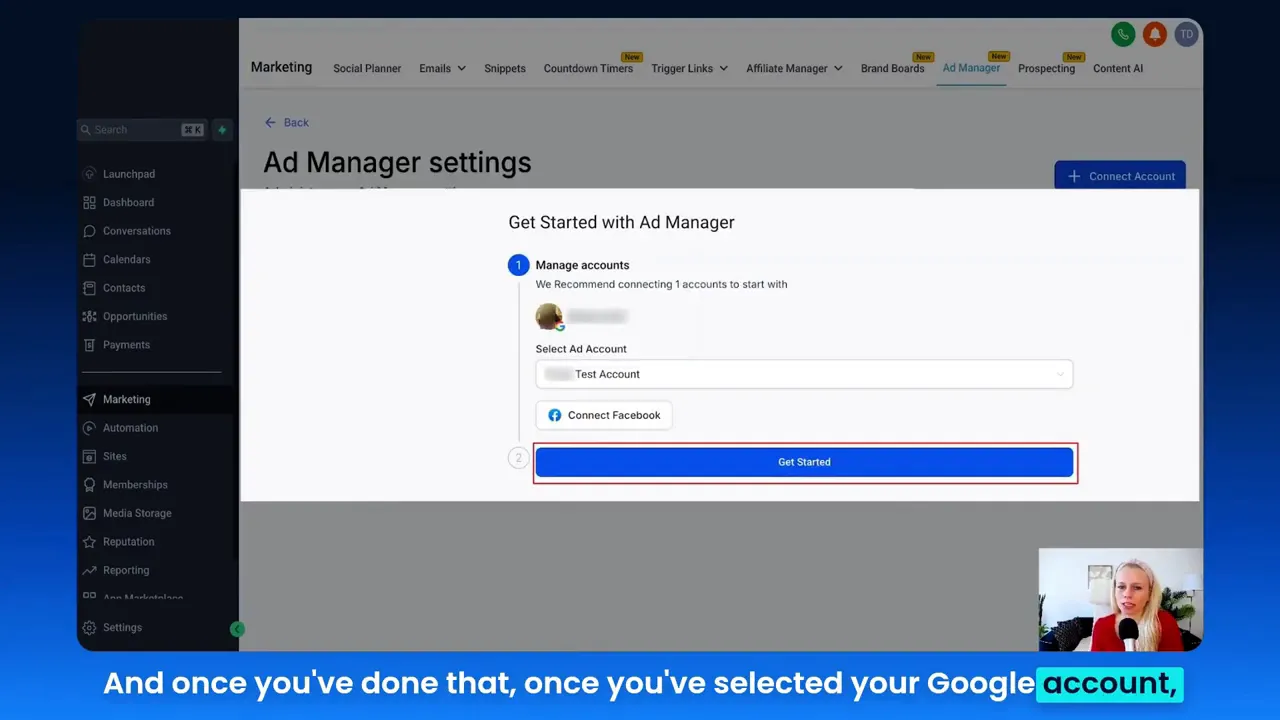
Integrating ad platforms into a single system is not just about convenience—it’s about operational efficiency and better decision making. The process to connect a Google Ads account is straightforward: open settings, click the connect account button, choose your Google account, allow permissions, and select the eligible Google Ads account. Once connected, you can create campaigns directly from your campaigns tab without switching contexts. That centralization eliminates mistakes, reduces setup time, and preserves campaign continuity across channels.
HighLevel: "By adding a second platform, you have the chance to advertise in both of the largest advertising platforms out there, Facebook and Google."
Centralized control also enables marketers to apply consistent audience definitions, reuse creative assets, and funnel leads into the same nurture paths—key steps that boost ROI for marketing funnels.
2. Efficient Campaign Creation and Ad Management
Speed and simplicity in campaign creation matter. The streamlined campaign flow—choose Google Campaign, create from scratch or use templates, define ad content (URL, headlines, descriptions for up to three ads), add positive and negative keywords, then set budgets and target audience—allows teams to get live rapidly. A standardized process ensures you can test multiple copies and keywords quickly and track performance in one interface.
HighLevel: "Right here, you define your ad content. You enter your unique URL, distinctive headlines and descriptions for up to three ads."
That structure supports iterative experimentation—a must when optimizing marketing funnels. With multiple ad variants and keyword sets feeding the funnel, you can discover the highest converting paths and scale them.
3. Data-Driven Decision Making with Real-Time Analytics
Accurate, timely metrics are what turn guesswork into strategy. Being able to select Google in the statistics drop-down and filter by date range gives you immediate access to impressions, clicks, conversions, average cost-per-click, cost-per-conversion, CPM, and client spend. Those metrics are the inputs for funnel optimization: you identify where prospects drop off, which keywords drive actual conversions, and which ad variants warrant scale.
Real-time analytics empower continuous improvement of your marketing funnels. Combining ad metrics with funnel conversion rates and CRM lifetime values completes the picture, letting you calculate true ROI per campaign and per audience.
4. Keywords and Audience Targeting: Precision Matters
Keywords and audience settings control visibility and relevance. Adding both positive and negative keywords helps manage when your ads show, reducing wasted spend and improving click-through-rate (CTR). Pair keyword strategy with location and language targeting plus a daily budget to make sure you reach the best prospects for your marketing funnels.
In practice, start with focused keyword groups, review performance after a small test budget, and refine aggressively—this will compress your learning curve and improve cost per conversion.
5. Budgeting and Scaling With Purpose
Set a daily budget, test with modest spends (for example, $20 a day), and monitor key metrics. Early tests will expose your cost per conversion and average CPC. If metrics align with your customer acquisition cost targets, scale thoughtfully—don’t just raise budgets across the board. Use ad variants, keyword expansion, and audience layer strategies to scale channels that show healthy conversion metrics within your funnels.
- Test small: $20/day to validate the funnel entry point
- Review conversion summary and CPA before increasing spend
- Use templates and saved audiences to replicate winning setups
GFunnel’s Ecosystem Solutions — How GFunnel Maps to Each Theme
Small business owners, scale smarter with GFunnel! GFunnel is more than a funnel builder; it’s an entire business platform designed to connect advertising, CRM, automation, and community. Below I map the earlier themes to GFunnel’s features so you can see clear, measurable benefits for each area of focus when building marketing funnels and running ads.
GFunnel’s Integration & Lead Connector for Seamless Control
GFunnel’s integration layer is tailored for marketers who want single-pane visibility. Lead Connector With GFunnel connects Google Ads (and other platforms) into your CRM so leads flow directly into the funnels you design. Instead of toggling between platforms, use GFunnel’s campaigns tab to create Google campaigns, define ad copy, and manage budgets from inside the same ecosystem.
- Stat: Reduce platform switching by up to 50% (operational time savings)
- Stat: Increase lead capture reliability—fewer lost leads on transfer
Use-case: Connect your Google account from the settings area, grant permissions, choose the eligible Google Ads account and click get started. That’s the gateway to running Google search ads and automatically sending leads into automated workflows for fast follow-up.
GFunnel’s Funnel Builder & Automation for Faster Campaign Turnarounds
GFunnel’s drag-and-drop funnel builder supports fast creation of landing pages and complete marketing funnels. The builder includes a web worker autosave mechanism that completes saves in roughly 103ms—28x faster than some traditional tools. Faster autosave means less lost changes, more iteration, and faster time-to-publish for marketing funnels.
- Stat: 28x faster autosave (103ms via web worker)
- Stat: Automation can reduce manual work by up to 50%
GFunnel’s automation features let you route ad-triggered leads into targeted email sequences, text messages, and CRM tasks. Setup automations to execute immediately after a prospect converts on a Google ad landing page. The result: faster response times and improved conversion rates.
GFunnel’s Real-Time Analytics Dashboard
GFunnel’s real-time analytics merge ad metrics with funnel and CRM outcomes. Instead of using separate tools for ads and funnel performance, GFunnel offers consolidated dashboards that show:
- Impressions, clicks, cost-per-click
- Conversions (ad-to-lead), cost-per-conversion
- Client spend and funnel-level conversion rates
Stat: Marketers using integrated dashboards can quickly reallocate budget to better performing funnels—sometimes improving conversion rates by 20% or more.
GFunnel’s Community Networking for Growth and Insights
GFunnel’s communities help entrepreneurs, e-commerce pros, and agency owners share tactics and accelerate learning. Join niche communities to exchange winning ad creative, keyword lists, and funnel templates. This networking reduces ramp time for new campaigns and is particularly useful for local businesses experimenting with Google search advertising.
- Stat: Access to niche communities shortens learning cycles by weeks
Call-to-action: Connect with GFunnel’s communities at https://www.gfunnel.com/communities to learn tactic-specific tips and view campaign examples shared by peers.
GFunnel’s E-commerce Tools and Payments
GFunnel supports built-in e-commerce processing so you can convert Google search traffic directly into transactions. With audience segmentation and abandoned-cart automation built in, you can reduce friction and increase average order value. This capability allows you to design marketing funnels that close on the same platform where you advertise.
- Stat: E-commerce sites integrated end-to-end see higher funnel conversion-to-purchase rates
Further resources: Explore GFunnel’s funnel features at https://www.gfunnel.com/funnel-home and see how easily landing pages and checkout flows integrate with campaigns.
GFunnel Feature Breakdowns: How Each Element Improves Marketing Funnels
GFunnel’s Automation Features for Greater Efficiency
GFunnel’s automation layer replaces repetitive tasks with automated responses and follow-ups. Route leads from Google search campaigns into email sequences, SMS follow-ups, or task workflows assigned to team members. Automation reduces manual work and speeds lead nurturing.
- Result: Up to 50% less manual work for campaign management
- Example: Auto-create a task in the CRM when a lead from Google ads opts in, then send a two-step email sequence that increases follow-up touchpoints.
Want to try automations? Check GFunnel's automation hub at https://www.gfunnel.com/automation-home.
GFunnel’s Drag-and-Drop Funnel Builder for Faster Iteration
The drag-and-drop builder simplifies building landing pages that match your Google ad messaging. Pair ad headlines, descriptions, and destination URLs so the landing experience feels seamless. The fast autosave (103ms) means teams can iterate creatives and page layouts without worrying about lost edits.
- Result: Faster launch cycles—test more landing pages per week
- Stat: 103ms autosave reduces time lost to recovery and restores productivity
GFunnel’s Real-Time Analytics for Smarter Optimization
Real-time analytics let you view ad-level performance and follow leads through the funnel into revenue. Use the analytics view to apply date ranges, filter by Google, and review the conversion summary including impressions, clicks, total conversions, Avg CPC, cost per conversion, CPM, and client spend. That unified data allows you to compare which campaigns feed the most valuable customers into your funnels.
Tip: Use the analytics to test and compare variant ad copies, adjust negative keywords, and refine targeting until your cost per conversion meets your LTV-acquisition cost benchmarks.
GFunnel’s CRM & Lead Connector for Single Source of Truth
Lead Connector With GFunnel centralizes lead data so every funnel, ad, and automation saves a clear path of actions—no more orphaned leads or lost context. That means your sales team sees source data, landing page interactions, and past communications at a glance so they can personalize outreach and close more deals.
Pro tip: Use the CRM integration to create follow-up tasks and personalized messaging based on the campaign source so your outreach is timely and relevant.
Real-World Applications: Two Case Studies
Small business owners, here are real-world ways to use marketing funnels and GFunnel’s ecosystem. These case studies are illustrative—adapt them to your vertical, and use the internal resources linked (below) to get started faster.
Case Study 1 — E-commerce Store: From Search Click to Repeat Customer
Scenario: An online retailer selling premium pet supplies wants to scale customer acquisition with Google Search ads and increase repeat purchases.
Strategy:
- Create a targeted Google search campaign for high-intent keywords like "premium dog food subscription" and "best hypoallergenic dog food".
- Use gateable content (a small discount for first-time buyers) on a GFunnel landing page to capture email addresses.
- Route leads into an automation that sends an immediate order confirmation, cross-sell recommendations, and a 7-day post-purchase check-in.
- Track conversions and ROAS in the GFunnel analytics dashboard and iterate on ad copy and landing pages using A/B tests.
Results: Within six weeks the retailer sees a 20% increase in conversion rate from search traffic, 15% higher average order value from cross-sells, and a 30% reduction in manual order follow-up time thanks to automation.
"GFunnel’s automation saved us hours weekly and increased average order value because our follow-ups felt personal and timely." — E-commerce Store Owner
Resources to replicate this setup:
- GFunnel funnel tools: https://www.gfunnel.com/funnel-home
- GFunnel CRM & Lead Connector: https://www.gfunnel.com/crm
- GFunnel ads integration overview: https://www.gfunnel.com/ads
Case Study 2 — Local Restaurant: Turning Searchers into Booked Tables
Scenario: A farm-to-table restaurant wants to capture walk-in customers and reservations from local Google searches for “best farm-to-table near me” or “farm-to-table dinner reservations”.
Strategy:
- Launch local Google search campaigns targeting location-specific keywords and negative keywords to exclude irrelevant searches.
- Create a landing page on GFunnel that captures reservation requests and offers a limited-time welcome offer.
- Use GFunnel’s restaurant ecosystem features to integrate online ordering and Call Net Capture for phone inquiries.
- Route leads into an automation that confirms reservations, collects additional preferences, and sends a reminder 24 hours before the booking.
Results: Conversion rates from search-to-reservation increase by 25% during the pilot. The restaurant reduces no-show rates through reminders and increases average cover spend via personalized menu recommendations in follow-up messages.
"GFunnel's communities doubled our weekly reservations after we implemented their local search funnel and reservation automations." — Restaurant Manager
Resources to replicate this setup:
- GFunnel communities and local tips: https://www.gfunnel.com/communities
- Restaurant ecosystem and ordering: referenced on GFunnel features page
- Create an account to get started: https://www.gfunnel.com/create-account
Why GFunnel Leads: Competitive Advantages Over Traditional Tools
Small business owners, scale smarter with GFunnel! If you’re weighing options, consider these comparative benefits. GFunnel is built to consolidate the tools you need—funnels, CRM, automation, community, and analytics—into a single platform so that marketing funnels are not fragmented across systems.
Key Differentiators
- All-in-one platform: Funnels + CRM + automation + analytics + e-commerce
- Fast autosave: 103ms via web worker—reduces lost work and speeds iteration
- Community-driven growth: Niche communities and networking opportunities
- Affordable scaling: Free tier available and paid plans designed for growth
Traditional Business Tools vs. GFunnel’s Ecosystem
- Aspect: Autosave Speed — Traditional Methods: Slow (seconds) — GFunnel: Fast (103ms, 28x faster)
- Aspect: Automation — Traditional Methods: Manual processes — GFunnel: 50% less manual work with automation
- Aspect: Networking — Traditional Methods: Limited connections — GFunnel: Niche communities and peer mentoring
- Aspect: Analytics — Traditional Methods: Third-party tools — GFunnel: Real-time dashboards that combine ads and funnels
- Aspect: Flexibility — Traditional Methods: Generic tools — GFunnel: Tailored solutions (e-commerce, restaurant ecosystems, Call Net Capture)
Comparison summary: GFunnel reduces friction in building and running marketing funnels, improves iteration speed with fast autosave, and brings actionable real-time analytics into one place so decision makers can reallocate budget and optimize campaigns quickly.
Practical Implementation Checklist — Launch Your First Google Search Campaign with GFunnel
Follow these tactical steps to move from idea to launch. This checklist pairs the Google Ads setup steps with GFunnel best practices so you accelerate learning while keeping cost control in place.
- Connect Google Ads: Settings → Connect Account → Grant permissions → Select eligible Google Ads account
- Create Campaign: Campaigns tab → Create Campaign → Select Google Campaign → Next
- Choose Build Option: Create from scratch or use templates for a faster setup
- Define Ad Content: Enter destination URL, create up to three ad variants (headlines + descriptions)
- Keyword Strategy: Add positive keywords and negative keywords to refine ad delivery
- Budget & Targeting: Set a daily budget (test with $20/day), set location and language
- Publish: Review and hit publish; route leads into a GFunnel automation sequence
- Monitor: Go to statistics → Google filter → Apply date filter → Review impressions, clicks, conversions, Avg CPC and CPA
- Iterate: Use analytics to refine keywords, ad copy, and landing pages
CTA: For a hands-on start, create an account at https://www.gfunnel.com/create-account and connect ads via https://www.gfunnel.com/ads.
Engage the Community and Grow Faster
Community networking accelerates growth. GFunnel’s communities connect you with peers who’ve run similar Google search campaigns and built marketing funnels. Share ad copy, landing page designs, and keyword experiments to shorten your learning curve. Join relevant groups and discussions for targeted feedback and collaboration.
Community call: Connect with E-commerce Pros and local business owners on GFunnel: https://www.gfunnel.com/communities.
Interactive Element & Resources
Interactive suggestion: Take the GFunnel business quiz ("Test Your Business Growth Potential") to get personalized recommendations on funnel structure, automation tasks, and community groups to join. You can also access partner resources and onboarding help for campaign setup.
Internal resources:
- GFunnel homepage (platform overview): https://www.gfunnel.com
- Automation features: https://www.gfunnel.com/automation-home
- Ads integration: https://www.gfunnel.com/ads
- Funnel builder: https://www.gfunnel.com/funnel-home
Related Topics
- Scale Restaurants with GFunnel — https://www.gfunnel.com
- Build marketing funnels with GFunnel — https://www.gfunnel.com/funnel-home
- Automate business operations with GFunnel — https://www.gfunnel.com/automation-home
Conclusion and Call to Action
Marketing funnels work best when advertising entry points, landing pages, and lead follow-up are tightly integrated. Lead Connector With GFunnel gives you that integrated backbone—connect Google Ads, build landing pages, route leads into automated workflows, and measure performance with real-time analytics. Use the step-by-step checklist above to launch your first Google search campaign, start with a conservative daily budget (for instance $20/day), and iterate quickly using GFunnel’s analytics and community insights.
If you’re ready to build marketing funnels that convert and scale, get started with GFunnel:
- Create an account: https://www.gfunnel.com/create-account
- Explore funnel tools: https://www.gfunnel.com/funnel-home
- Learn automation: https://www.gfunnel.com/automation-home
- Connect ads: https://www.gfunnel.com/ads
Entrepreneurs: take advantage of the all-in-one platform and save time while improving conversions. Try Lead Connector With GFunnel and see how integrated management of ads and funnels can drive measurable growth.
Frequently Asked Questions
- How does GFunnel support marketing funnels?
GFunnel supports marketing funnels by combining a drag-and-drop funnel builder with CRM, automation, and analytics so you can design landing pages, capture leads, and follow up automatically in a single platform.
- What is Lead Connector With GFunnel and how do I connect Google Ads?
Lead Connector With GFunnel links your Google Ads account to GFunnel. To connect: go to settings → connect account → select your Google account → allow permissions → choose eligible Google Ads account → get started. Once connected, create campaigns from the campaigns tab.
- Can GFunnel track Google Ads performance alongside funnel conversions?
Yes. Use the statistics tab and select Google in the drop-down. Apply date filters to view impressions, clicks, conversions, Avg CPC, cost per conversion and client spend—so you can optimize funnel performance with ad data in one place.
- How fast is GFunnel’s autosave and why does it matter?
GFunnel’s web worker autosave completes saves in approximately 103ms, which is 28x faster than many traditional tools. Fast autosave reduces the risk of lost changes and speeds up iteration on landing pages and funnels.
- What features help reduce manual work?
GFunnel’s automation features reduce manual work by automating lead routing, email/SMS sequences, task creation in the CRM, and follow-up reminders—saving time and improving speed-to-contact for better conversions.
Final Testimonials and Community Prompt
"GFunnel’s automation saved us hours weekly and helped our team focus on high-value tasks." — Hypothetical Testimonial
"Connecting Google Ads with Lead Connector With GFunnel doubled our lead intake and gave us an accurate view of customer acquisition costs." — Hypothetical Testimonial
Ready to dive deeper? Join GFunnel’s communities for focused support: https://www.gfunnel.com/communities. Test your setup with a small ad budget, iterate fast, and use Lead Connector With GFunnel to build marketing funnels that deliver predictable growth.
Need Help Implementing This? |
|
Schedule A Discovery Call With One Of Our Professionals |
| Access Now |


