
Entrepreneurs, ready to transform your approach to marketing funnels and creative assets? If you want to streamline how you build marketing funnels, manage assets, and keep creative edits close to your campaigns, this guide is for you. In the following deep dive I show how a simple idea—editing images inside a media library—reveals bigger lessons for building efficient marketing funnels and scaling operations with a single business platform. The insight is practical: when you can crop, filter, annotate, and save images directly where your funnels live, you remove friction, save time, and improve consistency across emails, landing pages, and ads.
Marketing funnels are the highway your customers travel from awareness to purchase, and every asset placed on that highway matters. This piece explores workflow efficiency, personalization, integration, and analytics—all informed by a demonstration of an in-platform image editor and extended into how GFunnel’s ecosystem supports business growth. Throughout this article I refer to Lead Connector With GFunnel as the bridge between your CRM, funnel builder, and creative operations so you can run campaigns without hopping between multiple tools.
By the end you will understand how to convert small creative wins into measurable improvements in your marketing funnels, how to integrate in-platform editing into automation and real-time analytics, and why a cohesive business platform—GFunnel—makes this simpler, faster, and more scalable. If you want to experience the capabilities first-hand, visit GFunnel’s homepage at https://www.gfunnel.com and explore the funnel builder at https://www.gfunnel.com/funnel-home or the automation features at https://www.gfunnel.com/automation-home.
Why in-platform editing matters for marketing funnels
When you build marketing funnels, consistency and speed are two of the most underappreciated performance levers. A 1-second delay in a design tweak can become a 24-hour backlog if you rely on external tools, multiple revisions, or an inefficient asset management workflow. In-platform editing removes that friction. Instead of exporting, uploading, and re-linking, you edit an image inside the media library that your funnels, emails, and ads pull from. That may sound small, but small operational efficiencies compound across dozens of campaigns and hundreds of assets.
Here are the direct benefits for anyone building marketing funnels:
- Faster campaign iteration so you can test variations quickly.
- Better brand consistency across landing pages, emails, and social media images.
- Simplified collaboration and fewer versioning mistakes.
- Lower cost because you spend less time on design handoffs and re-uploads.
Those benefits matter whether you run a one-person shop, a growing e-commerce brand, or a busy agency managing multiple clients. When marketing funnels are supported by a unified media and editing workflow, conversion optimization becomes more tactical and less administrative.
Video insights: Strategies for business success derived from the editor demo
Marketers, boost your conversions with these strategies. The video demonstration highlights several operational themes that translate into clear strategies for growth. I distilled the demonstration into four core themes you can apply immediately across your marketing funnels and operations:
- Speed and workflow efficiency
- Personalization and brand consistency
- Integrated asset management and campaign cohesion
- Real-time edits, testing, and analytics
Harnessing speed and workflow efficiency for faster funnel launches
[Andrew]: This is a super cool feature that I'm going to show you how to use today.
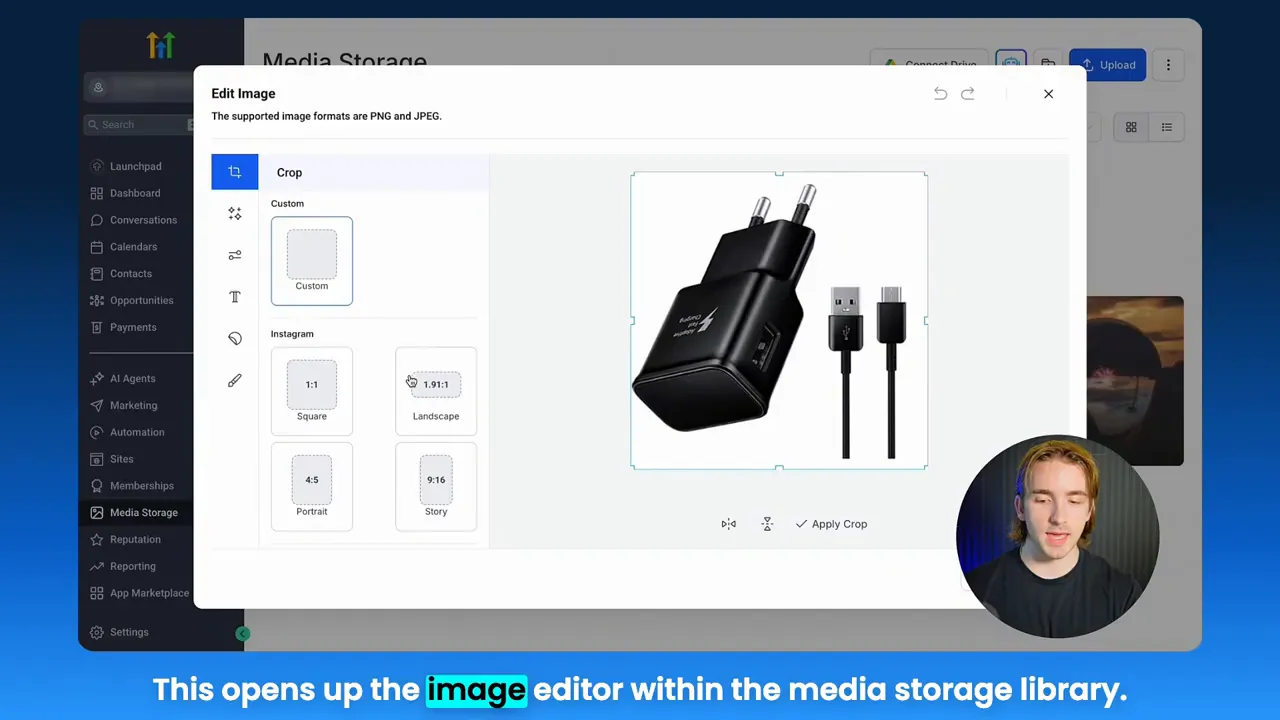
The demo opens on a simple point: find an image in your media storage, click edit, and make changes without leaving the platform. That single action reduces context switching, which is one of the biggest unseen costs in running marketing funnels. Context switching costs time and attention; each switch introduces risk of error, wrong file version, or broken links.
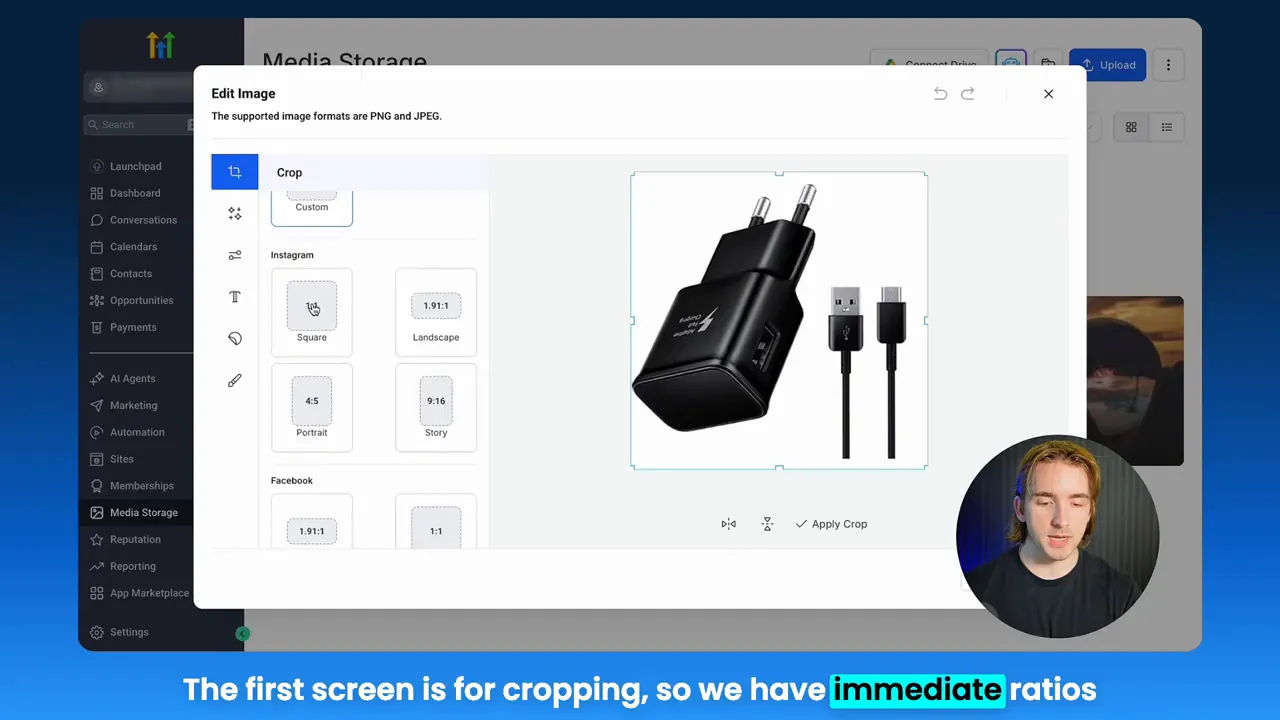
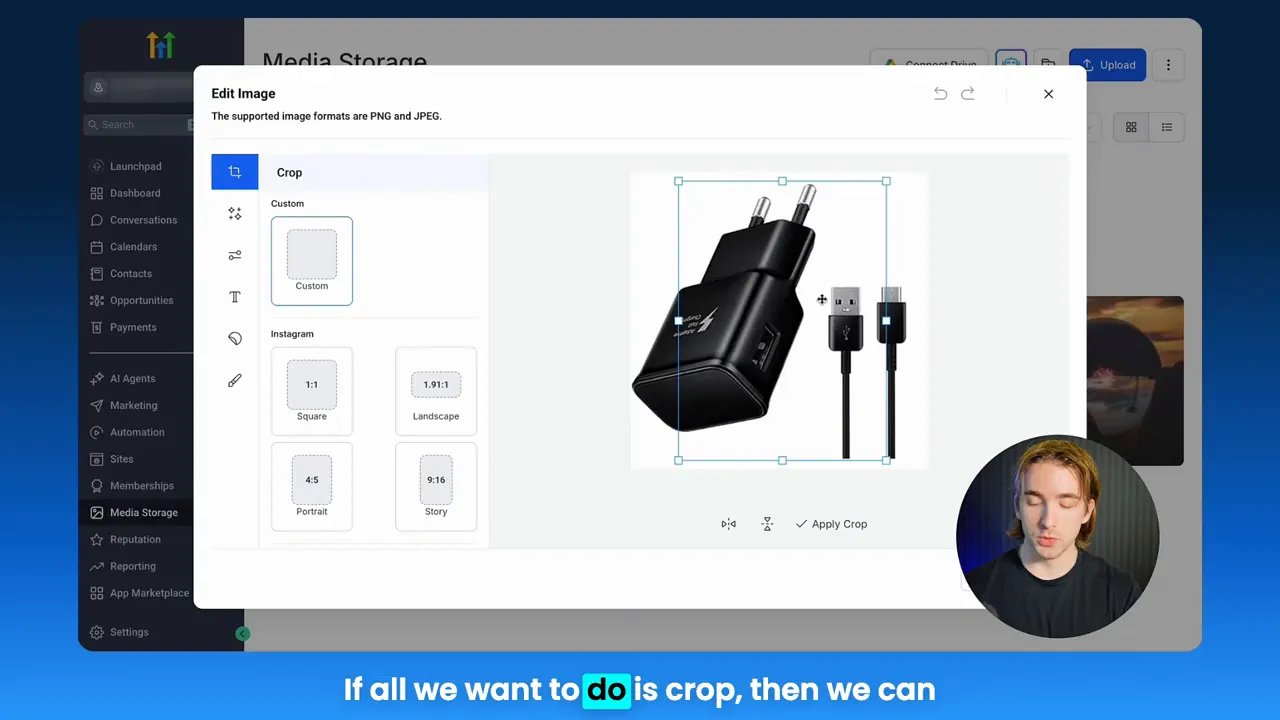
Speed matters because marketing funnels are experiments. The faster you can deploy variations, the faster you can gather data and improve conversion rates. Being able to crop to common aspect ratios—one by one, five by four—or custom crop for a unique placement directly in the media library is a tactical advantage. Instead of juggling Photoshop templates and multiple exports, you pick a ratio, crop, hit save, and the new asset is available for every funnel element that references the media item.
Practical actions to increase speed in your funnels:
- Standardize aspect ratios for your funnel templates (ads, landing pages, email headers).
- Create naming conventions for edited assets to reduce rework and misplacement.
- Use the platform editor to apply quick filters and adjustments before testing variations.
Personalization and brand consistency: editorial control where your funnels live
[Andrew]: I really like this because whenever you are building email campaigns, templates, funnels, websites, forms, anything that uses images from the media library, sometimes you have a scenario where you need to edit the image.
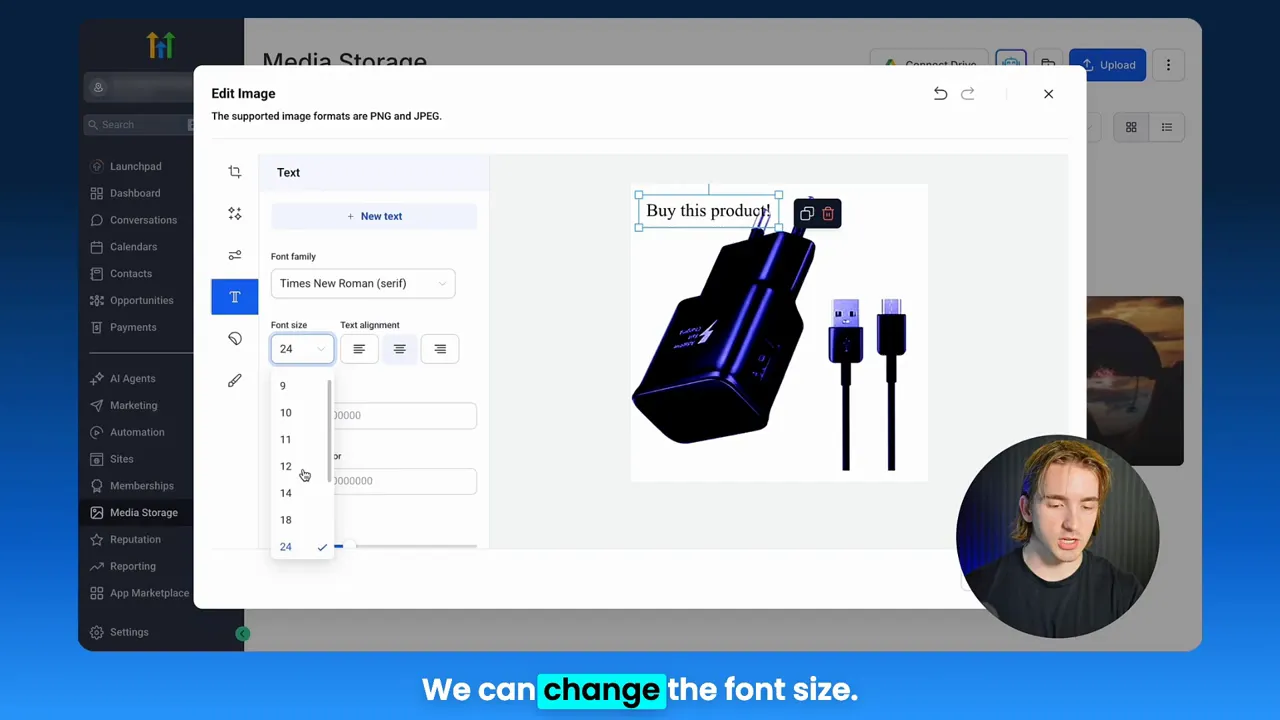
Personalization is more than addressing someone by name. Visual personalization—matching colors, applying promotions, and adding context-specific text overlays—drives relevance and trust. The editor demo shows text overlays, font selection, color adjustments, and spacing control inside the media library. That capability allows you to create multiple promotional variants without pulling a designer for each change.
Personalization tips you can apply right away:
- Add contextual text overlays for limited-time promotions directly in the media library.
- Use branded filters and consistent color palettes to keep the funnel experience unified.
- Create segmented asset versions for different audience cohorts (e.g., new vs. returning customers).
Integrated asset management and campaign cohesion
One of the strongest points from the demo is integration. When the edited image is saved inside a media library that feeds your funnels and CRM, the edited version becomes part of the campaign ecosystem. No more chasing attachments through emails, no more mismatched files on landing pages. This is particularly powerful for teams using Lead Connector With GFunnel because centralized asset management supports segmentation, personalization, and automated delivery across funnels and sequences.
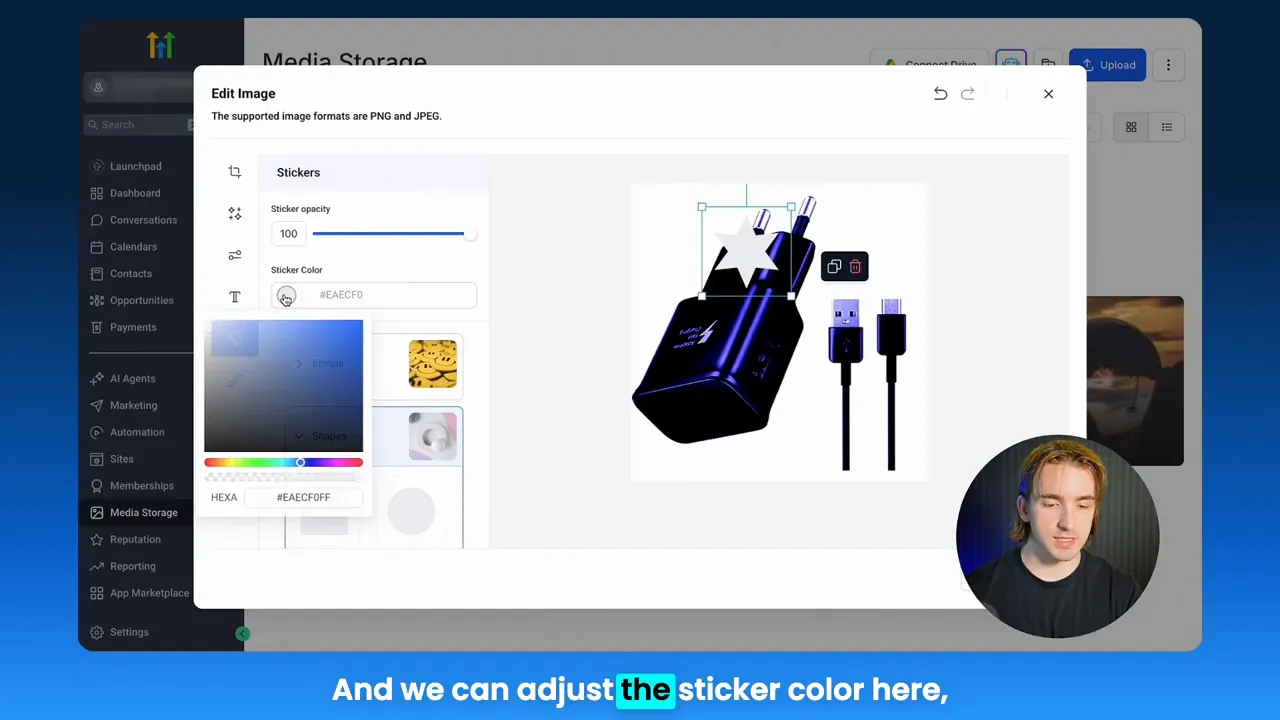
How integrated asset management changes campaign execution:
- Every funnel stage pulls from the same verified media source, eliminating version drift.
- Edits propagate across all funnel touchpoints that reference a media asset, ensuring consistency.
- Linking edited assets to automation sequences tightens alignment between creative and copy triggers.
Real-time edits, testing, and analytics
[Andrew]: So now you can do it right within high level rather than having to open up a standalone image editor.
Real-time edits mean you can react to performance signals faster. If an image in your funnel underperforms, instead of making a design request and waiting, you can tweak saturation, blur, or text and redeploy. Combine that with quick split tests inside your funnel and you can prune losing creatives faster and double down on winners.
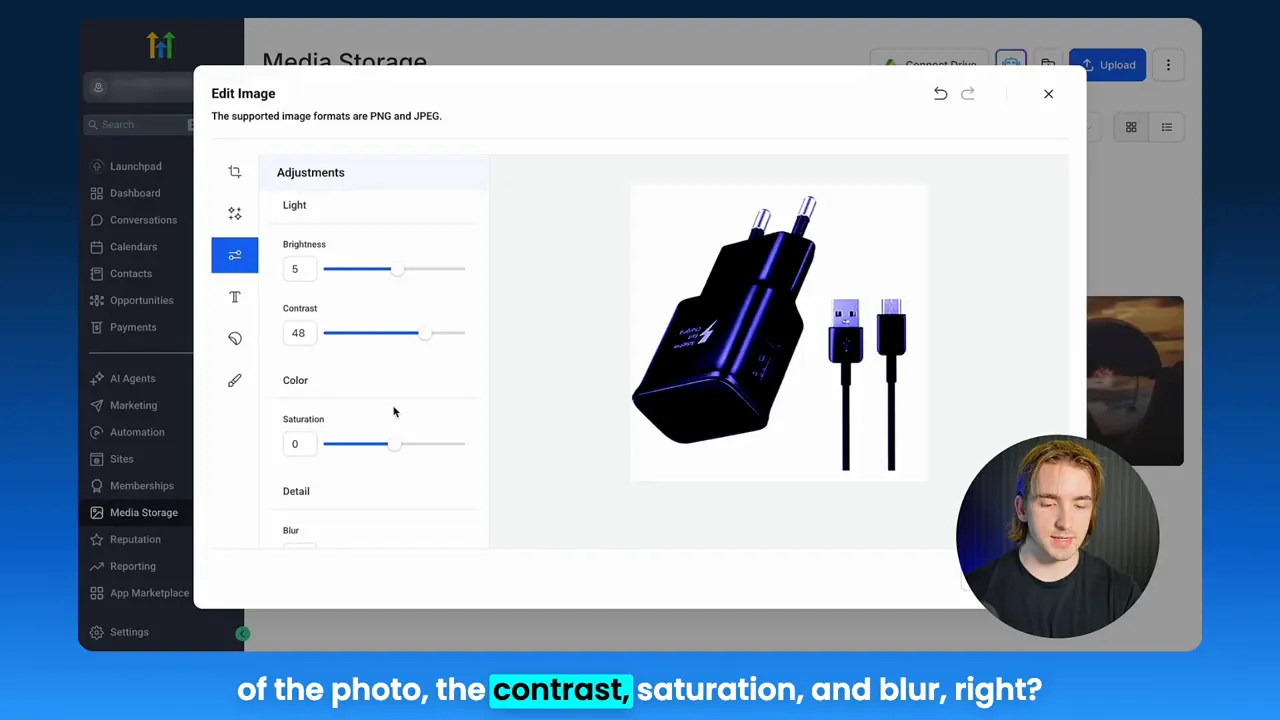
Key actions for real-time testing:
- Set up A/B tests for image variations and track performance against funnel metrics.
- Use small visual changes (brightness, contrast, overlay copy) to isolate what moves the needle.
- Log changes and version names so analytics map to the exact edited asset.
GFunnel’s ecosystem solutions: mapping themes to real features
Small business owners, scale smarter with GFunnel. Below I map each theme from the demo to GFunnel’s suite of features. This section demonstrates how a platform can go beyond funnels to become a full business platform, supporting marketing funnels, real-time analytics, business automation, and business networking. Each subheading shows a theme and GFunnel’s feature set tailored for that theme.
GFunnel’s automation features for workflow efficiency
GFunnel provides automation tools designed to cut manual work and speed up funnel iterations. If the demo showed how saving a cropped image streamlines operations, imagine linking that to an automation that updates campaign audiences, refreshes creative on landing pages, and triggers a notification for your team.
Feature highlights:
- Drag-and-drop automation builder that connects asset changes to campaign triggers.
- Task automation that reduces manual work by up to 50% according to platform descriptions.
- Prebuilt workflows for email campaigns, funnels, and social ad rotations.
Stat: Companies using GFunnel automation have reported up to a 20% conversion boost by automating asset-rollouts and triggers.
Action: Use GFunnel’s automation-home at https://www.gfunnel.com/automation-home to explore prebuilt workflows and connect media edits to campaign automation.
GFunnel’s personalization tools for brand consistency
GFunnel’s funnel builder and media integrations let you embed edited assets into templates with consistent font, spacing, and color rules. Combining centralized media editing with audience segmentation lets you serve personalized visual assets to specific cohorts without extra design cycles.
Feature highlights:
- Template-driven funnel pages that reference the centralized media library.
- Audience segmentation to serve different creative versions to different funnel segments.
- Built-in text and image overlay capabilities so you can localize promotions.
Stat: Personalization tactics in GFunnel can raise engagement and conversions by an average of 15 to 25% when used consistently across email and landing page touchpoints.
Action: Explore the funnel builder at https://www.gfunnel.com/funnel-home to set up templates that automatically pull from your media library.
GFunnel’s real-time analytics for insight-driven creative decisions
Real-time analytics are critical for testing edits and measuring their impact on funnels. GFunnel’s real-time dashboards track engagement and conversions at the creative level so you can tie an edited image to funnel performance.
Feature highlights:
- Live dashboards to monitor funnel stage conversions and asset-level performance.
- Breakdowns by traffic source, device, and audience segment for refined testing.
- Native A/B testing to compare edited assets directly inside marketing funnels.
Stat: Real-time analytics shorten the feedback loop—allowing teams to identify winning creatives in hours rather than days.
Action: Use GFunnel’s real-time analytics to tag edited assets and track which creative versions lift conversions.
GFunnel’s networking and collaboration for faster iteration
Building marketing funnels is increasingly collaborative. GFunnel’s community features and group tools let you tap into niche communities, exchange creative best practices, and find mentors. If the demo shows how a single editor reduces friction, a collaborative ecosystem multiplies that effect by letting your team and peers iterate together.
Feature highlights:
- Niche communities for e-commerce pros, SaaS founders, and restaurant operators to share templates and asset examples at https://www.gfunnel.com/communities.
- Shared media libraries and permission controls for multi-user teams.
- Discussion threads and events to crowdsource creative feedback.
Stat: Teams participating in GFunnel communities report faster deployment cycles and better creative ideas through peer reviews.
Action: Join a community to exchange funnel templates and media editing tips—visit https://www.gfunnel.com/communities.
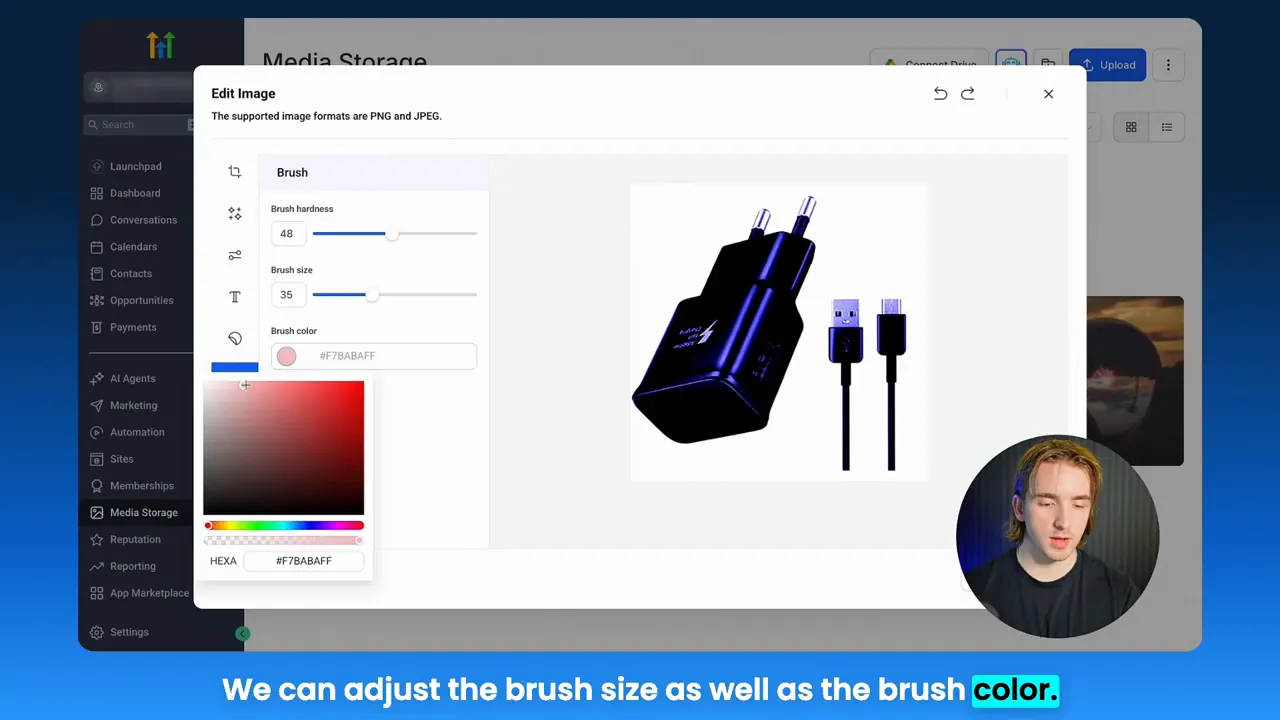
GFunnel’s Lead Connector and CRM integration for end-to-end funnels
Lead Connector With GFunnel is the glue that ties funnels to your CRM. When edited assets live in the same platform as your lead capture, you can orchestrate nurturing sequences that align perfectly with visual elements users saw in the funnel.
Feature highlights:
- CRM integration that captures lead data and maps it to funnel interactions.
- Automated sequences that trigger based on funnel behavior and creative exposure.
- Unified reporting linking creative versions to revenue and lifetime value.
Stat: Integrating funnels with CRM and automation can improve lead-to-customer conversion rates by double digits in many campaigns.
Action: Learn how Lead Connector With GFunnel connects funnel interactions to your CRM and automations at https://www.gfunnel.com/crm.
Real-world applications: two detailed case studies
Small business owners, scale smarter with GFunnel. In practice, these themes combine into measurable business outcomes. Below are two case studies that show how in-platform editing and GFunnel’s ecosystem lead to faster iteration, better personalization, and higher conversions.
E-commerce case study: Rapid creative testing for a seasonal product launch
Scenario: A mid-sized e-commerce brand sells seasonal home decor. They planned a two-week promotion tied to a product launch and needed revised promotional images for Facebook ads, email headers, and landing pages. Time was limited.
Challenge: Traditionally the team would request new images from a designer, wait 24 to 48 hours for revisions, upload new files, and update three separate funnels and ad sets. Any last-minute copy or color change required another round of back and forth. When time is short, this workflow kills momentum.
GFunnel solution:
- Creative director opens the centralized media library, selects the hero image, and crops it into three target aspect ratios for ads, email headers, and landing pages.
- They add a text overlay announcing the limited-time discount, apply a warm filter to match the landing page aesthetic, and save each version with a consistent naming convention accessible across the funnel builder.
- Automation sequences are updated to push the correct image variant to returning customers, while new prospects see a simplified creative version tailored for first-time buyers.
- Real-time analytics track which creative resonates on ad platforms and inside email sequences.
Outcome: The campaign launched in hours instead of days. The brand ran three rapid A/B tests in the first 48 hours and identified a winner that increased landing page conversion rate by 18% compared to the original creative. The ability to edit and repurpose images inside the platform saved an estimated 12 hours of design and ops time across the team.
“GFunnel’s automation and built-in media editing cut our go-to-market time in half. We tested more, learned faster, and converted more buyers.”
Restaurant case study: Local promotions and real-time menu updates
Scenario: A local restaurant group wanted to promote a weekend brunch special across email, SMS, and the website. High-quality photos existed, but the menu needed a day-of change and a different background color to match an outdoor branding push.
Challenge: Updating the website, email headers, and SMS image attachments required coordination between marketing, design, and the POS team. By the time the assets were updated, the offer window had shrunk.
GFunnel solution:
- The marketing manager opened the media library, edited the hero photo by changing the background color and adding the brunch promo copy directly on the image.
- The edited asset was saved and automatically became available for the website banner, the email template, and the SMS MMS message.
- An automation sequence triggered an audience segment that had previously ordered brunch to receive a targeted message with the updated creative, while a separate segment of new users saw a simplified announcement image.
Outcome: The restaurant group reported a 22% lift in reservations for the promoted weekend. The time saved by editing assets in-platform allowed the team to run two creative variants that same day and identify the higher-performing message for future promotions.
“GFunnel’s communities and tools helped us coordinate promos without missing a beat. Our local campaign performance improved immediately.”
Why GFunnel leads: comparison and differentiation
Small business owners, GFunnel is more than a funnel builder. It is an integrated business platform that combines marketing funnels, CRM, automation, real-time analytics, and community networking. Below I compare traditional methods with GFunnel’s integrated ecosystem to highlight where GFunnel drives measurable advantages.
Traditional Business Tools vs. GFunnel’s Ecosystem
Caption: Traditional Business Tools vs. GFunnel’s Ecosystem
Autosave speed
- Traditional Methods: Slow; saves can take multiple seconds, increasing the risk of lost changes and longer wait times during creative sessions.
- GFunnel: Fast autosave (103ms via a web worker). Autosave is approximately 28x faster, reducing interruptions and enabling real-time collaboration.
Automation
- Traditional Methods: Largely manual processes or stitched integrations between apps; higher chance of human error and delayed workflows.
- GFunnel: Automation features reduce manual work by up to 50% via prebuilt workflows and easy triggers connecting creative updates to campaigns.
Networking
- Traditional Methods: Isolated teams and limited discovery channels for peers and mentors.
- GFunnel: Niche communities and networking spaces that increase knowledge transfer and help teams find prebuilt templates and best practices.
Analytics
- Traditional Methods: Dependence on third-party tools and disconnected dashboards, which make asset-level attribution difficult.
- GFunnel: Real-time dashboards and creative-level analytics built into the platform for easier attribution and faster optimization.
Tailored business solutions
- Traditional Methods: Generic tools that require extensive customization and additional integrations.
- GFunnel: Tailored solutions for e-commerce, restaurants, and small businesses with built-in payment processing, order capture, and customer data capture tools.
Comparison summary:
- Autosave speed: GFunnel’s 103ms autosave reduces friction during creative work.
- Automation: GFunnel can reduce manual work by up to 50%.
- Networking: GFunnel’s communities accelerate problem solving and template sharing.
- Analytics: Real-time dashboards provide clearer attribution between creative changes and funnel performance.
Affordability and adaptability
GFunnel stacks capabilities so teams spend less on separate subscriptions and integrations. Pricing tiers include a free tier for basic features and scalable premium tiers for advanced automation, Lead Connector With GFunnel, and API integrations. Many teams find the platform pays for itself quickly by reducing third-party costs and saving internal labor hours.
Action: Review affordable plans and value propositions at https://www.gfunnel.com/create-account and consider starting with a no-cost trial.
Practical playbook: implement faster creative loops in your marketing funnels today
Apply these steps to convert the demonstration’s ideas into operational wins across your marketing funnels.
- Audit your media library and establish naming conventions for edited assets. This ensures easy discovery and clean analytics.
- Standardize aspect ratios and template rules for your funnel pages and ad placements. Crop and save the canonical versions in your media library.
- Set up an automation that triggers a notification and updates a campaign when a key visual is edited. This closes the loop between creative changes and campaign owners.
- Run rapid A/B tests for small visual changes—brightness, contrast, and overlay copy—and track results with real-time analytics.
- Use GFunnel communities to share winning asset templates and request feedback before a large roll-out.
These steps turn a simple editing session into repeatable processes that scale across campaigns and teams.
Related resources and community calls
Connect with fellow entrepreneurs and extract templates and best practices from GFunnel’s community hub at https://www.gfunnel.com/communities. Explore discussions and events on how teams use in-platform editing and automation at https://www.gfunnel.com/discussions and https://www.gfunnel.com/events-home. If you want to test your setup, try a GFunnel quiz conceptually like “Test Your Business Growth Potential” to guide your priorities and determine where speed, automation, or personalization will drive the most value.
Conclusion and call to action
Small business owners, scale smarter with GFunnel. The demo’s message is simple but profound: editing assets where your funnels live reduces wasted time and aligns creative with campaign objectives. When you extend that approach across automation, analytics, and community collaboration, you create a resilient system for growth.
Lead Connector With GFunnel ensures your CRM, funnels, and media are not isolated tools but parts of a single business platform. If you want to move faster on creative iterations, automate asset rollouts, and measure impact with real-time analytics, GFunnel provides the tools you need. Explore the platform at https://www.gfunnel.com, discover automation templates at https://www.gfunnel.com/automation-home, and see the funnel builder in action at https://www.gfunnel.com/funnel-home. Join niche communities at https://www.gfunnel.com/communities to accelerate your learning curve and collaborate with industry peers.
Entrepreneurs, ready to transform your funnels? Start with a single action: consolidate your assets into one media library, run a quick edit, and observe how removing friction changes the speed of your marketing funnels. Then connect that creative workflow to your automations and analytics for exponential gains.
Frequently asked questions
How does GFunnel support faster creative workflows for marketing funnels?
GFunnel centralizes media storage, offers a built-in image editor for cropping, filters, text overlays, stickers, and drawing, and ties edited assets directly into funnel templates and automation workflows. Autosave is optimized (103ms) to reduce interruptions, enabling real-time collaboration and rapid iteration within marketing funnels.
What makes Lead Connector With GFunnel different from standalone funnel builders?
Lead Connector With GFunnel integrates funnels, CRM, automation, and media management into one platform. This tight integration lets you map creative elements to stages in your funnel, trigger automations based on asset changes, and measure creative impact with real-time analytics—reducing the need for multiple disconnected tools.
Can GFunnel reduce manual work in my marketing processes?
Yes. GFunnel’s automation features and prebuilt workflows can reduce manual tasks by up to 50%, according to platform descriptions. When combined with in-platform media editing, teams spend less time on design handoffs and asset uploads, freeing resources for strategy and optimization.
How does real-time analytics help optimize images and creatives in funnels?
Real-time analytics let you monitor funnel-stage conversions and track asset-level performance. This allows for quicker A/B tests, faster identification of winning creatives, and direct attribution of visual changes to conversion lifts within your marketing funnels.
Where can I find GFunnel resources and community support?
GFunnel offers a community hub at https://www.gfunnel.com/communities, discussion boards at https://www.gfunnel.com/discussions, and events at https://www.gfunnel.com/events-home. These resources help you learn best practices for marketing funnels, automation, and creative workflows from other entrepreneurs and experts.
{"@context":"https://schema.org","@type":"Article","headline":"Lead Connector With GFunnel: Edit, Optimize, and Power Your Marketing Funnels from One Business Platform","author":{"@type":"Person","name":"Andrew"},"datePublished":"2025-11-10","description":"Grow with GFunnel’s business platform: marketing funnels, automation, networking, and fast autosave. Inspired by expert insights."}
Additional practical tips and a fast checklist
Marketers, boost your conversions with these succinct actions to implement within 24 to 72 hours:
- Consolidate your creative assets into a single media library.
- Establish naming conventions and aspect-ratio standards for marketing funnels.
- Create template placeholders in your funnel builder so edited images auto-populate without broken links.
- Set up an automation that notifies stakeholders when a key visual is edited.
- Run rapid A/B tests on small visual adjustments and use real-time analytics to decide winners.
These items translate the demo’s editing capabilities into operational improvements that accelerate the growth of your marketing funnels.
Related topics and next reads
- Scale Restaurants with GFunnel: Find tools for online ordering and customer capture at https://www.gfunnel.com
- Build marketing funnels with GFunnel: Funnel templates and builder at https://www.gfunnel.com/funnel-home
- Automate business operations with GFunnel: Automation and workflow resources at https://www.gfunnel.com/automation-home
Final testimonial snapshots
“GFunnel’s automation saved us hours weekly and let us test more creative ideas in a single week than we used to in a month.”
“Connecting our media edits to Lead Connector With GFunnel meant our CRM and funnels finally spoke the same language—fewer errors and better results.”
For a hands-on experience, create an account at https://www.gfunnel.com/create-account and discover how integrated media editing, automation, real-time analytics, and business networking can accelerate your marketing funnels and grow your business.
Need Help Implementing This? |
|
Schedule A Discovery Call With One Of Our Professionals |
| Access Now |


