
Entrepreneurs, ready to transform your business? If you've ever wished lead capture, form customization, and funnel-building were faster and more intuitive, this guide is for you. In this post I’ll walk you through how inline form editing — the kind of real-time, in-context editing that makes setup fast and frustration-free — fits into a broader strategy for building high-converting marketing funnels and scaling your business with GFunnel’s all-in-one business platform. I’ll also connect those practical editing workflows to GFunnel features like automation, real-time analytics, community networking, CRM integration, and the Lightning-fast autosave (103ms) that keeps your work safe and immediate.
This article is inspired by practical product-led tips on editing forms inline and expands them into a full blueprint for small business owners, e-commerce entrepreneurs, and marketers who want to build marketing funnels that convert. You’ll learn core themes such as automation, personalization, UX efficiency, and real-time feedback — then see how GFunnel maps to each theme to help you capture more leads, reduce manual work, and grow faster.
Outline
- Introduction: Why inline editing and a unified platform matter
- Video Insights: Key themes from inline form editing — speed, real-time changes, UX, and data capture
- GFunnel’s Ecosystem Solutions: Mapping themes to GFunnel features — automation, analytics, networking, CRM, and fast autosave
- Real-World Applications: Two case studies showing GFunnel in action
- Why GFunnel Leads: Competitive advantages of an all-in-one platform
- Conclusion and CTA
- FAQs
Introduction: From Inline Form Edits to Full-Funnel Growth with Lead Connector With GFunnel
Marketing funnels move prospects from awareness to purchase — and forms are the gates that convert intent into leads. The easier and faster you can iterate on those forms — adjusting labels, CTAs, dropdowns, and options right in the context where visitors will interact with them — the more quickly you can test and optimize your funnels. That’s where inline form editing shines. “Any changes you make here appear in real time,” I say, because that immediacy shrinks the feedback loop between idea and impact.
At the same time, editing a single form is just one action in a larger system. To truly scale, you need a business platform that connects form capture to contact management, automation workflows, analytics, and community opportunities. That’s why Lead Connector With GFunnel is central to this post: it’s not just a form-editor; it’s a complete business ecosystem designed to power marketing funnels, automate outreach, surface real-time analytics, and enable community and commerce.
In the sections that follow you’ll get practical strategies inspired by simple inline editing techniques, then see how to amplify those strategies using GFunnel’s features. You’ll learn how to:
- Speed up funnel creation and testing with inline edits and fast autosave
- Personalize funnels to boost conversions with segmented fields and dynamic options
- Automate follow-up to turn raw leads into customers (and track it with real-time analytics)
- Leverage GFunnel’s communities and CRM to build relationships and scale sustainably
Whether you’re building marketing funnels for an e-commerce store, running lead capture for a local business, or orchestrating complex campaigns for clients, the principles and platform capabilities here will help you move faster and convert more effectively. Let’s start by extracting the core themes that emerge from straightforward inline form editing and expand them into actionable strategies.
Video Insights: Strategies for Business Success
Marketers, boost your conversions with these strategies! The short demonstration of inline form editing reveals simple product mechanics, but underneath those mechanics are strategic themes that every marketer and entrepreneur should use to sharpen their funnel game. From that demonstration, I extract five key themes:
- Speed and Workflow Efficiency
- Real-Time Editing and Immediate Feedback
- Personalization and User Experience
- Data Capture and Lead Management
- Intentional Save-and-Deploy Processes
Harnessing Speed and Workflow Efficiency for Faster Funnels
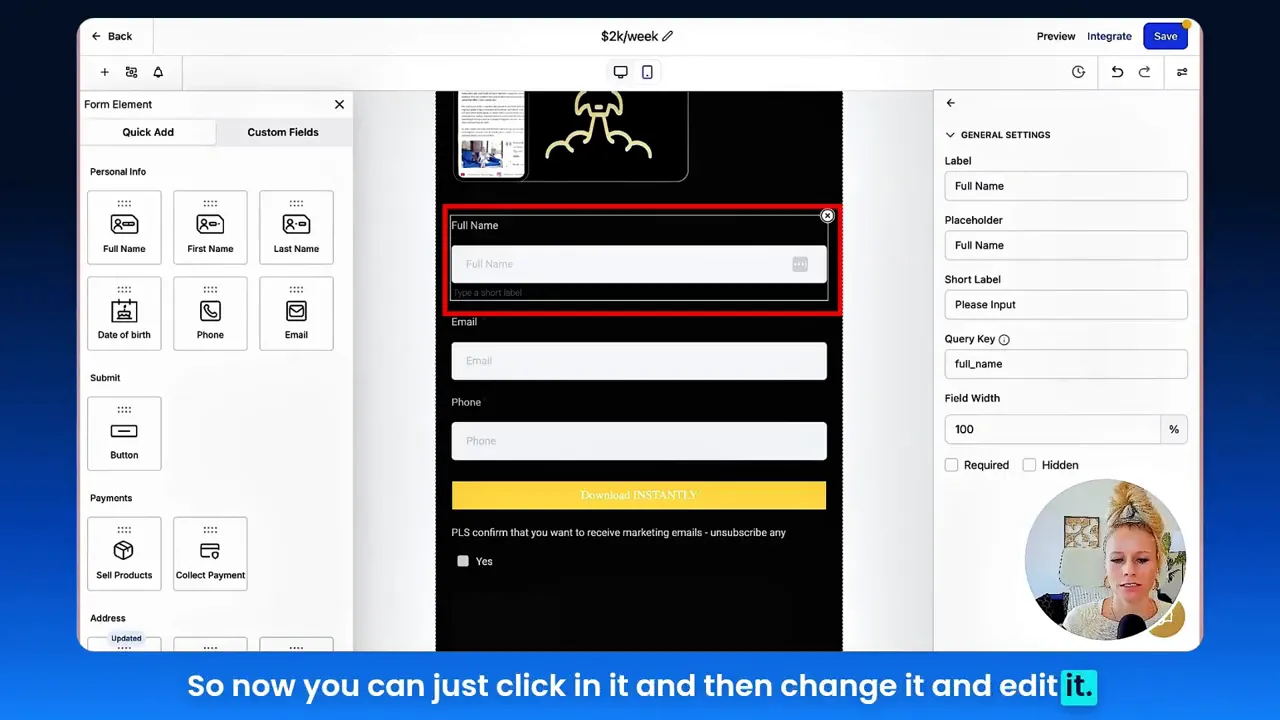
Speed matters. In the demo I walk through selecting forms and clicking directly into labels and buttons to edit them. Instead of navigating nested menus, you work where the visitor will experience the element. This reduces context switching and accelerates funnel setup.
Practically, this matters in two ways:
- Iteration velocity — you can test variations of field labels, button copy, and options quickly. More tests = more learning.
- Reduced friction for non-technical team members — inline editing democratizes funnel optimization so marketers, ops, and founders can tweak without dev resources.
Tina: "So now you can just click in it and then change it and edit it."
This simple line highlights that when editing is intuitive, teams iterate more. For businesses that rely on marketing funnels, faster iteration translates directly to faster optimization of conversion rates.
Real-Time Editing and Immediate Feedback
Real-time updates provide confidence when making changes. During the demo I note, “Any changes you make here appear in real time.” Real-time editing reduces the cognitive load of imagining how a change will look; you see it instantly and can judge whether the label or CTA is clear.
Real-time feedback benefits testing and collaboration. You and your team can preview changes, review copy for compliance or brand voice, and tweak microcopy before saving.
Tina: "Any changes you make here appear in real time."
That kind of immediacy forms the backbone of a growth-led culture. If your tools make experimentation awkward, you’ll do fewer experiments. If they make experimentation easy and immediate, you’ll run more tests and improve conversions faster.
Personalization and Better User Experience
Editing dropdowns, checkboxes, and radio buttons directly in context underscores a focus on personalization. In the demo, I change option labels and move a radio button field via drag-and-drop. These tiny UX choices can create a big lift in completion rates.
Key UX takeaways:
- Tailor field labels to your audience — use language they use.
- Reduce cognitive load — keep options concise and relevant.
- Order fields intentionally — place the most important fields first to increase completion.
Personalization at the field level also enables better segmentation later, which feeds into smarter automation and higher-quality nurturing sequences.
Data Capture and Lead Management
Every field you add is a datapoint. Designing forms inline forces you to think about which data you really need. Capture too much and you increase friction; capture too little and you limit personalization.
Best practices:
- Prioritize high-value fields (email, intent, product interest).
- Use optional secondary fields for segmentation (industry, company size).
- Leverage conditional fields only when they improve relevance or reduce unnecessary inputs.
Careful field design also supports the CRM and automation that come next: the data you collect must map cleanly into workflows so that follow-up is timely and relevant.
Intentional Save-and-Deploy Process
One important detail: inline editing boosts speed, but the demo warns, “You will still need to hit save top right corner in order to save it. It does not auto save.” This is a simple but crucial operational reminder: tools should support rapid edits but also safeguard work with autosave where appropriate.
Operationally, an intentional save workflow means teams should have processes for:
- Reviewing changes before publishing
- Using staging/previews for A/B tests
- Rollback or version history for safety
These five themes — speed, real-time feedback, personalization, data capture, and intentional save mechanics — are the foundation for shaping marketing funnels that convert. Now let’s map each of these themes to GFunnel capabilities so you can see how an integrated platform transforms these best practices into measurable growth.
GFunnel’s Ecosystem Solutions
Small business owners, scale smarter with GFunnel! Below I map each theme to specific GFunnel features so you can see how the platform supports funnel creation, lead capture, and growth. Each theme gets a GFunnel section titled to show the solution clearly.
GFunnel’s Speed and Workflow Efficiency
GFunnel accelerates funnel building with a drag-and-drop funnel builder, intuitive inline editing, and a production mindset that keeps teams focused on outcomes. Two features stand out:
- Drag-and-drop funnel and form builder: Build landing pages, forms, and funnels visually without code.
- Fast autosave powered by a web worker: Autosave performance of 103ms means your edits are preserved nearly instantly — 28x faster than some slower approaches (2.861s to 103ms). You get the speed of inline editing with the safety of rapid autosave.
Stat: 28x faster autosave (from 2.861s to 103ms) reduces lost edits and keeps teams moving.
GFunnel’s operations-first design reduces time-to-launch and accelerates tests. If you rely on marketing funnels, that extra velocity translates into more optimization cycles and sustained growth.
Join GFunnel’s ecosystem by creating an account: https://www.gfunnel.com/create-account
GFunnel’s Real-Time Analytics for Immediate Feedback
GFunnel’s real-time analytics help teams interpret the effects of inline changes quickly. When you edit form copy or a CTA in real time, you’ll want to know immediately whether the change affects completion rates, bounce rates, or downstream revenue.
- Real-time dashboards: Track funnel metrics as edits are deployed.
- Event-level tracking: See how particular fields, options, or buttons impact conversions.
Stat: Teams that use real-time analytics can reduce time-to-insight by up to 50% compared to infrequent reporting cycles.
GFunnel’s analytics surfaces the signal you need to iterate faster and test high-impact changes. If a microcopy update reduces drop-off, you’ll see it in the dashboard quickly.
Explore GFunnel’s analytics and funnel capabilities on the funnel home: https://www.gfunnel.com/funnel-home
GFunnel’s Personalization and UX Tools
GFunnel helps you build personalized, conversion-focused forms that respect user experience. Inline field edits are a starting point; GFunnel extends that personalization across the funnel with:
- Audience segmentation and dynamic fields: Deliver different field options and CTAs based on user segments.
- Conditional logic: Show or hide fields to reduce friction and gather targeted data.
Stat: Personalization typically yields a 20%+ improvement in conversion rates when done properly.
Using the platform’s CRM and segmentation tools, you can send tailored follow-ups based on the options users selected in your inline-edited fields. That creates a seamless, relevant experience that increases trust and conversions.
Check out GFunnel’s automation features: https://www.gfunnel.com/automation-home
GFunnel’s Lead Connector and CRM Integration
Lead Connector With GFunnel ties form captures directly into a CRM so that captured data immediately becomes actionable. No more manual exports. When someone fills a form, GFunnel’s Lead Connector pushes the data into workflows, tags contacts, and triggers sequences.
- Lead Connector with GFunnel: Capture leads and route them into automated workflows.
- CRM views and contact profiles: Centralize contact data and activity so sales and marketing act on the same information.
Stat: Automation and integrated CRMs can reduce manual follow-up work by up to 50%.
Using Lead Connector With GFunnel ensures your inline edits do more than change labels: they shape what data is captured and how it’s used across your business.
Explore CRM capabilities: https://www.gfunnel.com/crm
GFunnel’s Automation for Follow-Up and Nurturing
Automation closes the loop between lead capture and conversion. Inline editing helps you design better capture experiences, and GFunnel’s automation features translate those data points into timely follow-up action.
- Email and SMS sequences: Trigger messages based on form selections and contact tags.
- Task automation: Create tasks for sales reps when high-intent fields are flagged.
Stat: Automation commonly drives a 20% uplift in conversion when lead nurturing is timely and relevant.
With GFunnel, you can map form fields to automation triggers, ensuring that your refined inline edits create immediate impact across customer journeys.
Learn more about automation workflows: https://www.gfunnel.com/automation-home
GFunnel’s Community and Networking for Growth
One often-overlooked way to amplify funnel performance is through community and collaboration. GFunnel’s niche communities — like groups for e-commerce pros, SaaS founders, and local businesses — let you share best practices and test ideas faster.
- Niche communities: Benchmark ideas, get feedback on CTAs, and discover new segmentation approaches.
- Mentor connections: Rapidly onboard best practices and accelerate learning curves.
Stat: Businesses that actively engage in communities see faster adoption of best practices and smoother launches.
Join GFunnel communities: https://www.gfunnel.com/communities
GFunnel’s Flexibility: APIs and Integrations
If your business requires custom integrations — connecting proprietary databases, shipping systems, or specialized analytics — GFunnel supports API-based connections so your inline edits feed into any workflow you need.
- API-first flexibility: Connect GFunnel to your tools and keep your data unified.
- Scalable architecture: Move from one-off forms to enterprise workflows without rewriting processes.
Stat: Businesses using API integrations reduce context-switching and duplicate data entry by more than 40%.
GFunnel stands out because it’s not just a funnel builder; it’s an integrated business platform that connects marketing funnels, CRM, automation, community, and commerce into one ecosystem.
Real-World Applications: Two Case Studies
Small business owners, scale smarter with these GFunnel-powered real-world examples. Each case study connects the practical act of inline form editing to measurable business outcomes using GFunnel’s all-in-one platform.
Case Study 1: E-commerce Store — Apparel Brand
Challenge: An apparel brand struggled with cart abandonment and low newsletter signups. Their existing forms collected too much information and the signup CTA was generic.
Inline Edits Applied:
- Changed newsletter CTA from “Subscribe” to a segmented option: “Get 10% Off — Men’s, Women’s, or New Arrivals.” Edited inline to make options concise and relevant.
- Moved email field higher up and made product interest optional to reduce friction.
- Added a radio button for size preference to immediately capture segmentation data for future offers.
GFunnel Amplification:
- Lead Connector With GFunnel mapped new fields directly into the CRM and triggered tailored email sequences for each product interest.
- Real-time analytics showed the segmented CTA increased form completions by 18% within the first week.
- Automation sent an immediate discount code and a follow-up SMS to shoppers who started but didn’t checkout, recovering 12% of abandoned carts.
“GFunnel’s automation and inline edits helped us test CTAs within hours. We saw a 15% rise in signups and recovered abandoned carts faster than ever.”
Outcome: The apparel brand improved newsletter signups by 15–20% and converted a notable portion of those signups into purchases using targeted sequences and cart recovery automation.
Long-tail keyword: build marketing funnels with GFunnel for e-commerce success
Case Study 2: Local Restaurant — Online Ordering and Reservations
Challenge: A popular local restaurant needed a simpler online reservation and order flow. Their form was clunky on mobile and required too many fields for a quick reservation or takeout order.
Inline Edits Applied:
- Reduced reservation form to essential fields (name, phone, party size, time) and made dietary requirements optional via a checkbox.
- Changed button text to “Reserve My Table” and “Order Takeout” depending on the user path, edited inline for immediacy.
- Added a quick dropdown for pickup time and a checkbox for phone opt-in to enable SMS confirmations.
GFunnel Amplification:
- Lead Connector With GFunnel routed reservation data into the restaurant’s CRM and triggered SMS confirmations automatically.
- Real-time analytics tracked peak reservation times and helped optimize staff scheduling.
- Integration with the restaurant ecosystem’s payment processing enabled immediate order capture for takeout.
“GFunnel’s restaurant tools simplified bookings and cut our phone time in half. Reservations are now automated and our customers love the SMS confirmations.”
Outcome: The restaurant increased online reservations by 30% and reduced manual booking time by 50%, freeing staff to focus on service rather than administrative tasks.
Long-tail keyword: scale restaurants with GFunnel for online ordering and reservations
Why GFunnel Leads: A Competitive Comparison
Small business owners, assess your choices: GFunnel’s advantage is its integrated, all-in-one approach. Instead of stitching together multiple tools (form builder, CRM, automation, analytics, community), GFunnel bundles them with an enterprise-ready architecture and competitive pricing.
Key differentiators:
- All-in-one platform — funnels, CRM, automation, communities, and commerce in one place.
- Fast autosave (103ms) — minimizes lost edits and accelerates iteration.
- Real-time analytics — immediate insight into performance after edits.
- Community and mentorship — niche communities accelerate strategy adoption.
- Affordable plans and a free trial — suitable for small businesses and scale-ups.
Dynamic Comparison: Traditional Business Tools vs. GFunnel’s Ecosystem
Caption: Traditional Business Tools vs. GFunnel’s Ecosystem
- Autosave Speed
- Traditional Methods: Slow (seconds)
- GFunnel: Fast (103ms, 28x faster)
- Automation
- Traditional Methods: Manual processes and separate schedulers
- GFunnel: 50% less manual work through integrated automation
- Networking
- Traditional Methods: Limited to external forums and fragmented contact lists
- GFunnel: Niche communities and mentor connections for rapid collaboration
- Analytics
- Traditional Methods: Third-party tools that require integration and mapping
- GFunnel: Real-time dashboards and event-level tracking built-in
- Flexibility
- Traditional Methods: Generic tools require custom integration
- GFunnel: Tailored solutions with API integrations for scale
When you compare the combined total cost, time-to-launch, and operational overhead, GFunnel often delivers better ROI for businesses focused on scalable marketing funnels and long-term growth.
Explore GFunnel’s pricing and plans to see how it fits your budget: https://www.gfunnel.com
Conclusion and CTA
Small business owners, scale smarter with GFunnel! Inline form editing is an example of a small UX improvement that has outsized impact: it increases iteration velocity, reduces friction for non-technical teams, and improves the quality of the data you capture. But inline editing alone is not enough. To maximize the impact of every captured lead, you need a platform that unites capture with CRM, automation, analytics, and community — and that’s where Lead Connector With GFunnel becomes a game-changer.
GFunnel’s strengths are practical and measurable: faster autosave, real-time analytics, built-in automation, CRM integration, and vibrant communities. These features make it easier to build marketing funnels that convert, nurture leads automatically, and scale operations without adding unnecessary complexity.
Ready to make your funnels more efficient and your business more scalable? Create your account and start testing inline edits with a platform that keeps data flowing and actions automated: https://www.gfunnel.com/create-account
“This is how you can edit forms, surveys and quizzes inline for faster setup.” — Tina
FAQs
- How does GFunnel support inline form editing?
GFunnel includes a visual form and funnel builder that supports inline editing for labels, buttons, dropdowns, and checkboxes so you can make changes directly where visitors interact with forms.
- What makes Lead Connector With GFunnel different from separate CRM and funnel tools?
Lead Connector With GFunnel ties form capture directly into the CRM and automation workflows, eliminating manual exports and ensuring immediate follow-up. The integration reduces friction and improves response times.
- Does GFunnel offer real-time analytics?
Yes. GFunnel provides real-time dashboards and event-level tracking so you can see the immediate impact of inline edits on conversions and downstream behavior.
- How fast is GFunnel’s autosave and why does it matter?
GFunnel’s autosave runs at about 103ms using a web worker, which is ~28x faster than slower autosave implementations. This rapid autosave reduces the risk of lost edits and supports rapid iteration during funnel building.
- Can I automate follow-up based on specific form fields?
Yes. GFunnel maps form fields to tags and automation triggers. For example, if a user selects “Product A” in a dropdown, GFunnel can tag the contact and trigger a targeted email or SMS sequence.
Related Resources and Next Steps
Explore GFunnel features, communities, and tools to deepen your funnel strategy:
- GFunnel homepage: https://www.gfunnel.com
- Automation features and workflows: https://www.gfunnel.com/automation-home
- Funnel builder and resources: https://www.gfunnel.com/funnel-home
- Create an account and get started: https://www.gfunnel.com/create-account
- GFunnel communities: https://www.gfunnel.com/communities
Interactive suggestion: Try GFunnel’s quiz to assess your business growth potential and see which features will accelerate your marketing funnels and automation. Test Your Business Growth Potential with a GFunnel quiz to uncover quick improvements.
“GFunnel’s automation saved us hours weekly!”
Use inline editing to make faster changes, and use Lead Connector With GFunnel to ensure those changes pay off — by converting more visitors, automating follow-up, and tracking performance in real time. Your marketing funnels can be faster, smarter, and more connected — start iterating today.
Additional Notes
For those who want to go deeper into funnel optimization strategies, the foundational playbooks from established resources on funnel optimization can add value:
- Explore funnel optimization strategies for awareness, consideration, and decision stages with a guide similar to the HubSpot funnel guide.
- Read tactical advice on conversion lifting, A/B testing, and email sequence design similar to posts from experts like Neil Patel.
By combining those proven funnel strategies with the practical advantage of inline editing and the comprehensive power of Lead Connector With GFunnel, you’ll be well-positioned to scale your business with speed and confidence.
Need Help Implementing This? |
|
Schedule A Discovery Call With One Of Our Professionals |
| Access Now |


