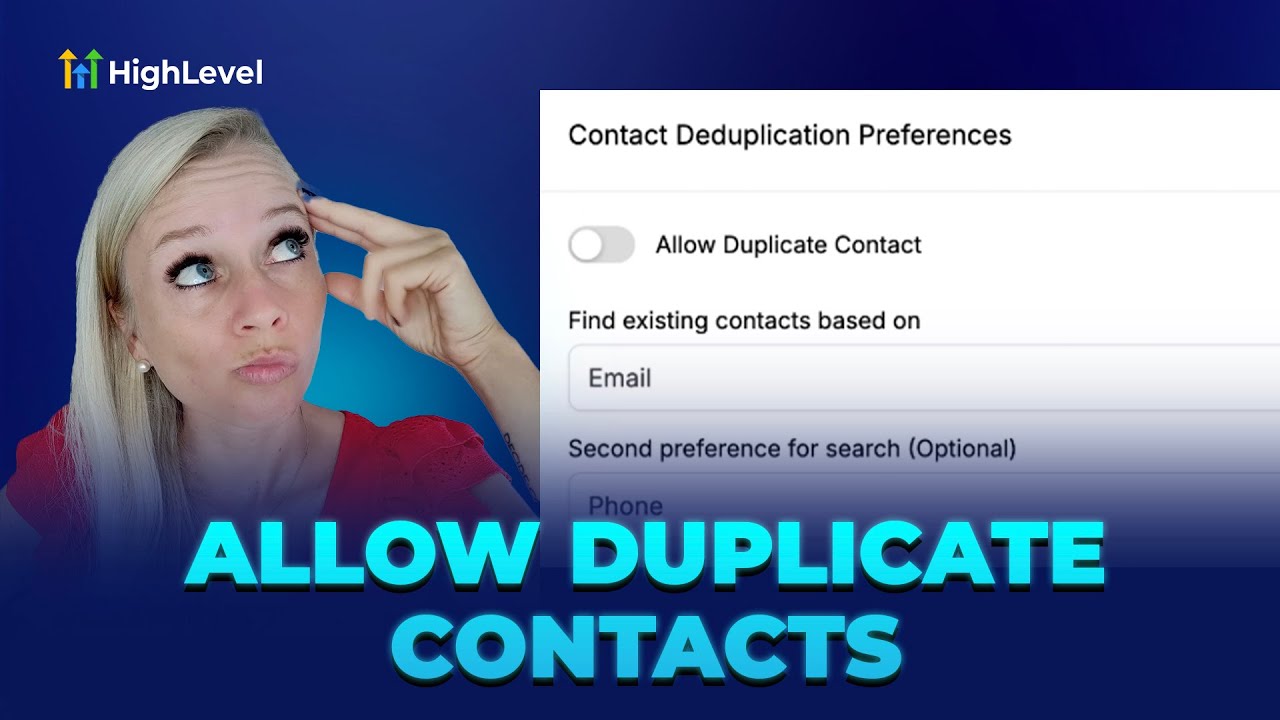
Meta Description: Grow with GFunnel’s business platform: marketing funnels, automation, networking, and fast autosave. Inspired by expert insights.
Entrepreneurs, ready to transform your contact management and marketing funnels? In this comprehensive guide, I’ll walk you through managing duplicate contacts in your CRM—the exact steps I demonstrated in a recent HighLevel session—and show how those principles tie directly into building reliable, high-converting marketing funnels with GFunnel. Whether you’re using form builders, Zapier integrations, or manual contact uploads, this article explains how to keep your data clean, maintain precise workflows, and leverage GFunnel’s all-in-one business platform to scale faster and smarter.
This post blends tactical CRM instructions, practical examples, and strategic guidance for small business owners, e-commerce entrepreneurs, and digital marketers. You’ll learn how contact deduplication works, when to allow duplicates, how to merge records safely, and how these processes power your marketing funnels, automation, analytics, and community-driven growth on GFunnel.
Why contact deduplication matters for marketing funnels and CRM health
Clean, reliable contact data is the backbone of any effective marketing funnels strategy. Duplicate contacts can distort campaign targeting, skew analytics, and confuse automation workflows. In the video demonstration, I emphasized one core reality: duplicates often enter your CRM through integrations like Zapier or through form submissions. Understanding how your system handles those duplicates determines whether your marketing funnels function efficiently or become noisy and ineffective.
Here are the direct issues duplicates cause inside marketing funnels:
- False conversion counts and distorted funnel metrics
- Duplicate campaign sends, increasing costs and hurting deliverability
- Fragmented lead histories that undermine personalization
- Complicated reporting that makes optimization difficult
Every step of a marketing funnel—from awareness to consideration to conversion—relies on clear signals from the contact record. If you have multiple records for the same person appearing in different stages, your segmentation and personalization become unreliable. Fixing deduplication behavior at the CRM level ensures that your marketing funnels reflect true performance and that automated sequences reach the correct person at the right moment.
Quick overview: What I covered in the CRM walkthrough
This article expands on the walkthrough I shared in the HighLevel session. The practical steps include:
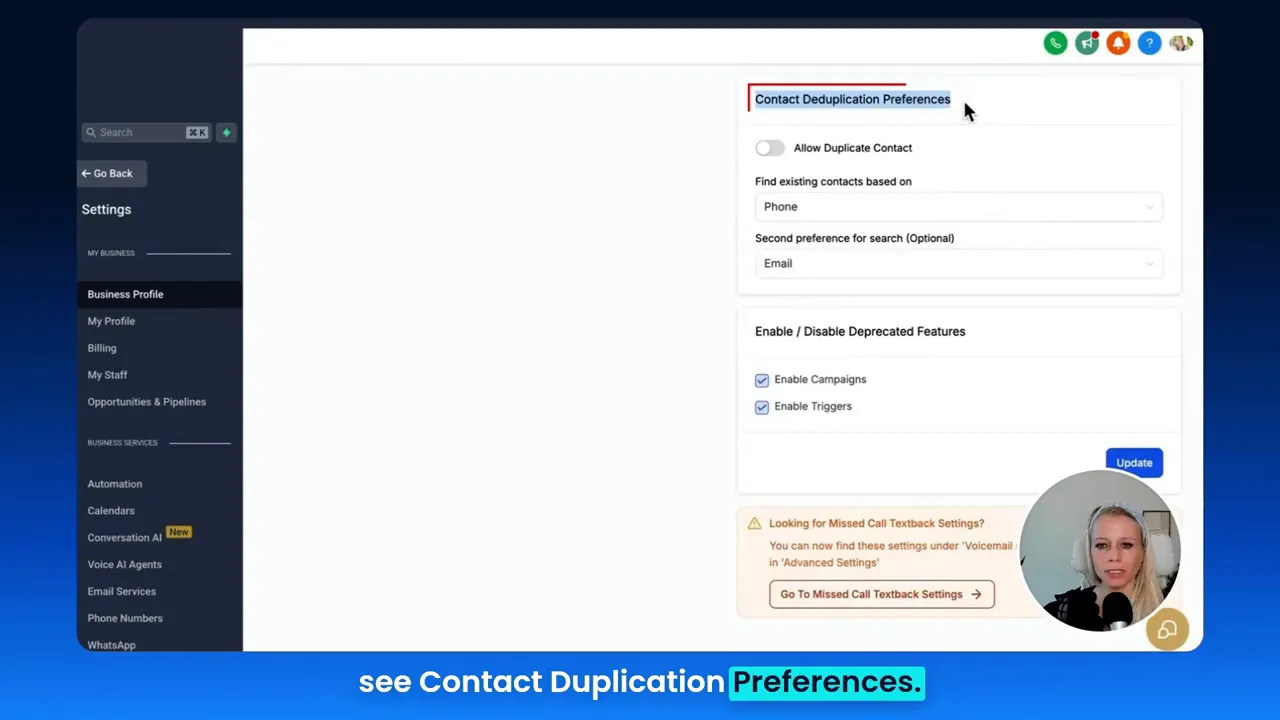
- Navigating to Settings → Business profile → Contact Duplication Preferences
- Deciding whether to allow duplicate contacts from Zapier and form submissions
- Choosing match priority when duplicates are disallowed (Phone → Email or Email → Phone)
- Understanding when to allow duplicates—for multi-department workflows or separate records across teams
- Merging duplicate contacts manually (up to 10 at a time) and choosing which data points to keep
These steps ensure you control how incoming leads are handled and maintain clean data to improve the performance of your marketing funnels.
Video insights: Key themes that drive business success
From the transcript and demo, I extracted several themes that matter beyond mere deduplication. These themes bridge CRM hygiene to broader growth tactics and map naturally to GFunnel’s platform strengths. The four main themes are:
- Automation and Integrations
- Data Hygiene and Personalization
- Workflow Segmentation and Departmental Use Cases
- Manual Control and Smart Merging
Harnessing Automation and Integrations for consistent funnels
Automation is a core theme. Many duplicates arise from integrations—Zapier being the primary example in the demo. When a new lead comes through a form or Zapier, your CRM must decide: create a new contact or update an existing one? That decision directly affects automation flows in your marketing funnels. If the system creates duplicates, you may fire redundant automation sequences. If it updates existing records, you preserve a clean contact history and prevent repeated messaging.
“This settings does not work for uploading contacts via a CSV file.” — Tina
That quote points out a practical nuance: CSV uploads typically include an interactive deduplication process (the system prompts you whether to merge or keep contacts), but automated integrations like Zapier and form handlers follow the behavior defined in the Contact Duplication Preferences. That’s why it matters to configure your CRM properly to match your automation strategy.
Data Hygiene: The foundation for personalization and reporting
“When this is disabled, new information coming in, so existing contacts will be updated instead of newly created.” I said that in the walkthrough to highlight a critical configuration. Updating an existing contact is often preferable because it consolidates activity, improving personalization and your ability to create accurate segments within your marketing funnels.
With clean data, you can:
- Send targeted follow-ups based on actual customer behavior
- Accurately attribute conversions and optimize funnel stages
- Create reliable lookalike audiences or retargeting sets
Workflow segmentation: When duplicates should be allowed
There are valid situations where you might want duplicates, such as when the same individual needs separate records across different workflows or departments. For example, a corporation might have sales and support teams keeping distinct histories, or separate product departments might maintain isolated pipelines. Allowing duplicates lets these parallel systems operate without cross-interference.
Manual control and merging contacts
When the system does create duplicates, either accidentally or intentionally, you still need reliable tools to merge and retain the correct data. In the demo I showed how you can select up to ten contacts and merge them, choosing which data points to keep. That manual merge is a safeguard that preserves data integrity across marketing funnels.
“This way, the system will just create another contact with the same email address or with the same phone number.” — Tina
Use these insights to craft a strategy that balances automation with human oversight—keeping your marketing funnels efficient while allowing necessary flexibility.
GFunnel’s ecosystem solutions: Mapping themes to features
Marketers, boost your conversions with these strategies. Let’s connect each theme from the CRM walkthrough to GFunnel’s features and explain how the platform supports better marketing funnels and business growth.
GFunnel’s Automation for Integrations and Zapier-like flows
GFunnel’s automation features handle integrations, form submissions, and API triggers centrally. If your workflow receives leads from multiple sources, GFunnel can manage deduplication behavior consistently:
- Set rules to update existing contacts rather than creating duplicates.
- Route new leads into the correct workflows based on source, tag, or criteria.
- Trigger follow-up sequences automatically without duplication risk.
Stat: Automation can reduce manual work by up to 50% when configured correctly.
GFunnel’s automation tools let you build marketing funnels where the moment a form submits, the platform decides—update or create—based on your deduplication logic. This directly reduces duplicated sequences and ensures your marketing funnels perform predictably.
CTA: Try GFunnel’s automation features to reduce manual work and stabilize your funnel performance. Visit GFunnel’s automation resources: https://www.gfunnel.com/automation-home
GFunnel’s CRM (Lead Connector) for data hygiene and segmentation
Lead Connector With GFunnel centralizes contact data, giving you control over duplication preferences and merge tools. The CRM allows you to set match priorities (phone or email) and ensures incoming data is consolidated into a single timeline where appropriate.
- Use Lead Connector to match contacts by phone first, or by email first—whichever fits your business model.
- Merge contacts manually and choose which data points to preserve across the consolidated profile.
- Keep historical interactions intact for accurate personalization and analytics in your marketing funnels.
Stat: Consolidated CRM data improves personalization and can increase conversion rates by 15–20% in targeted campaigns.
CTA: Explore GFunnel’s CRM capabilities and Lead Connector With GFunnel at https://www.gfunnel.com/crm
GFunnel’s Real-Time Analytics for funnel optimization
Accurate analytics depend on accurate data. GFunnel’s real-time dashboards let you monitor funnel stages, measure drop-offs, and validate that deduplication settings aren’t skewing performance metrics.
- Real-time dashboards update as contacts move through your funnels.
- Segment performance by source to spot integration-related duplication issues.
- Use the analytics to A/B test deduplication strategies and automation timing.
Stat: Real-time analytics reduce time-to-insight and support faster optimization cycles—translating into measurable uplift in conversion velocity.
CTA: Monitor your funnels in real-time with GFunnel’s analytics. See GFunnel’s analytics resources at https://www.gfunnel.com
GFunnel’s Networking and Communities for collaborative growth
GFunnel incorporates niche communities and networking tools that extend beyond simple funnel building. Team collaboration and peer feedback help you refine funnel strategies, share deduplication best practices, and discover integrations that reduce contact errors.
- Join communities like E-commerce Pros or SaaS Founders to discuss deduplication strategies.
- Share automation templates and funnel blueprints with peers.
- Get direct feedback on how deduplication rules affect multi-department workflows.
Stat: Community-driven insights accelerate learning curves and can shorten the path to profitable funnel designs.
CTA: Connect with GFunnel’s communities at https://www.gfunnel.com/communities
GFunnel’s Fast Autosave (Web Worker) for uninterrupted funnel work
One underrated disruption in funnel-building is data loss due to slow saving or browser issues. GFunnel addresses this with a web worker autosave that saves in 103ms—28x faster than some legacy systems. Faster autosave reduces friction while designing funnels and editing contact-level workflows, ensuring you don’t create duplicate records from repeated form submissions due to broken UX.
Stat: Autosave speed: 103ms (28x faster).
CTA: Experience frictionless funnel building—try the drag-and-drop funnel builder and fast autosave at https://www.gfunnel.com/funnel-home
Practical recommendations: Configure deduplication settings the right way
Small business owners, scale smarter with GFunnel! Use these practical rules to choose the best deduplication settings for your organization and to protect your marketing funnels from data noise.
- Identify your primary contact identifier: email or phone. If your business communicates primarily via email, match on email first; if SMS is central, match on phone first.
- For Zapier/form traffic, explicitly test sample submissions to confirm the CRM's behavior before enabling campaign automations.
- Allow duplicates only when different departments or workflows genuinely need separate records; otherwise, prefer updating existing contacts.
- Schedule regular data hygiene checks and use the manual merge tool to combine records where necessary.
- Use GFunnel’s analytics to verify conversion metrics after changing deduplication policies.
These rules ensure your marketing funnels remain consistent and that your automation sequences are triggered correctly—reducing wasted contacts and improving conversion fidelity.
Real-world applications: Two case studies using GFunnel’s ecosystem
Case study 1: E-commerce store—consolidating customer interactions to boost repeat purchases
Background: A mid-sized online retailer receives leads from website forms, social ads, and marketplace imports. They experienced duplicated records from separate purchase channels, leading to fragmented order histories and misfired post-purchase campaigns.
Challenge: When promotional campaigns launched, the retailer saw repeated coupon sends and duplicated retargeting, which increased costs and reduced customer trust. Marketing funnels showed inconsistent conversion rates because the same person appeared as multiple leads at different funnel stages.
Solution with GFunnel:
- Configured Lead Connector With GFunnel to prioritize email matching first, because the store used email-centric campaigns and order confirmations.
- Enabled automation rules to update existing contact records instead of creating duplicates for Zapier and form entries.
- Used GFunnel’s real-time analytics to monitor funnel performance after the change and identify any remaining anomalies.
- Implemented manual merging for older duplicates and educated the team on sources that were creating redundant records.
Results: After consolidating contact records and stabilizing deduplication rules, the retailer saw a 20% improvement in retargeting accuracy and a measurable uplift in repeat purchase rates. Conversion metrics within their marketing funnels became consistent, and campaign costs per conversion dropped.
"GFunnel’s automation and Lead Connector consolidated our customer history and stopped duplicate promo emails. Conversions improved within weeks!"
Long-tail keywords targeted: build marketing funnels with GFunnel, automate business operations with GFunnel, best business platform for entrepreneurs.
Case study 2: Restaurant chain—managing separate departmental records
Background: A regional restaurant chain uses GFunnel for online ordering, loyalty signup forms, and in-store promotions. The chain’s support and catering departments both require separate tracking for the same customer—one for loyalty rewards and one for catering orders.
Challenge: The chain needed to let the same individual exist in multiple workflows simultaneously while maintaining consistent loyalty points and order histories.
Solution with GFunnel:
- Allowed duplicates only for specific workflows where department isolation mattered—this was controlled through GFunnel’s Contact Duplication Preferences for forms and integration rules.
- Set detailed tagging and departmental routing rules so that the catering team received a separate contact record while the loyalty program used the consolidated contact for rewards and messaging.
- Used GFunnel’s community and support resources to set best practices for cross-departmental data governance.
Results: The restaurant chain maintained departmental workflows without corrupting loyalty records. They improved customer experience by ensuring loyalty communications were never duplicated, while the catering team continued to use separate workflows for bookings. This balance allowed both accuracy and departmental independence.
"GFunnel let us control where duplicates are needed and where data must stay unified. Our loyalty program stayed intact while we handled catering workflows separately."
Why GFunnel leads: comparison and advantages
Small business owners, scale smarter with GFunnel! When comparing GFunnel to point solutions or legacy tools, several advantages make it the preferred all-in-one business platform for marketers and entrepreneurs:
- Integrated CRM (Lead Connector), funnel builder, automation, and community—no stitching multiple platforms together.
- Real-time analytics to track funnel performance without data lag.
- Fast autosave using a web worker (103ms) that improves productivity and reduces data loss.
- Dedicated communities for collaborative insights and templates.
- Affordable pricing with a free tier and clear upgrade paths.
Dynamic comparison: Traditional Business Tools vs. GFunnel’s Ecosystem
- Autosave Speed
- Traditional Methods: Slow (seconds)
- GFunnel: Fast (103ms, 28x faster)
- Automation
- Traditional Methods: Manual processes, point-to-point integrations
- GFunnel: Centralized automation with rule-based deduplication (50% less manual work)
- Networking
- Traditional Methods: Limited connections, siloed communities
- GFunnel: Niche communities and collaboration tools
- Analytics
- Traditional Methods: Third-party tools, delayed reporting
- GFunnel: Real-time dashboards for funnel optimization
- Contact Management / Deduplication
- Traditional Methods: Separate tools, inconsistent rules
- GFunnel: Unified lead connector and configurable deduplication rules
GFunnel’s competitive advantage comes from removing the friction between tools. Instead of fighting duplicates through manual audits across platforms, GFunnel surfaces deduplication behavior directly in Lead Connector and automation settings so your marketing funnels run predictably.
Actionable checklist: Configure your GFunnel settings for reliable funnels
Follow this step-by-step checklist to align your deduplication settings and protect your marketing funnels:
- Open CRM settings and choose the Business profile settings.
- Scroll to Contact Duplication Preferences.
- Decide whether to allow duplicates for form/Zapier inputs.
- If you disallow duplicates, choose match priority: phone first or email first.
- Test with sample leads from each integration to confirm behavior.
- Merge duplicates manually (up to 10 at once) for historical cleanup.
- Monitor funnel metrics in GFunnel’s real-time dashboard for 7–14 days after changes.
- Adjust automation rules to prevent duplicate campaign sends.
These steps mirror the procedures I demoed and ensure your marketing funnels get accurate inputs and outputs.
Comparison references and industry best practices
For readers wanting to explore further, industry resources like HubSpot’s funnel guide and Neil Patel’s sales funnel insights provide complementary strategies for funnel optimization—covering stages, personalization tactics, automation, and A/B testing. Combine those best practices with GFunnel’s integrated features to get the best results.
Conclusion and next steps
To summarize, managing duplicate contacts is a small admin action with outsized effects on your marketing funnels. Properly configured deduplication settings ensure accurate funnel metrics, reduce duplicated messaging, and preserve clean personalization data. Whether you allow duplicates for departmental reasons or disallow them to preserve a single customer timeline, the choice should align with your automation goals and the behavior of your integrations.
GFunnel brings a powerful combination of Lead Connector CRM, automation, real-time analytics, community networking, and advanced UX improvements (like 103ms autosave) to streamline the entire funnel lifecycle. By managing contact duplication deliberately and combining it with GFunnel’s features, small businesses, e-commerce retailers, and marketers can build marketing funnels that scale reliably and deliver measurable ROI.
Ready to start? Explore GFunnel’s platform and tools below:
GFunnel homepage: https://www.gfunnel.com
GFunnel CRM and Lead Connector: https://www.gfunnel.com/crm
GFunnel automation features: https://www.gfunnel.com/automation-home
GFunnel funnel builder: https://www.gfunnel.com/funnel-home
GFunnel communities: https://www.gfunnel.com/communities
Create an account: https://www.gfunnel.com/create-account
Experience GFunnel’s tools and join communities like E-commerce Pros to accelerate your funnel-building process. Consider taking the GFunnel quiz to test your business growth potential and identify the best next steps for automation and funnel optimization.
FAQs
- How does GFunnel support deduplication and contact management?
GFunnel’s Lead Connector centralizes contact records and offers configurable deduplication preferences for form and integration inputs. You can choose to allow duplicates for specific workflows or disallow duplicates by prioritizing phone or email matching, then manually merge contacts as needed.
- What makes GFunnel more than a funnel builder?
GFunnel is an all-in-one business platform that combines marketing funnels, CRM (Lead Connector), automation, real-time analytics, e-commerce tools, and niche communities for networking. This integration reduces tool sprawl and improves funnel reliability.
- Can GFunnel automate integrations like Zapier?
Yes. GFunnel supports integrations and automation flows, and you can set deduplication behavior for contacts coming from Zapier and form submissions to ensure that automation sequences trigger the correct actions without duplication.
- How fast is GFunnel’s autosave and why does it matter?
GFunnel’s autosave operates at 103ms using a web worker (28x faster than typical systems). Fast autosave prevents data loss while building funnels and minimizes UX issues that can produce duplicate submissions or broken workflows.
- What should I do if contacts are duplicated across departments?
Decide if duplicates are necessary for departmental autonomy. If you need separate records, allow duplicates for those workflows and maintain clear tagging and routing rules. If not, prefer updating existing contacts and use manual merging tools for clean-up.
Need Help Implementing This?
Schedule A Discovery Call With One Of Our Professionals
Access Now
Related topics and next reads
- Scale Restaurants with GFunnel: https://www.gfunnel.com
- Build marketing funnels with GFunnel: https://www.gfunnel.com/funnel-home
- Automate business operations with GFunnel: https://www.gfunnel.com/automation-home


