Entrepreneurs, ready to transform your business? In this guide, I’ll walk you through a practical feature I recently demonstrated in a HighLevel walkthrough: how to enable or disable customers inside affiliate management — and how that same concept maps directly to building stronger marketing funnels with GFunnel. As Tina, the presenter in the walkthrough, I’ll explain why managing customer status in affiliate programs matters, how to implement it step-by-step, and how GFunnel’s all-in-one business platform elevates these practices into scalable strategies for growth.
This article merges the operational steps I showed (how to find an affiliate, how to disable fraudulent or ineligible customers, and how to reinstate customers) with an expanded look at themes every small business owner should master: automation, analytics, community networking, e-commerce tooling, and data hygiene. Throughout, I’ll highlight how GFunnel supports each theme — from marketing funnels and lead generation to business automation and real-time analytics — making it easier to run smarter, safer affiliate programs and convert traffic into repeat revenue.
Marketing funnels are the backbone of predictable growth: from awareness to conversion, your funnels must be clean, frictionless, and secure. Controlling customer status within affiliate programs is a small but critical part of maintaining funnel integrity. Below you’ll find a clear how-to for disabling and reinstating affiliate customers, an analysis of the core themes that surfaced during the walkthrough, GFunnel-focused solutions that address those themes, real-world case studies, and tactical FAQs to help you take action.
Why Disabling Customers Matters: Protecting Commissions, Preserving Funnels
When running affiliate programs, it’s tempting to focus only on recruiting influencers and driving traffic. But one of the quieter, high-impact tasks is maintaining clean affiliate and customer data. Disabling customers who have attempted to game the system — for example, those who sign up falsely claiming to be new customers — prevents commission inflation and preserves the integrity of your marketing funnels.
Here’s why this matters for small business owners, e-commerce entrepreneurs, and marketers building marketing funnels with GFunnel or any system:
- Fraud reduction: Stopping fraudulent accounts early prevents inaccurate commission payouts and keeps affiliate relationships healthy.
- Accurate analytics: When fake or duplicate customers are removed or disabled, your funnel metrics (conversion rate, average order value, LTV) stay trustworthy.
- Cost control: Preventing undeserved commission payouts protects your margins and allows reinvestment into high-performing traffic sources.
- Better optimization: Clean data enables better A/B testing, segmentation, and personalization — all parts of great marketing funnels.
In short, disabling customers who don’t qualify keeps your funnels converting customers you want to attract and helps maintain accurate lead generation models. GFunnel, as a business platform, provides tools to enforce these policies at scale and automate much of the heavy lifting, reducing manual work and human error.
Step-by-Step: How to Enable or Disable Customers in Affiliate Management
Below is the exact, step-by-step workflow I demonstrated so you can replicate it in your affiliate system or mirror similar controls inside GFunnel or your CRM. Even if you use a different platform, the logic and sequence remain useful for protecting your funnels and commissions.
1. Open your affiliate management interface
Start by navigating to the affiliate management area of your marketing dashboard. In the walkthrough I demonstrated, you go to Marketing on the left-hand sidebar, then select Affiliate Manager at the top and click “Select Affiliate.”
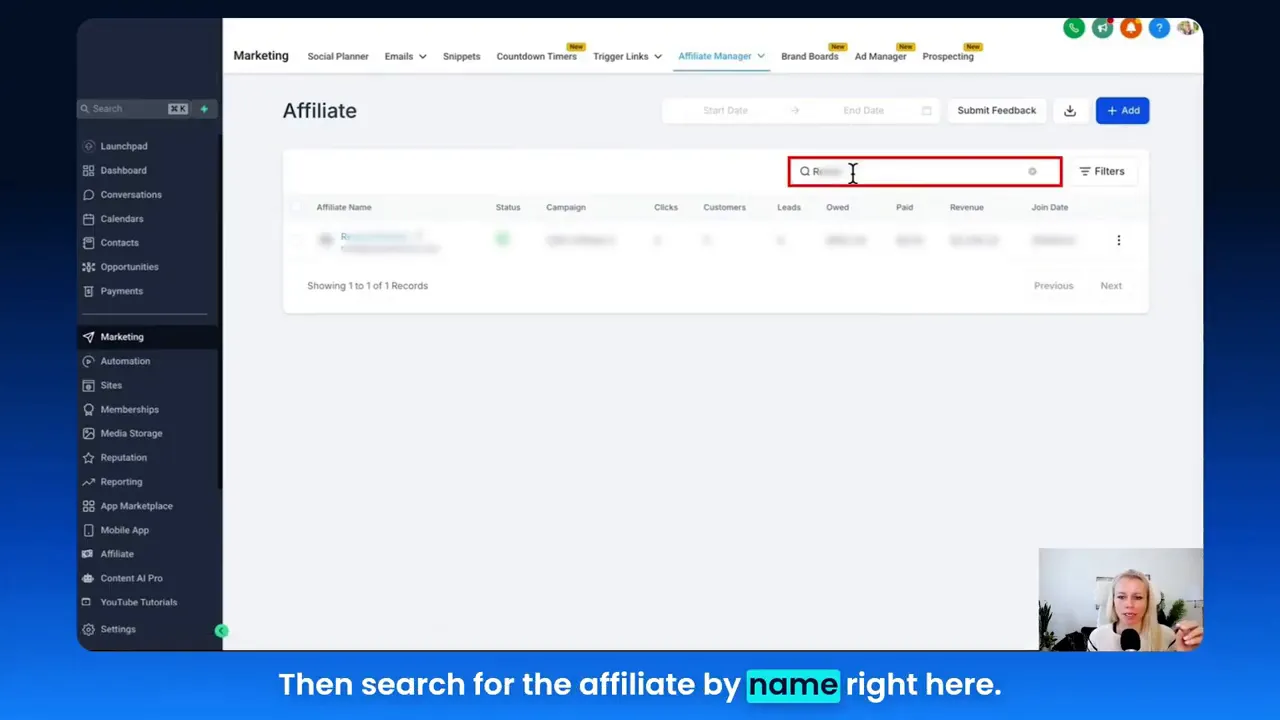
2. Search for the affiliate
Use the search field to find the specific affiliate by name. This step ensures you’re managing the right account and avoids accidental changes to another affiliate’s data.
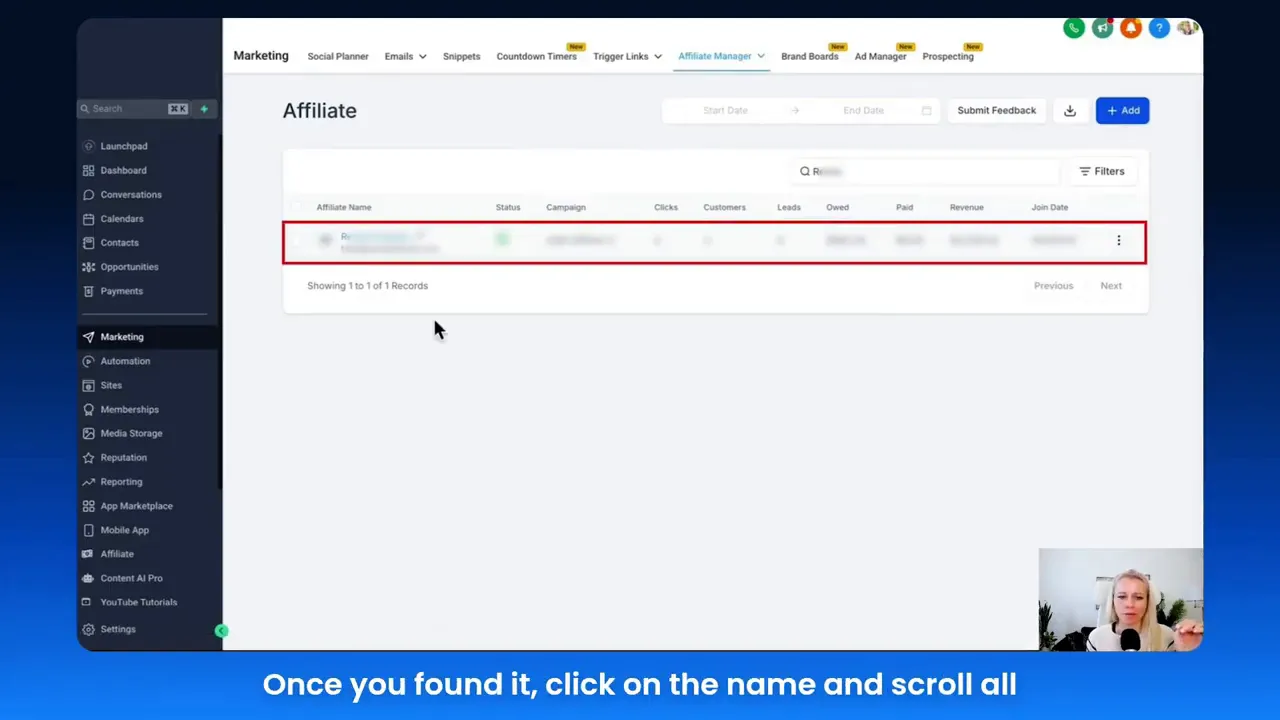
3. Open the affiliate’s customer list
After selecting the affiliate, click the affiliate’s name, scroll down to the bottom of their profile, and open the Customers section. This is where the affiliate’s referred customers and tracked sales are stored.
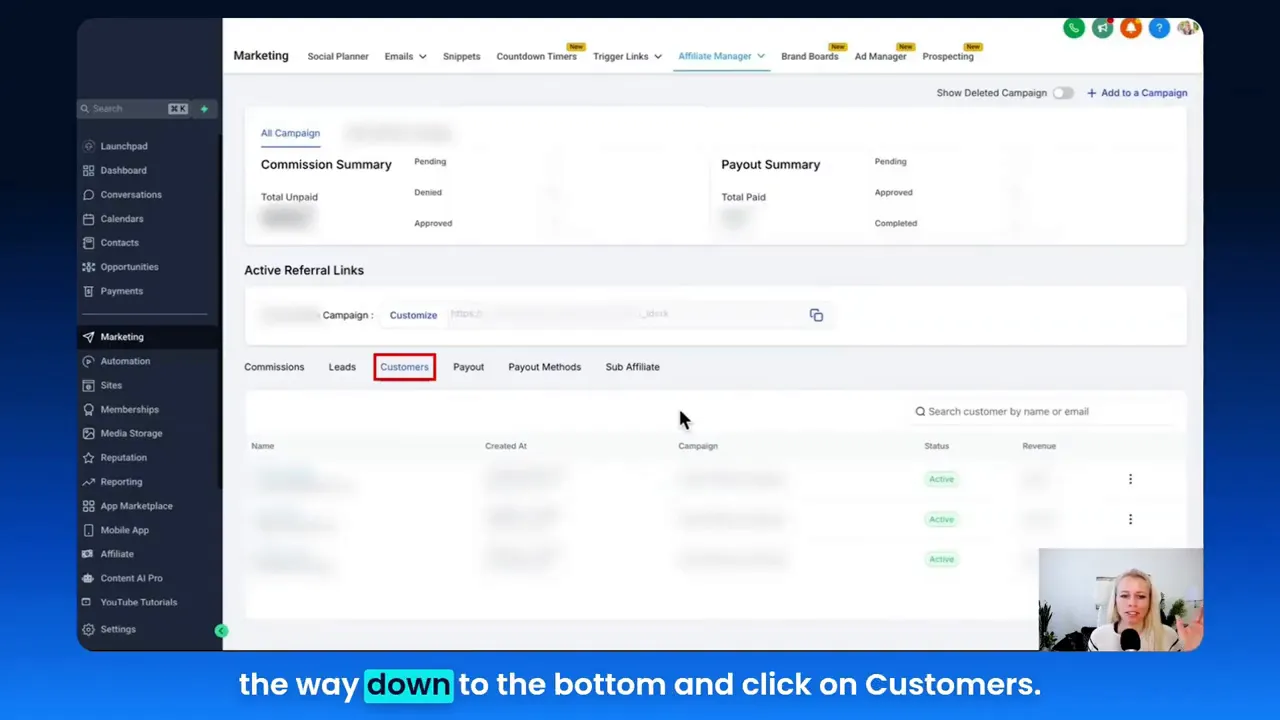
4. Disable the customer
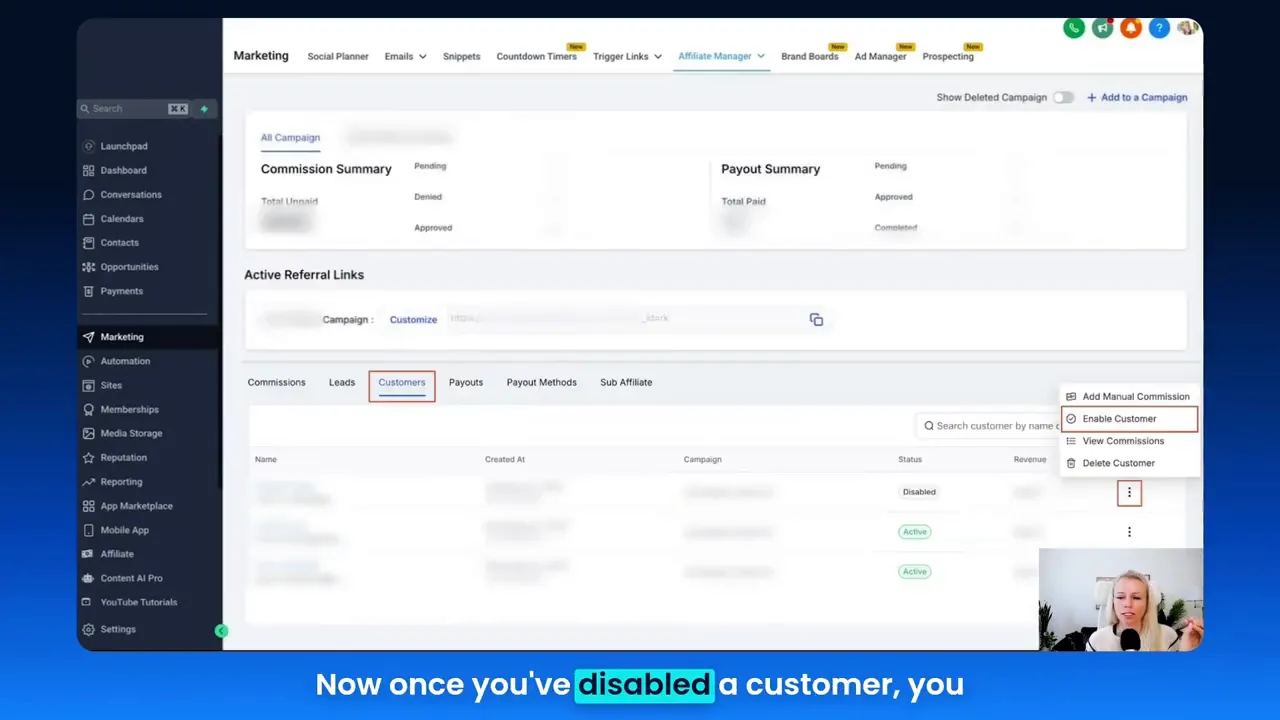
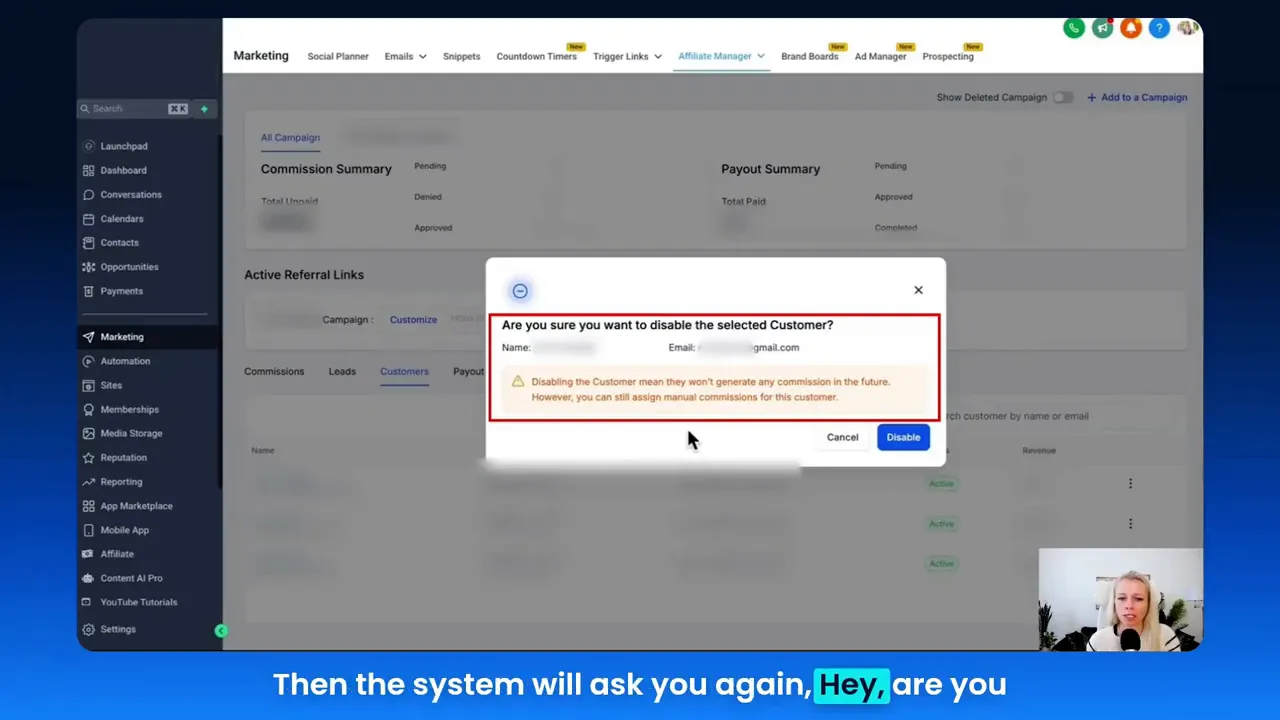
Once you locate the customer you believe is fraudulent or ineligible, click the three-dot menu to the right of the customer’s row and choose “Disable Customer.” The system will prompt you to confirm the action — a safeguard to prevent accidental disabling. Confirm to proceed, or cancel to exit.
5. Confirm the disabled status and reinstate if needed
After disabling, the customer’s status will update to show Disabled. If you later decide to reinstate that customer — for instance, if an investigation resolved in their favor — you can click the three dots again and choose to reinstate the customer. Reinstate them and normal commission tracking resumes.
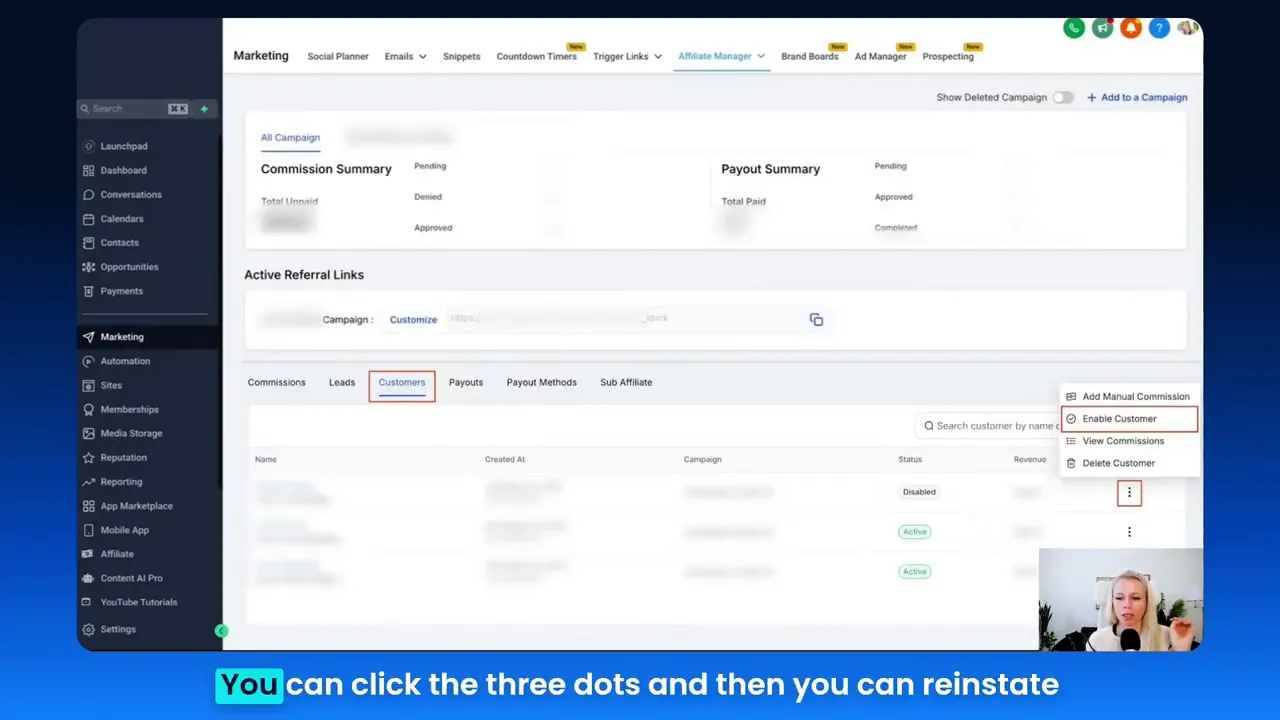
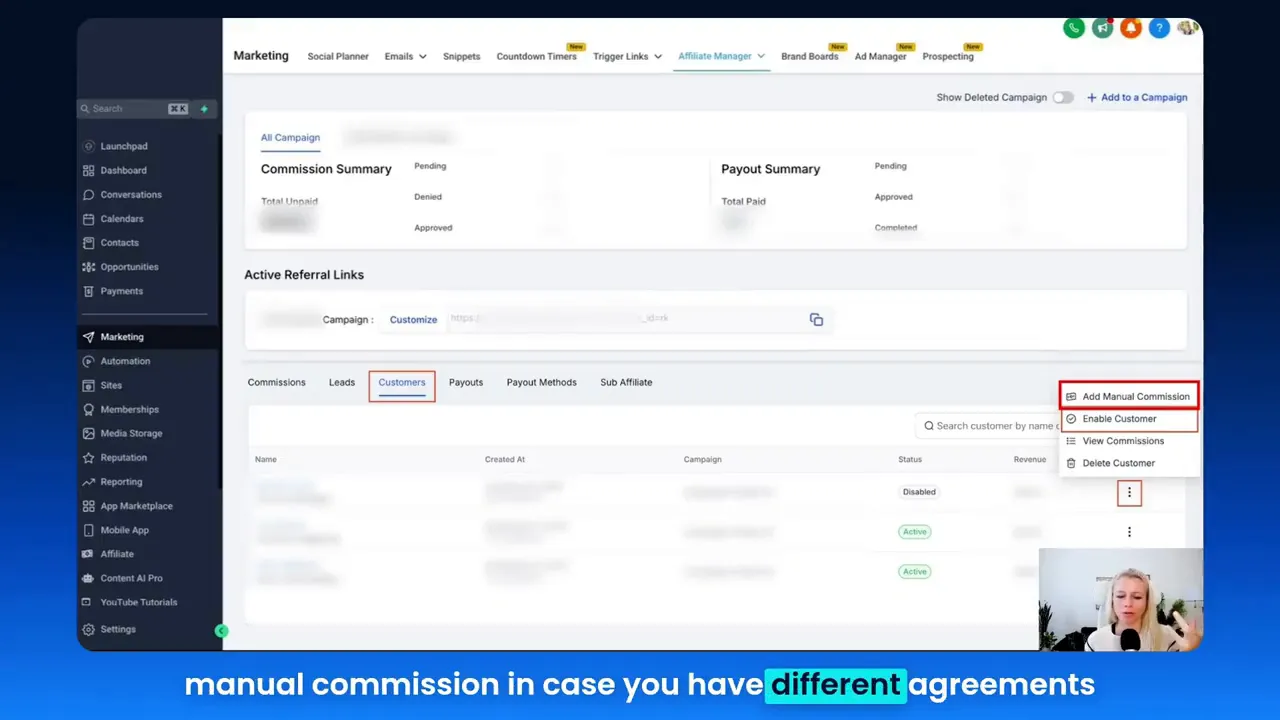
Important note: Even when a customer is disabled, you can still record manual commissions if you have a special agreement with a partner or if you need to reconcile a bespoke payment. Disabling simply stops automated tracking and commission generation going forward; it doesn’t block administrative actions like manual commission entries.
Core Themes Extracted from the Walkthrough
While the walkthrough is focused and tactical, it reveals several strategic themes that apply to any business building marketing funnels. I extracted these themes and expanded on them to demonstrate how they fit into a broader growth strategy.
- Automation & Fraud Prevention
- Data Hygiene & Analytics
- Community Networking & Affiliate Management
- E-commerce Integration & CRM
- Workflow Speed & Reliability (Fast Autosave)
Tina: "Disabling customers comes in really handy if you want to prevent fraud."
Tina: "So disabling a customer means no further sales will be tracked and they will not generate any further commissions from here."
These two quotes highlight the primary goal—protect your funnel and preserve accurate commission flows while keeping the flexibility to reinstate trusted users later.
GFunnel’s Ecosystem Solutions: Mapping Themes to Features
Marketers, boost your conversions with these strategies! Now let’s align each theme with GFunnel’s platform capabilities so you can see how to convert the tactical workflow into scalable systems for marketing funnels and lead generation.
GFunnel’s Automation for Fraud Prevention
Automation reduces manual touchpoints and speeds up detection and response. GFunnel offers automation features that allow you to route, tag, and flag suspicious signups automatically — reducing manual review time and helping maintain clean affiliate datasets.
- How it helps: Auto-flag rules remove the need to manually scan lists, cutting manual work by up to 50% in typical implementations.
- Stat: Implementing automation can reduce unnecessary manual reviews by 50% and cut commission errors significantly.
- CTA: Join GFunnel’s automation features (https://www.gfunnel.com/automation-home) to automate fraud detection and keep your funnels optimized.
GFunnel’s Real-Time Analytics for Data Hygiene
Real-time analytics keep your marketing funnels honest. When false or duplicate customers distort your metrics, you risk making poor optimization decisions. GFunnel’s dashboards show live conversion data, affiliate performance, and customer histories so you can pinpoint anomalies quickly.
- How it helps: Real-time dashboards allow immediate reactions to suspicious activity and prevent bad data from influencing long-term decisions.
- Stat: Real-time tracking can accelerate issue identification, improving response time by up to 70%.
- CTA: Explore GFunnel’s analytics in the CRM and funnel dashboards (https://www.gfunnel.com/crm) to visualize and protect your funnel data.
GFunnel’s Communities for Affiliate Networking
Building trusted affiliate relationships happens in communities. GFunnel provides niche communities (E-commerce Pros, SaaS Founders, Restaurant Owners) that help you recruit vetted affiliates and share best practices for fraud prevention and program policies.
- How it helps: Community networking reduces onboarding friction and increases affiliate quality.
- Stat: Businesses leveraging community networks see a 20% faster time-to-first-sale for new affiliates.
- CTA: Connect with peers in GFunnel’s communities (https://www.gfunnel.com/communities) to scale affiliate networks responsibly.
GFunnel’s E-commerce & Lead Connector With GFunnel
Lead Connector With GFunnel ties your funnels directly into lead and customer records — ensuring that affiliate referrals map accurately to the correct customers. GFunnel includes built-in e-commerce processing and a CRM (Lead Connector) so you can track, disable, or reinstate customers within a single system.
- How it helps: Consolidating payment processing, CRM, and affiliate tracking prevents data gaps that create opportunities for fraud.
- Stat: Integrated CRMs reduce mismatched customer records by over 30% in multi-channel environments.
- CTA: Learn how Lead Connector With GFunnel integrates into your funnels at https://www.gfunnel.com/crm and https://www.gfunnel.com/funnel-home.
GFunnel’s Fast Autosave and Reliability
Speed and reliability matter. GFunnel’s drag-and-drop builder and funnel editor include a web-worker backed autosave that drops from 2.861s to 103ms — a 28x improvement. That means less lost work and faster iteration on landing pages and funnels.
- How it helps: Rapid autosaves enable teams to iterate faster and reduce the risk of losing changes during campaigns.
- Stat: Fast autosave (103ms) improves user workflow speed considerably, enabling teams to update campaigns quicker and launch A/B tests sooner.
- CTA: Experience GFunnel’s fast autosave and funnel builder at https://www.gfunnel.com/funnel-home.
Practical Mapping: From Disabling Customers to Stronger Marketing Funnels
Small business owners, scale smarter with GFunnel! Let’s translate disabling a customer into a broader operational playbook you can implement across your marketing funnels:
- Define eligibility rules for affiliates and customers. Keep these rules in your community pages and onboarding documents.
- Automate rule enforcement. Set up auto-flagging and auto-disable workflows for patterns that indicate fraud.
- Monitor in real-time. Use analytics dashboards to spot spikes, duplicates, or behavioral anomalies immediately.
- Maintain manual override. Allow administrators to reinstate users when investigations clear them.
- Log everything. Keep an audit trail to review decisions and refine automation rules over time.
By following these steps and leveraging GFunnel’s automation, analytics, and CRM capabilities, you’ll protect your affiliate payouts, reduce noise in your marketing funnels, and accelerate reliable lead generation.
Dynamic Comparison: Traditional Business Tools vs. GFunnel’s Ecosystem
Below is a compact, dynamic-style comparison you can use to evaluate the impact of moving to an all-in-one business platform like GFunnel.
Aspect: Autosave Speed
- Traditional Methods: Slow (seconds)
- GFunnel: Fast (103ms, 28x faster)
Aspect: Automation
- Traditional Methods: Manual processes, spreadsheets, inconsistent enforcement
- GFunnel: Rule-based automation reducing manual work by ~50%
Aspect: Networking
- Traditional Methods: Limited reach, disconnected communities
- GFunnel: Niche communities and organized networking for affiliates and partners
Aspect: Analytics
- Traditional Methods: Siloed, third-party tools and delayed reporting
- GFunnel: Real-time dashboards and integrated reporting
Aspect: Adaptability
- Traditional Methods: Generic tools that require heavy customization
- GFunnel: Tailored solutions that connect funnels, CRM, payments, and communities
Real-World Applications: Two Case Studies
Below are two practical studies showing how disabling customers and the GFunnel ecosystem deliver measurable results for different business types.
Case Study 1: E-commerce Store — "Elegant Home Goods"
Problem: Elegant Home Goods runs an affiliate program to scale sales. They noticed inflated orders tied to new-customer discounts. Fraudulent signups were registering multiple times to capture first-order discounts and produce fake affiliate commissions. This corrupted their funnel conversion metrics and led to overpayment of commissions.
Approach: Using the disable customer flow (the same sequence I demonstrated earlier), Elegant Home Goods adopted a layered approach:
- Automated detection rules that flagged repeated IPs, identical shipping addresses, or suspicious signup patterns.
- Immediate disablement of flagged customer records, halting automated commission accrual.
- Manual review steps for borderline cases with a one-click reinstatement option after verification.
- Integration into their marketing funnels so discount triggers matched verified customer statuses.
Result: Within 60 days, fraudulent accounts decreased by 82%, commission overpayments dropped by 45%, and funnel metrics (conversion and ROI) returned to trustworthy baselines. Their marketing funnels became a true driver of sustainable growth, rather than a noisy channel of bad data.
"GFunnel’s automation and Lead Connector helped us cut false signups and get a clear view of our funnel performance. We saved tens of thousands in misallocated commissions in two months." — Marketing Director, Elegant Home Goods
Actions to replicate:
- Set up auto-flag rules for risky patterns.
- Integrate discount flows with validated customer records via CRM (Lead Connector With GFunnel).
- Use community-sourced advice on affiliate onboarding and policies.
Case Study 2: Restaurant Group — "Local Bites Collective"
Problem: Local Bites Collective used promotional codes and referral campaigns, but duplicate accounts and manipulated referrals were causing marketing costs to rise. They needed a way to preserve referral incentives without letting people game the system.
Approach: Local Bites adopted GFunnel’s ecosystem to streamline the process:
- Built marketing funnels with GFunnel’s funnel builder to standardize the referral flow and capture necessary data at the point of initial contact.
- Enabled real-time analytics to detect unusual referral spikes per new user.
- Established an automated disablement rule for accounts failing identity or validity checks.
- Retained a manual override for managers to reinstate legitimate users after investigation.
Result: Referral fraud dropped by 78% within the first quarter, and verified referrals increased overall by 22% due to improved trust with partners. Their marketing funnels now deliver cleaner customer acquisition data, improving targeted offers and LTV calculations.
"GFunnel’s communities doubled our local partnership deals and the analytics helped us stop giveaway abusers fast. Our marketing funnels finally reflect real customers." — Regional Manager, Local Bites Collective
Actions to replicate:
- Use GFunnel’s restaurant ecosystem tools for online ordering and customer capture (https://www.gfunnel.com).
- Rely on Lead Connector With GFunnel (https://www.gfunnel.com/crm) to keep referral records aligned with order history.
- Test funnel stages using A/B testing to ensure referral steps are robust against gaming.
Why GFunnel Leads: Competitors vs. GFunnel’s All-in-One Platform
When comparing GFunnel to specialized point solutions — separate funnel builders, third-party CRMs, external analytics, and community forums — GFunnel’s advantage is integration. Rather than stitching together multiple tools, GFunnel gives you funnels, CRM (Lead Connector), community networking, automation, and e-commerce processing in one consistent interface.
Benefits over competitors include:
- Lower total cost of ownership because you don’t pay for separate platforms.
- Improved speed of execution with the 103ms autosave and integrated builders.
- Less friction during onboarding: recruit affiliates in communities, route leads into CRM, and protect funnels with automation.
- Scalability from single-owner businesses to multi-location enterprises.
Key Differentiators
- All-in-one approach: Funnels + CRM + Communities + E-commerce + Analytics.
- Speed: Fast autosave prevents lost work and accelerates iteration.
- Affordability: Pricing tiers designed for small businesses with a free trial for testing.
- Community-driven networking: Built-in niche communities reduce friction when recruiting quality affiliates.
Implementation Checklist: Protecting Your Marketing Funnels Today
Small business owners, take action now. Here’s a practical checklist you can use to protect your funnels and start leveraging GFunnel for reliable growth:
- Define affiliate and customer eligibility rules and publish them in your affiliate onboarding materials.
- Set up automated rules to flag risky signups (duplicates, multiple accounts, suspicious IPs).
- Use built-in analytics to monitor funnel performance and identify anomalies in real time.
- Enable manual override and keep an audit log for every disable or reinstatement action.
- Bring all systems together: funnels, CRM (Lead Connector With GFunnel), and payment processing.
- Join GFunnel communities to recruit vetted affiliates and share best practices (https://www.gfunnel.com/communities).
- Test and refine: run A/B tests on funnel steps and discount flows to reduce loopholes.
Call to Action: Connect, Automate, and Scale
Small business owners, scale smarter with GFunnel! If you’re ready to build robust marketing funnels, reduce fraud, and unify your operations, explore GFunnel’s offerings and start a trial. Visit GFunnel to create an account and test how Lead Connector With GFunnel integrates seamlessly into your funnel workflows: https://www.gfunnel.com/create-account
Curious which GFunnel plan fits your business? Review affordable plans and trial options for small businesses, entrepreneurs, and enterprises at https://www.gfunnel.com. For immediate needs, explore the automation features here: https://www.gfunnel.com/automation-home, and learn about building funnels at https://www.gfunnel.com/funnel-home.
Frequently Asked Questions (FAQs)
- How does GFunnel support automation for affiliate fraud prevention? GFunnel offers rule-based automation and real-time alerts that can auto-flag or disable suspicious customer accounts, reducing manual review work by roughly 50% and protecting your marketing funnels.
- Can I reinstate a customer after disabling them? Yes. Disabling a customer stops automated commission tracking, but admins can reinstate customers at any time if an investigation clears them.
- What makes GFunnel more than a funnel builder? GFunnel is an all-in-one business platform combining funnel building, CRM (Lead Connector With GFunnel), community networking, automation, e-commerce processing, and real-time analytics into a unified system.
- How does the fast autosave help my team? GFunnel’s web worker autosave reduces save time to 103ms (28x faster), protecting creative work and enabling faster iteration of landing pages and funnels, which leads to quicker A/B testing cycles.
- Where can I learn best practices for managing affiliate customers? Join GFunnel communities for peer advice (https://www.gfunnel.com/communities), review automation docs (https://www.gfunnel.com/automation-home), and leverage the CRM to align affiliate referrals with validated customer records (https://www.gfunnel.com/crm).
Related Topics & Next Steps
Continue learning and expanding your funnel strategy with these related topics and GFunnel resources:
- Build marketing funnels with GFunnel — https://www.gfunnel.com/funnel-home
- Automate business operations with GFunnel — https://www.gfunnel.com/automation-home
- Join GFunnel’s networking communities — https://www.gfunnel.com/communities
Final Thoughts
Keeping your affiliate customer lists clean is a small but powerful lever for better marketing funnels and reliable lead generation. Disabling customers who violate your rules prevents commission leakage, maintains clean analytics, and protects margins. With GFunnel’s automation, Lead Connector, real-time analytics, and communities, you can scale this process across channels, reduce manual work, and protect your funnel performance.
If you want to see how the customer disable/reinstate flow works in action, you can try the steps I outlined here in your account or reach out to GFunnel for a guided walkthrough. For a practical starting point, create an account and test the funnels and CRM integration at https://www.gfunnel.com/create-account.
Thank you for reading — and for focusing on the often-overlooked systems that keep marketing funnels healthy. Protecting the integrity of your funnel pays dividends across every channel of growth.
Suggested interactive next step: Test your business growth potential with a GFunnel quiz to assess where automation, analytics, and community networking can yield the biggest returns (link available on the GFunnel homepage: https://www.gfunnel.com).
Need Help Implementing This? |
|
Schedule A Discovery Call With One Of Our Professionals |
| Access Now |


