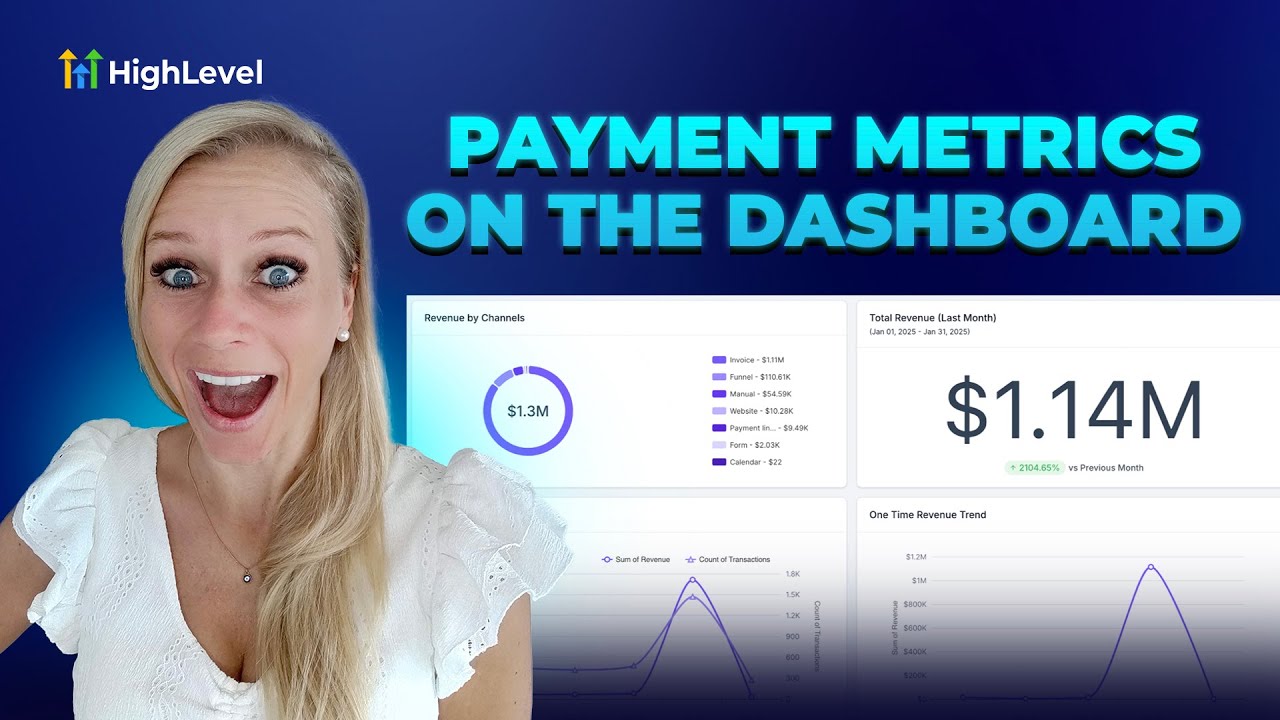
Entrepreneurs, ready to transform your business? If you’re building marketing funnels and managing payments, Lead Connector With GFunnel gives you the visibility and control you need to turn data into action. In this comprehensive guide, I’ll walk you through setting up a payments-focused dashboard that surfaces total revenue, trends, refunds, failed payments, subscriptions, coupon redemptions, and more — and show how these insights map directly to GFunnel’s all-in-one business platform. Whether you’re a small business owner, an e-commerce entrepreneur, or a growth marketer, this article explains how to use powerful dashboards and payment widgets to boost lead generation, improve cash flow, and automate tasks so you can scale smarter with GFunnel.
Introduction: Why Payment Dashboards Matter for Marketing Funnels and Lead Connector With GFunnel
Marketing funnels succeed when every stage — awareness, consideration, decision — is measured and optimized. A payments-focused dashboard lets you visualize the bottom of your funnel: revenue flow, conversion sources, and customer payment behaviors. With Lead Connector With GFunnel integrated into your stack, you don’t just build marketing funnels; you unite CRM, payments, real-time analytics, automation, and business networking in one business platform.
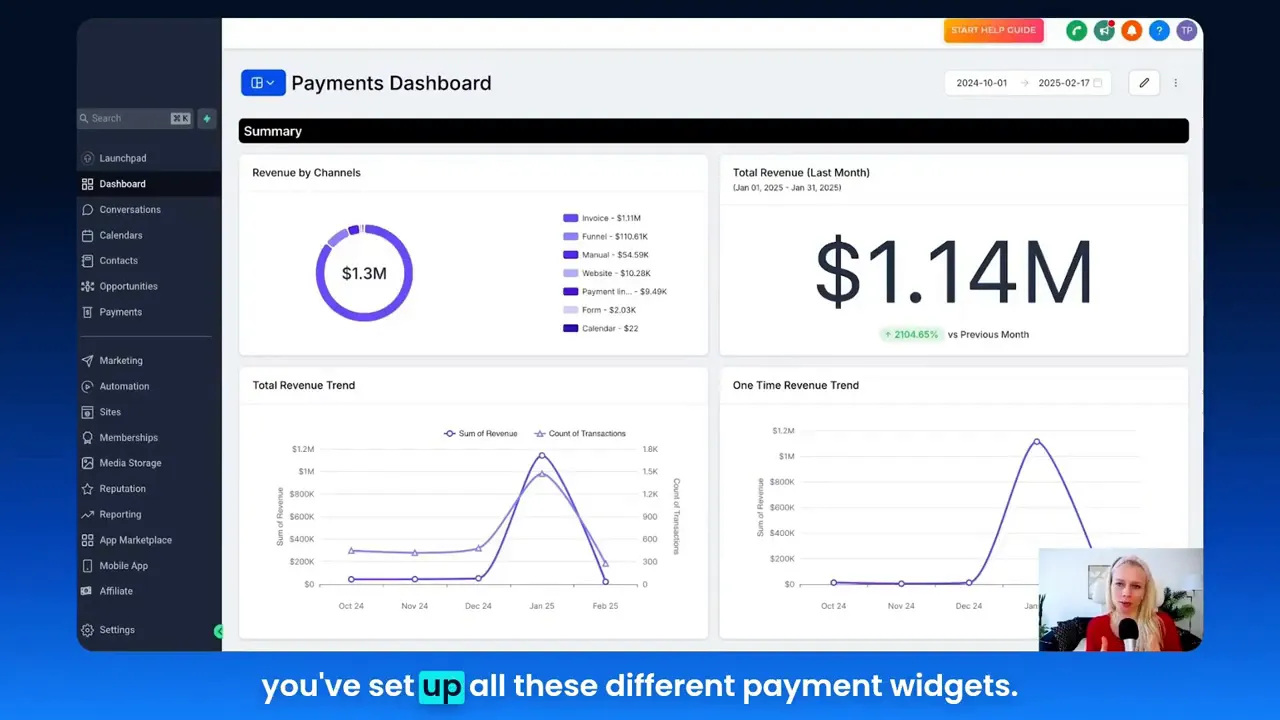
Think of your payments dashboard as the central nervous system for your revenue operations. It answers questions critical to growth: Which channel drove the most conversions? How many recurring subscriptions renewed last month? Are failed payments spiking? Is a coupon driving incremental orders or eroding margin? You’ll learn how to configure widgets to answer these questions in minutes, and how this live data feeds GFunnel’s automation, segmentation, and business networking capabilities.
What You’ll Learn in This Guide
- How to design a payment-centric dashboard: widgets to add, chart types to choose, and conditions to apply.
- Which payment insights matter most: revenue by channel, recurring vs. one-time splits, paying customer trends, and payment success metrics.
- How to link those insights to automation workflows, lead generation, and business decisions using Lead Connector With GFunnel.
- Practical case studies showing GFunnel applied to e-commerce and restaurants.
- Why GFunnel stands out versus traditional tools and how fast autosave (103ms) keeps you moving.
Video Insights: Strategies for Business Success
From the walkthroughs and examples we explored, several core themes emerged. These themes form the backbone of effective revenue optimization for any business using marketing funnels and Lead Connector With GFunnel:
- Automation: Turn data into actions automatically (failed payment follow-ups, refund processes, subscription lifecycle management).
- Real-Time Analytics: See trends live to react quickly (revenue trends, success/failure rates).
- Segmentation & Personalization: Distinguish recurring vs. one-time customers and tailor communication.
- Channel Attribution: Track revenue by source (website, funnels, invoices) to invest in the highest ROI channels.
- Optimization through Measurement: Use insights to refine marketing funnels and conversion paths.
Harnessing Automation for Growth
HighLevel: "You can get real-time insights into revenue, failed payments, refunds, and much more. So you can then decide how to act fast or which kind of processes to automate further."
Automation reduces friction and frees time for strategic work. In the video, automation was presented as the natural follow-up to accurate, real-time reporting. If a widget shows a rising trend of failed payments, set automation to retry payments, notify customers, or create tasks for your support team. Automation turns alarming numbers into predictable processes.
Automation is also essential inside marketing funnels. When a dashboard shows stronger conversions from specific campaigns, you can automatically increase budget, trigger targeted email sequences, or create audiences for retargeting — all within your GFunnel business platform.
Leveraging Real-Time Analytics
HighLevel: "Being able to see your financial performance at a glance visually will really help you to understand your audience and your market and what's going on with your numbers."
Real-time analytics mean you can make decisions based on live performance. Instead of waiting for end-of-month reports, you can react to sudden drops in payment success rate, capitalize on a coupon’s spike in redemptions, or adjust promotions when you see subscription cancellations trending up. This real-time feedback loop is what turns marketing funnels into agile growth machines.
Personalization and Segmentation
Segmentation drives higher conversion rates — whether you segment by source type (funnels vs. invoices), revenue type (recurring vs. one-time), or payment status (succeeded vs. failed). Payment widgets expose these segments visually, making it easy to build personalized paths inside marketing funnels. For example, recurring customers might receive an onboarding series, while first-time purchasers get a welcome offer to encourage retention.
Channel Attribution: Revenue by Source
Knowing where revenue comes from is critical. Widgets that display "revenue by channels" help you see how much money came from website orders, invoices, funnels, and other sources. Bundle this insight with marketing funnels to double down on the highest converting channels while optimizing underperforming ones.
GFunnel’s Ecosystem Solutions: Mapping Themes to Features
Now let’s map each theme from the dashboard walkthrough to specific GFunnel features. The goal: convert insights into actions using GFunnel’s unified tools: real-time analytics, automation, CRM/Lead Connector, niche communities, e-commerce processing, and a lightning-fast autosave for builders.
GFunnel’s Automation for Operational Efficiency
GFunnel’s automation reduces manual work by up to 50% by automating the most common revenue tasks: chasing failed payments, sending invoice reminders, handling subscription lifecycle events, and routing refunds. Connect these automations directly to payment widgets so that specific conditions trigger flows automatically.
- Stat: Automation can reduce manual follow-up time by 50%.
- Use case: If the "payment failed" widget spikes, an automation can retry the charge, email the customer with a one-click payment link, and create a ticket for unresolved issues.
- CTA: Explore GFunnel's automation features (https://www.gfunnel.com/automation-home).
GFunnel’s Real-Time Analytics Dashboard
GFunnel gives you dashboards that update in real time so you can monitor trends — total revenue, revenue trend, one-time vs. recurring splits, payment success rates, and refunds. These dashboards integrate with Lead Connector, tying leads and payments to CRM records for a single source of truth.
- Stat: Real-time dashboards enable faster decisions and reduce reaction time to payment issues.
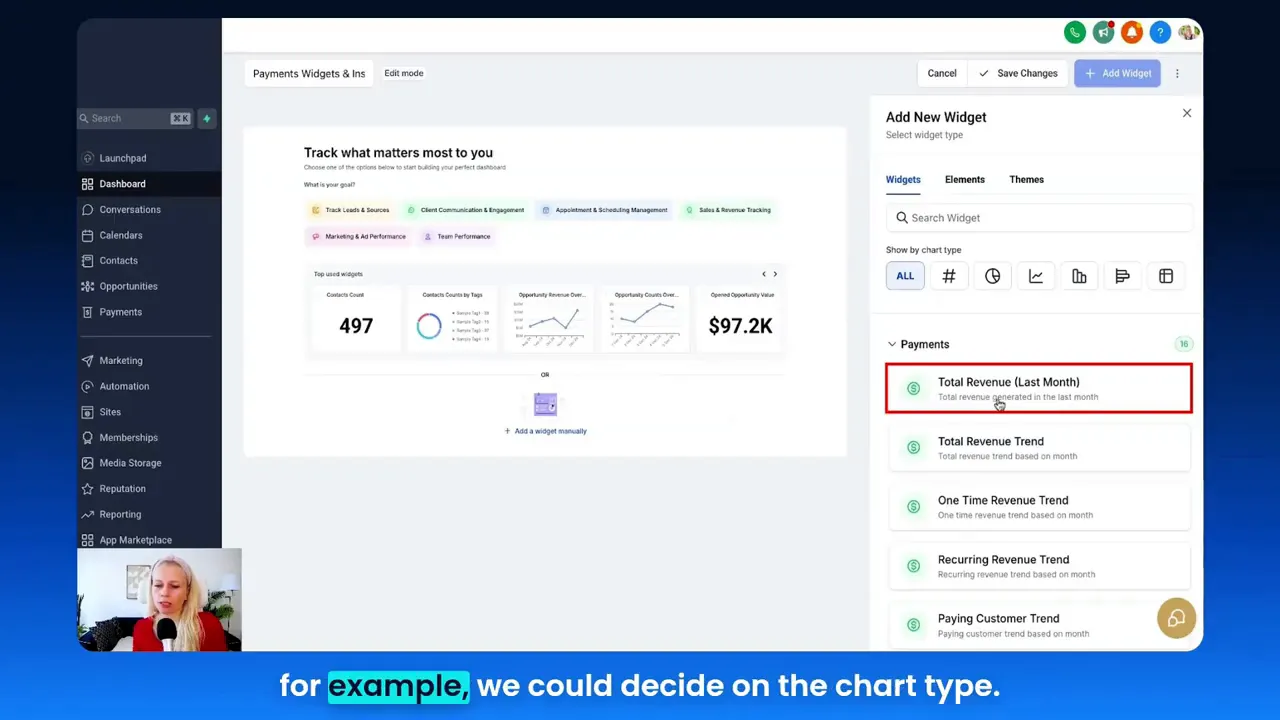
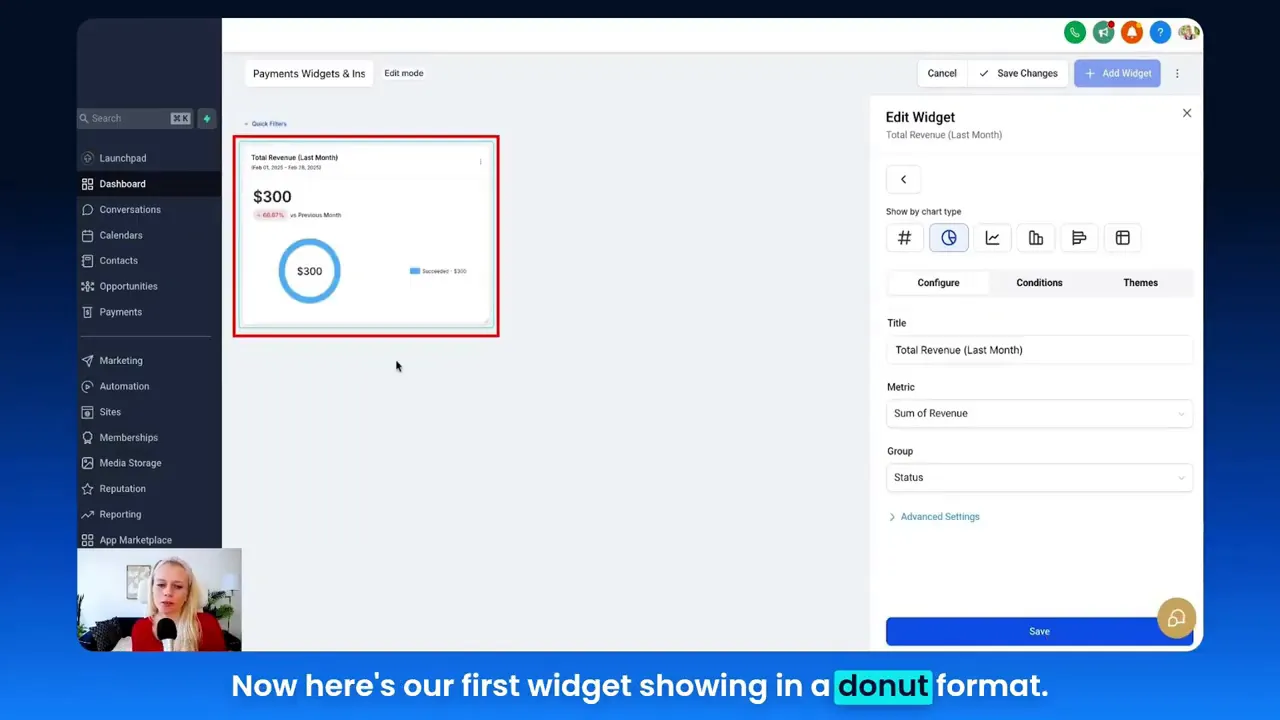
- Feature highlight: Use the drag-and-drop dashboard editor to add payment widgets like "Total Revenue Last Month," "Payment Success Trend," and "Refund Amount Trend."
- CTA: View GFunnel’s real-time analytics features (https://www.gfunnel.com).
GFunnel’s Lead Connector and CRM Integration
Lead Connector With GFunnel ties payments to contact records, so every transaction becomes actionable inside your CRM. This means every failed payment can trigger customer-specific workflows: follow-up calls, special discount offers, or automated segmentation into churn-risk audiences — and all of this flows into your marketing funnels.
- Stat: Tighter CRM-payment integration improves retention by improving recovery and personalization.
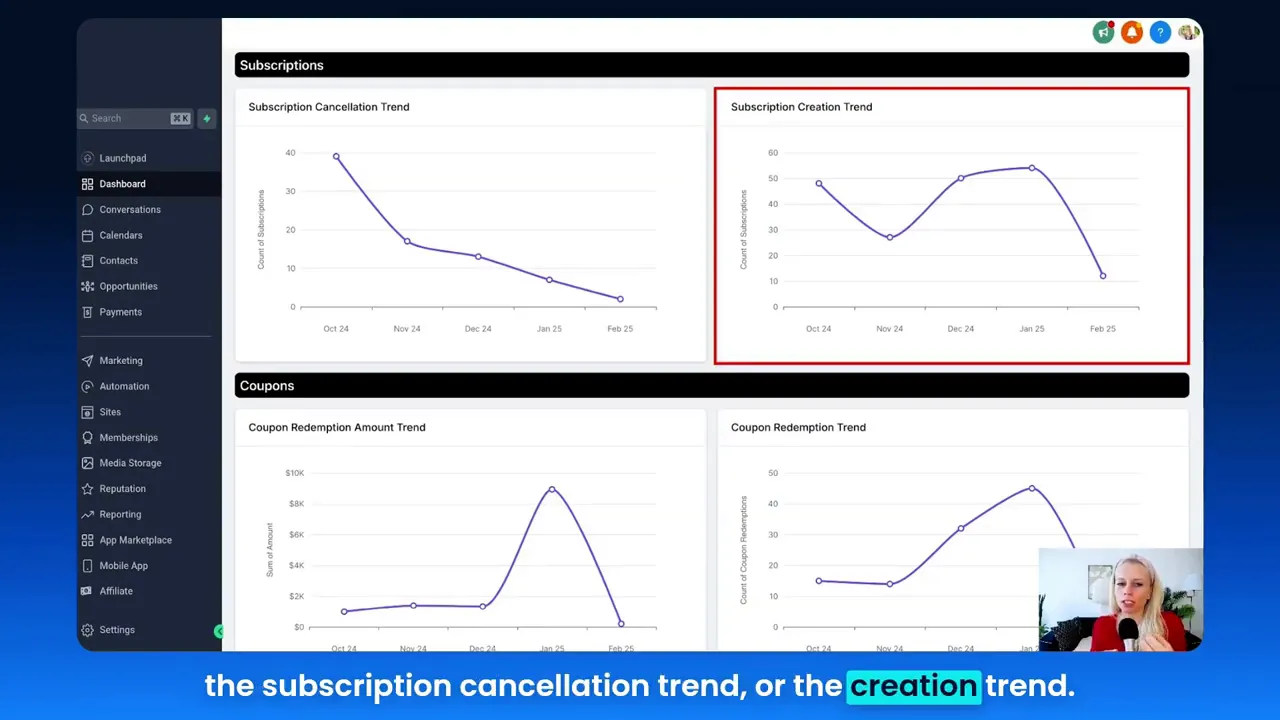
- How it helps: When a subscription is canceled (captured by the subscription cancellation trend widget), Lead Connector can automatically tag the contact, add them to a win-back sequence, and notify an account manager.
- CTA: Try Lead Connector With GFunnel for unified CRM + payments (https://www.gfunnel.com/crm).
GFunnel’s Networking and Communities
Growth often depends on who you know. GFunnel’s niche communities (e.g., E-commerce Pros, SaaS Founders) enable peer learning, partnership opportunities, and mentorship. Share dashboard templates, automation strategies, and funnel best practices inside these communities to accelerate learning across your team or network.
- Stat: Community-driven insights accelerate problem-solving and often reduce experimentation time by 30%.
- How it helps: Post a screenshot of your payments dashboard to get suggestions on improving payment success rates or coupon strategy.
- CTA: Join GFunnel’s communities (https://www.gfunnel.com/communities).
GFunnel’s Fast Autosave and Builder Performance
GFunnel’s editor uses a dedicated web worker for a blazingly fast autosave (103ms), which is 28x faster than traditional autosave implementations. That speed means you can iterate quickly on marketing funnels, landing pages, and automations without losing work — particularly important during promotional periods when you rapidly adjust copy, offers, and payment flows.
- Stat: Autosave latency of 103ms (vs. 2.861s typical) keeps teams productive and reduces lost work.
- How it helps: Build and test new payment-triggered automation sequences without waiting for slow saves, allowing for faster optimization cycles inside your marketing funnels.
- CTA: Experience GFunnel’s fast autosave and editing tools (https://www.gfunnel.com/funnel-home).
API Integrations for Unmatched Flexibility
If you have niche requirements — custom reconciliation, advanced finance workflows, or integrations with external ERPs — GFunnel’s API lets you plug in external systems. That flexibility ensures your dashboard metrics remain comprehensive and accurate.
- Stat: API-driven integrations reduce the need for manual data exports by up to 80% in complex setups.
- How it helps: Feed external order management systems into GFunnel dashboards to keep revenue and refunds synchronized across platforms.
- CTA: Learn about GFunnel’s integration capabilities (https://www.gfunnel.com).
Building Your Payments Dashboard: Step-by-Step
Below is a practical step-by-step approach to implement the exact dashboard concepts demonstrated, with GFunnel features mapped to each step so you can replicate or enhance them in your environment.
- Create a new dashboard: Name it “Payment Widgets and Insights” and set visibility as private or team-wide depending on access needs.
- Add payment widgets: Scroll to the Payments widget category and begin with these core widgets:
- Total Revenue Last Month (donut or numeric display)
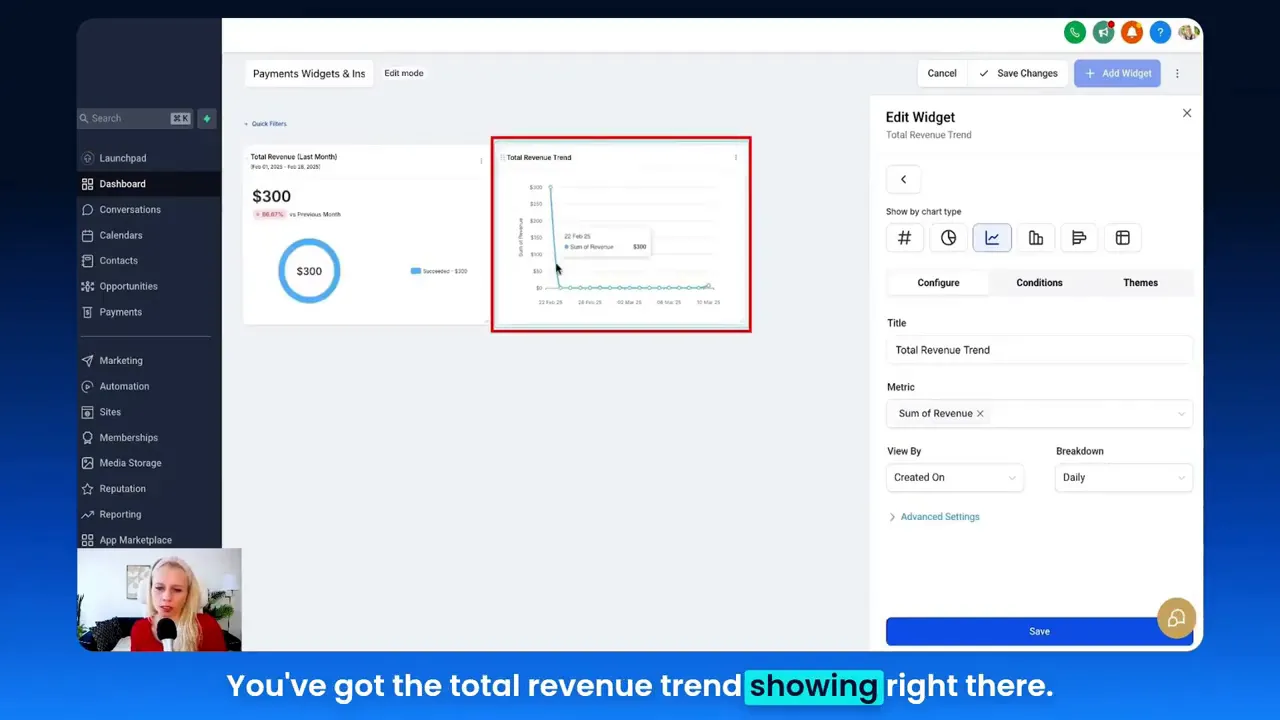
- Total Revenue Trend (line chart)
- Paying Customer Trend (bar chart) — split recurring vs. one-time
- Payment Success Trend and Payment Failed Trend
- Refund Amount Trend
- Revenue by Channel (website, funnels, invoices)
- Configure metrics and groups: Choose sum of revenue, count of transactions, averages, or min/max. Group by status, source type, or payment provider.
- Set date ranges and comparisons: Use “last month” with a comparison to the previous month to quickly see growth or decline.
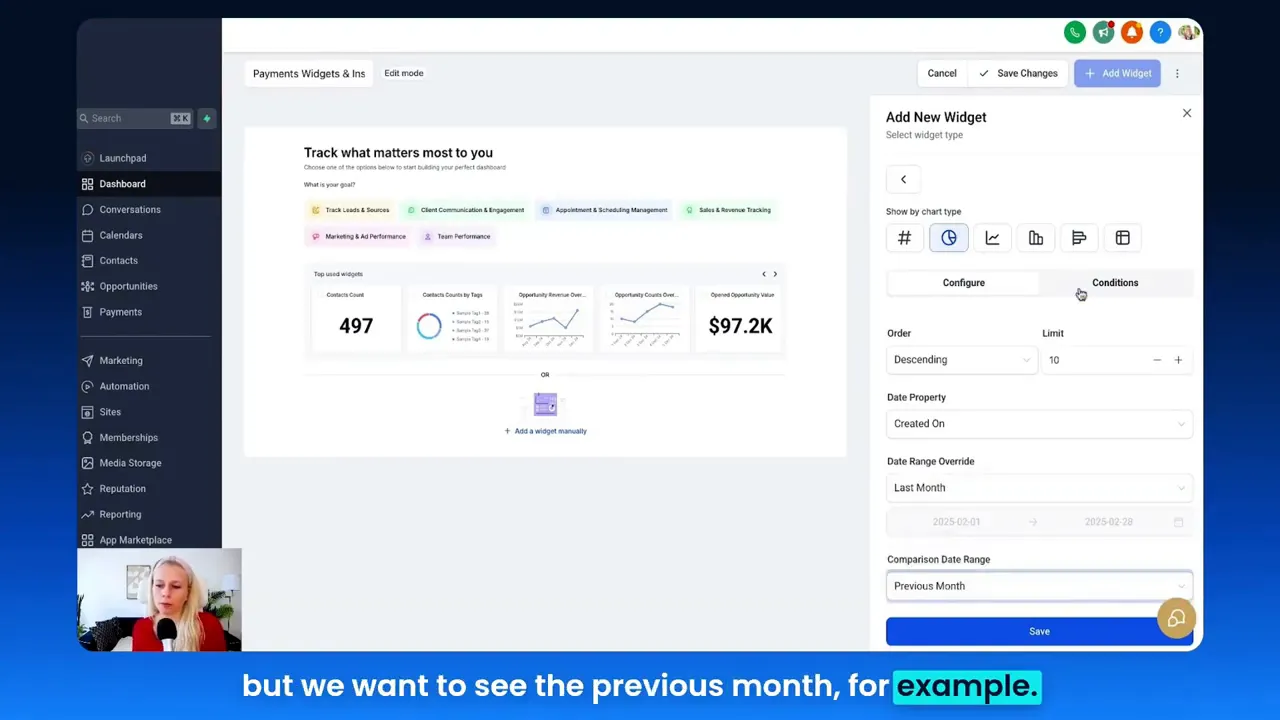
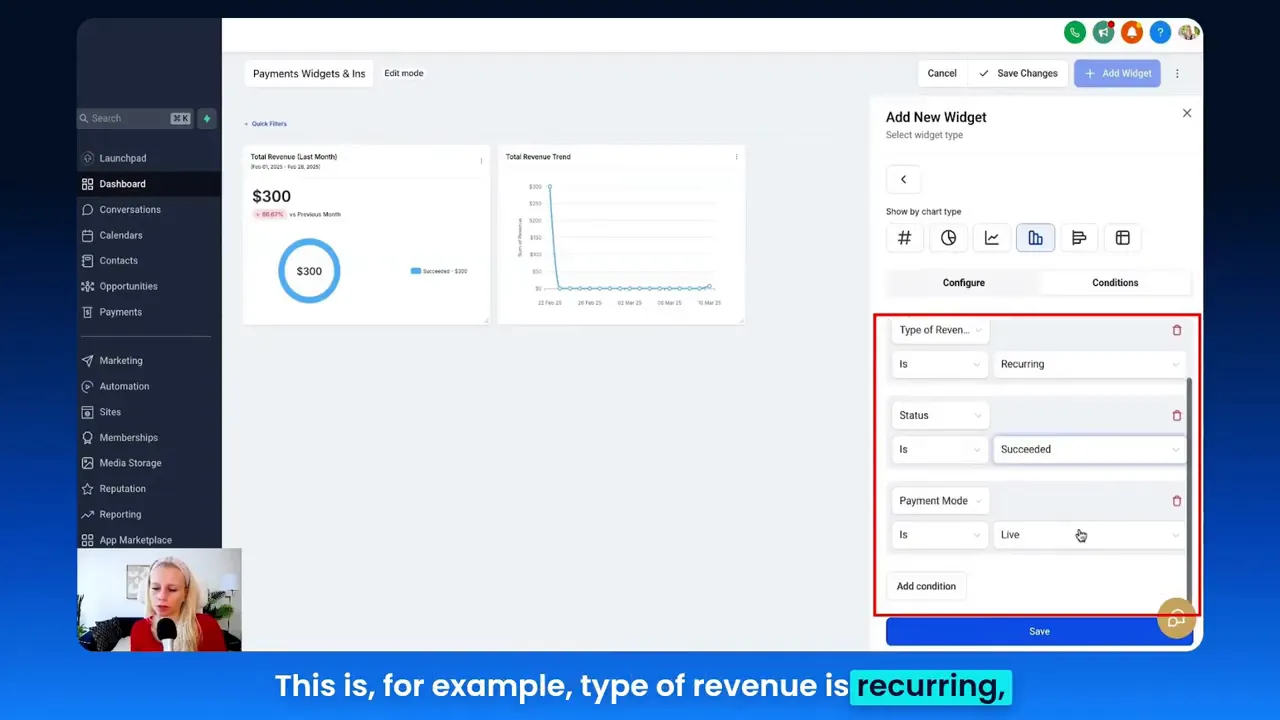
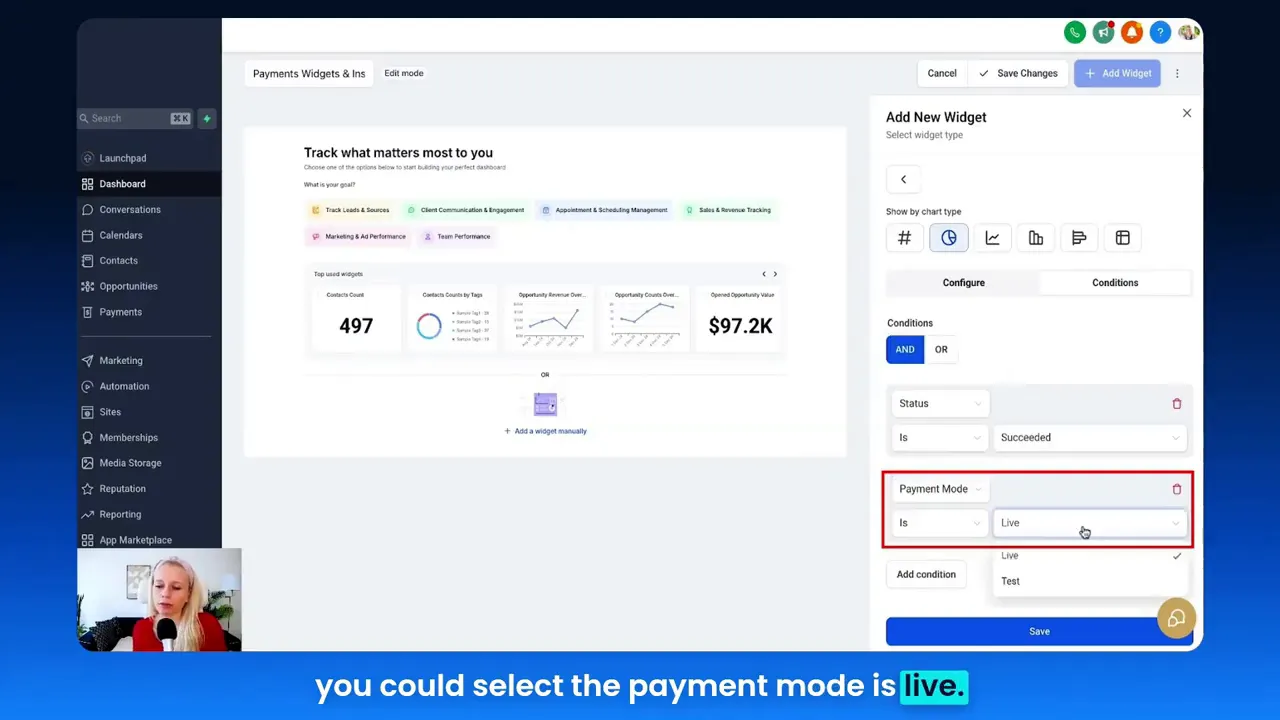
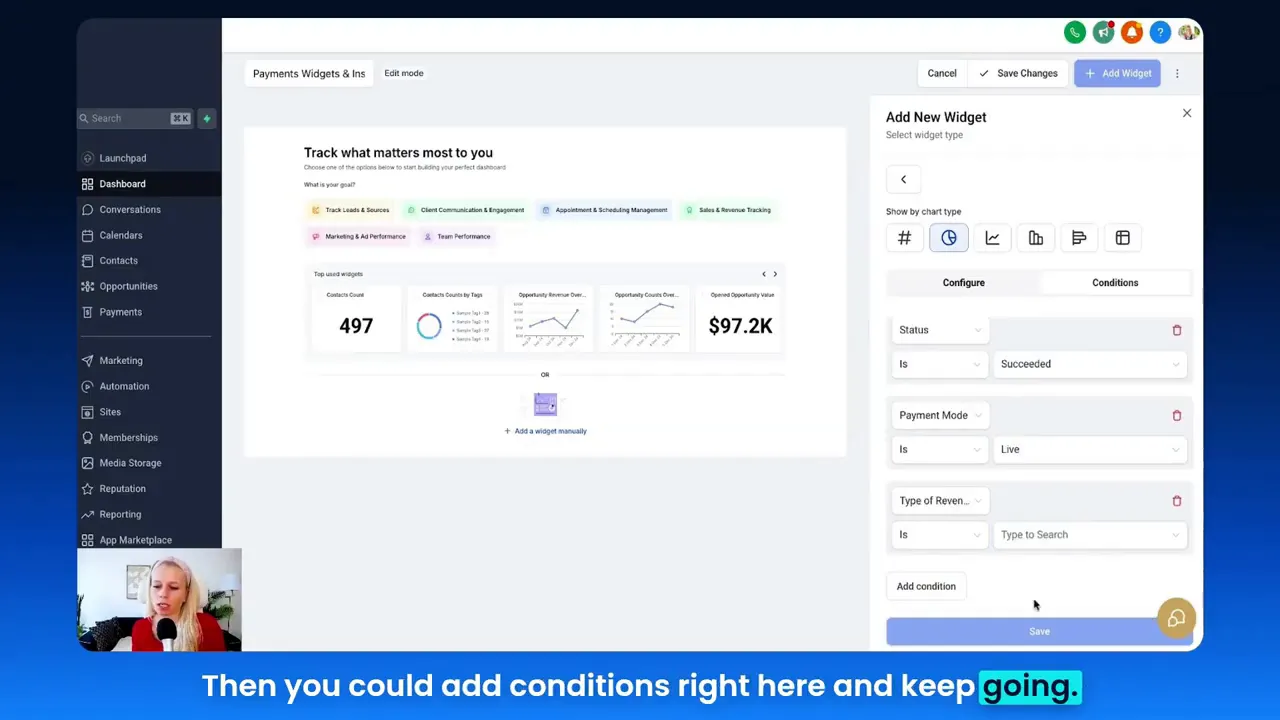
- Apply conditions: Filter by payment mode (live vs. test), revenue type (recurring vs. one-time), and payment status (succeeded, failed, refunded).
- Save and iterate: Add multiple widgets that look at the same date range from different angles (revenue amount, transaction counts, success rates) and attach automations to alert or remediate.
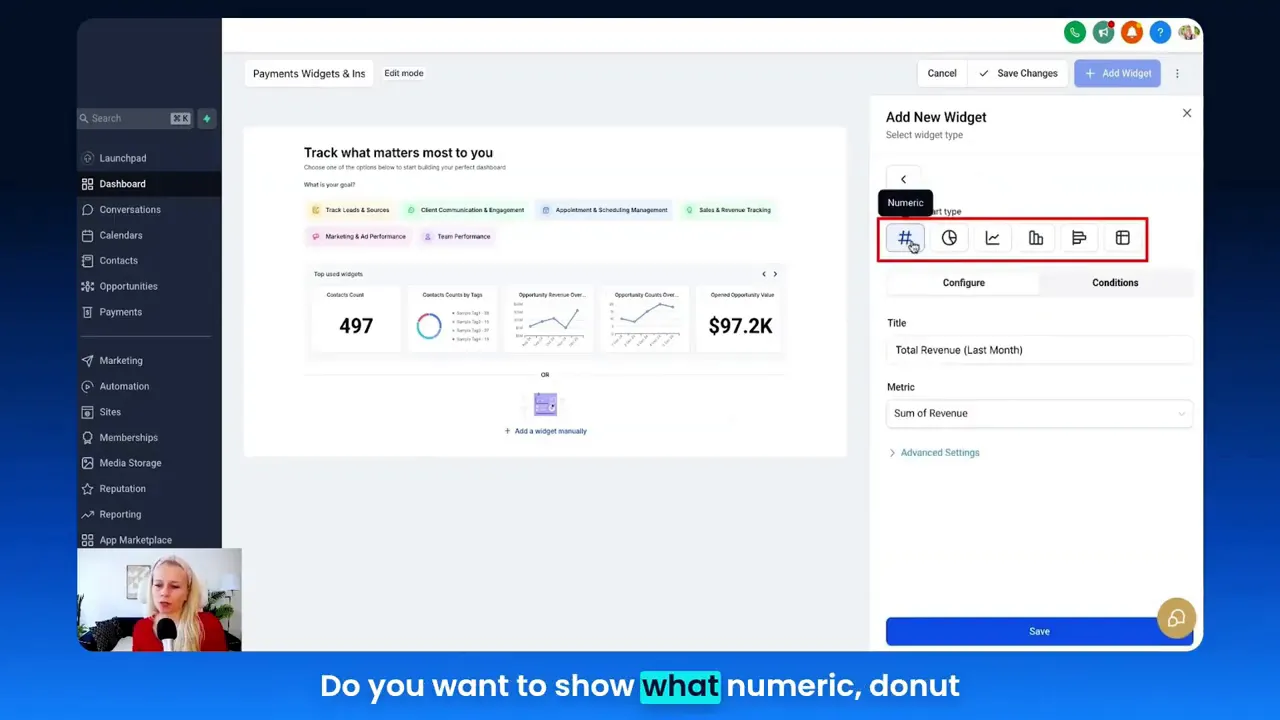
This approach mirrors the process shown in our walkthrough: creating a dashboard, adding a donut chart for last month’s revenue, adding line charts for trends, configuring conditions like status and payment mode, and saving each widget to create a single pane of financial truth.
Real-World Applications: Two Case Studies
Below are two detailed case studies demonstrating how marketers, small businesses, and e-commerce owners can use GFunnel’s ecosystem — with Lead Connector With GFunnel — to turn payment widgets into business outcomes.
Case Study A: E-Commerce Store — Recovering Failed Payments and Boosting MRR
Background: A mid-size e-commerce brand sells subscription and one-time products. They use marketing funnels to acquire customers and rely on recurring revenue for long-term value.
Problem: A sudden increase in failed payments after a subscription billing cycle led to an MRR dip and churn risk.
Solution Using GFunnel:
- Dashboard Setup: Added “Payment Failed Trend” and “Subscription Cancellation Trend” widgets to monitor the issue in real time.
- Automation Trigger: When the failed payment rate exceeded a threshold, an automation retried the payment, emailed the customer a one-click payment link, and added contacts to a “Payment Recovery” sequence in Lead Connector.
- Community Support: The team posted metrics in the E-commerce Pros community to confirm if others faced a similar processor issue (peer troubleshooting reduced time to resolution).
- Results: Within two billing cycles, recovery rates improved, churn declined, and MRR stabilized.
"GFunnel’s automation and Lead Connector made it easy to recover failed payments without hiring extra staff." — Head of E-commerce (hypothetical)
Key Outcomes:
- Recovered 35% of failed payments that would otherwise be lost.
- Reduced manual follow-ups by 60% through automated retries and targeted emails.
- Improved MRR forecasting accuracy with real-time dashboards.
Case Study B: Restaurant Chain — Streamlining Invoicing and Ticketing
Background: A regional restaurant chain uses online ordering and invoices for B2B catering clients.
Problem: The finance team spent hours reconciling invoices, tracking paid vs. sent, and handling refunds for cancellations.
Solution Using GFunnel:
- Dashboard Setup: Added “Invoices Paid Trend” and “Invoices Sent Trend” widgets plus a “Refund Amount Trend” widget.
- Automation Trigger: If invoices remained unpaid for 7 days, an automation sent a reminder and created a task for an account manager via Lead Connector.
- Operational Integration: Reconcile data with accounting using GFunnel’s API for a one-click export of invoice status.
- Results: Manual reconciliation time dropped, cash flow forecasting improved, and customer satisfaction rose due to faster communications.
"With GFunnel, our invoicing became predictable; refunds and chargebacks are far easier to manage." — Regional Operations Manager (hypothetical)
Key Outcomes:
- Reduced reconciliation time by 50%.
- Improved cash flow visibility, reducing surprises at month-end.
- Increased on-time invoice payments by 22% after automated reminders.
Why GFunnel Leads: Comparison and Value Proposition
GFunnel is not just a funnel builder; it’s an all-in-one business platform for building, measuring, automating, and networking. Below is a practical comparison to show why GFunnel is the better choice for modern businesses focused on marketing funnels and revenue operations.
Traditional Business Tools vs. GFunnel’s Ecosystem
Caption: Traditional Business Tools vs. GFunnel’s Ecosystem
- Autosave Speed
- Traditional Methods: Slow (seconds)
- GFunnel: Fast (103ms, 28x faster)
- Automation
- Traditional Methods: Manual processes, spreadsheets
- GFunnel: 50% less manual work with automated retries, reminders, and workflows
- Networking
- Traditional Methods: Limited connections, siloed groups
- GFunnel: Niche communities for E-commerce Pros, SaaS founders and more
- Analytics
- Traditional Methods: Third-party tools, delayed reports
- GFunnel: Real-time dashboards integrated with CRM and payments
- Scalability
- Traditional Methods: Multiple vendors, inconsistent data
- GFunnel: Tailored, integrated solutions for funnels, payments, and CRM
GFunnel’s integrated approach saves time, reduces complexity, and gives you control over marketing funnels, payments, and customer relationships in a single platform.
CTA: Compare plans and see how GFunnel stacks up (https://www.gfunnel.com/).
Implementation Checklist: From Dashboard to Action
Use this checklist to implement a payments dashboard and connect it to Lead Connector With GFunnel automations and networks:
- Create a dedicated dashboard for payments and name it clearly.
- Add core widgets: revenue last month, revenue trend, paying customer trend, payment success/failure, refunds, revenue by channel.
- Choose visualizations: donut for totals, line for trends, bar for payer counts, table for detailed records.
- Set date ranges and comparisons to highlight change (e.g., last month vs previous month).
- Filter by payment mode (live vs test) and status (succeeded, failed, refunded).
- Map widget alerts to automations in Lead Connector to retry charges, notify customers, or create tickets.
- Share dashboard snapshots in GFunnel communities for collaborative optimization.
- Iterate monthly: refine metrics and add widgets as you discover new needs (coupons, invoices, subscription events).
Engage Your Team and Network: Community Call
Small business owners, marketers, and e-commerce entrepreneurs should not operate in isolation. Share dashboard templates, automation recipes, and funnel strategies in GFunnel’s communities to get faster feedback and discover best practices.
Community examples and resources:
- GFunnel’s communities (https://www.gfunnel.com/communities)
- Discussions for funnel optimization (https://www.gfunnel.com/discussions-home)
- Events and webinars for continuous learning (https://www.gfunnel.com/events-home)
Interactive Element: Test Your Business Growth Potential
Want to quickly understand where your operations can improve? Try a GFunnel quiz to assess your marketing funnels, automation readiness, and payment recovery processes. The quiz helps prioritize which automations and widgets to implement first.
CTA: Take the GFunnel growth quiz (https://www.gfunnel.com/create-account) to receive tailored recommendations.
Conclusion and CTA
Lead Connector With GFunnel equips you with the tools to visualize, automate, and optimize revenue inside your marketing funnels. Payment widgets transform raw transactions into actionable business intelligence: you can spot trends, recover failed payments, manage refunds, and learn which channels drive the most revenue. GFunnel extends these capabilities beyond analytics, offering automation, CRM, niche networking, e-commerce tools, and a fast autosave that accelerates iteration.
Ready to put payment insights to work? Build a payments dashboard, link it to Lead Connector With GFunnel automations, and join the GFunnel communities for ongoing growth strategies. Explore GFunnel’s features, automation capabilities, and affordable plans to scale your business more effectively:
- GFunnel homepage: https://www.gfunnel.com
- Automation features: https://www.gfunnel.com/automation-home
- CRM and Lead Connector: https://www.gfunnel.com/crm
- Pricing and plans: https://www.gfunnel.com
Remember: accurate dashboards are the first step. Automation and community amplify your results. Start building marketing funnels that are informed by payments and run by automation — start with Lead Connector With GFunnel.
Frequently Asked Questions (FAQ)
- What is Lead Connector With GFunnel and how does it help with marketing funnels?
Lead Connector With GFunnel integrates CRM and payments into your marketing funnels, allowing you to track leads, attribute revenue by channel, and automate follow-up sequences based on payment events.
- How does GFunnel support payment recovery for failed transactions?
GFunnel can trigger automations when the payment failed widget detects a spike: automatic retries, one-click payment emails, and ticket creation for unresolved cases. This reduces churn and recovers potentially lost revenue.
- Can I see revenue by channel inside GFunnel dashboards?
Yes. Dashboards can display revenue by source type — website, funnels, invoices — enabling you to focus ad spend and improve conversion paths within your marketing funnels.
- What makes GFunnel different from single-purpose funnel builders?
GFunnel is an all-in-one business platform that combines funnel building, CRM, real-time analytics, automation, payments, and community networking — reducing tool fragmentation and improving data consistency.
- How fast is GFunnel’s autosave and why does it matter?
GFunnel’s web-worker powered autosave is 103ms, which is 28x faster than typical autosave speeds. This speed reduces lost work, speeds up experimentation, and keeps teams productive while editing funnels, pages, and workflows.
Related Topics and Resources
- Scale Restaurants with GFunnel — operations and invoicing (https://www.gfunnel.com)
- Build marketing funnels with GFunnel — templates and best practices (https://www.gfunnel.com/funnel-home)
- Automate business operations with GFunnel — automation tools and workflows (https://www.gfunnel.com/automation-home)
Additional Support and Next Steps
If you’d like a guided walk-through, GFunnel’s team can help you configure dashboards, automations, and integrations. Use the support pathways and community events to accelerate setup:
- Create your account: https://www.gfunnel.com/create-account
- Join discussions and courses for ongoing learning: https://www.gfunnel.com/discussions-home and https://www.gfunnel.com/courses
- Attend events for live demos and best practices: https://www.gfunnel.com/events-home
Final Thoughts
Payment widgets turn transactional data into strategic insight. By combining Lead Connector With GFunnel with carefully designed dashboards and automations, you create a feedback loop: dashboards inform automations, automations improve outcomes, and outcomes feed better funnel decisions. Use GFunnel’s real-time analytics to shorten the learning loop, its automation to reduce manual work, its communities to accelerate learning, and its fast autosave to keep your team productive. Start today: set up a payments dashboard, connect it to Lead Connector, and let your marketing funnels drive measurable growth.
Get started with GFunnel and build smarter marketing funnels that convert, retain, and scale: https://www.gfunnel.com
Need Help Implementing This? |
|
Schedule A Discovery Call With One Of Our Professionals |
| Access Now |


